healthyR.ts
The Time Series Modeling Companion to 'healthyR'
Hospital time series data analysis workflow tools, modeling, and automations. This library provides many useful tools to review common administrative time series hospital data. Some of these include average length of stay, and readmission rates. The aim is to provide a simple and consistent verb framework that takes the guesswork out of everything.
healthyR.ts 


The Time Series Modeling Companion to healthyR
To view the full wiki, click here: Full healthyR.ts Wiki
healthyR.ts is a comprehensive R package designed specifically for
time series analysis and forecasting of hospital administrative and
clinical data. Built on the powerful
tidymodels ecosystem, it provides a
consistent, user-friendly framework that simplifies complex time series
workflows.
Why healthyR.ts?
Hospital data analysis often requires handling time series for metrics like: - Average Length of Stay (ALOS) - Readmission rates - Patient volumes and admissions - Bed occupancy rates - Clinical outcomes over time
healthyR.ts takes the guesswork out of time series analysis by
providing:
✅ Automated Workflows - One-function solutions for complete
modeling pipelines
✅ Visual Analytics - Rich plotting functions for data exploration
✅ Data Generators - Simulate realistic time series for testing and
validation
✅ Statistical Tools - Comprehensive suite of time series
statistics
✅ Clustering - Feature-based time series clustering capabilities
✅ Forecasting - 15 automated model workflows (ARIMA, Prophet,
XGBoost, and more)
Key Features
🤖 Automatic Modeling Workflows
Complete end-to-end modeling pipelines in a single function call:
- ts_auto_arima() - Automatic ARIMA modeling
- ts_auto_prophet_reg() - Facebook’s Prophet algorithm
- ts_auto_xgboost() - Gradient boosting for time series
- ts_auto_nnetar() - Neural network autoregression
- Plus 11 more specialized workflows!
Each function handles recipe creation, model specification, workflow setup, model fitting, tuning, and calibration automatically.
📊 Visualization Suite
- Calendar heatmaps for temporal patterns
- Time series clustering plots
- Velocity, acceleration, and growth visualizations
- QQ plots and scedasticity analysis
- Moving average and SMA plots
- Event analysis visualizations
🎲 Data Generation
Generate synthetic time series data for testing: - Random walks and Brownian motion - Geometric Brownian motion - ARIMA simulations - Custom parameter configurations
📈 Statistical Analysis
- ADF stationarity tests
- Fast Fourier Transform (FFT) analysis
- Confidence intervals
- Lag correlation analysis
- Time series feature extraction
Installation
Stable Release (CRAN)
Install the latest stable version from CRAN:
install.packages("healthyR.ts")
Development Version
Get the latest features and bug fixes from GitHub:
# install.packages("devtools")
devtools::install_github("spsanderson/healthyR.ts")
Quick Start
Basic Example: Random Walk Simulation
Generate and visualize random walk data to understand market volatility or patient flow variations:
library(healthyR.ts)
library(ggplot2)

df <- ts_random_walk()

head(df)
#> # A tibble: 6 × 4
#>     run     x       y cum_y
#>   <dbl> <dbl>   <dbl> <dbl>
#> 1     1     1  0.113  1113.
#> 2     1     2  0.119  1245.
#> 3     1     3 -0.0178 1223.
#> 4     1     4  0.141  1396.
#> 5     1     5 -0.163  1169.
#> 6     1     6 -0.0485 1112.
Now that the data has been generated, lets take a look at it.
df %>%
   ggplot(
       mapping = aes(
           x = x
           , y = cum_y
           , color = factor(run)
           , group = factor(run)
        )
    ) +
    geom_line(alpha = 0.8) +
    ts_random_walk_ggplot_layers(df)
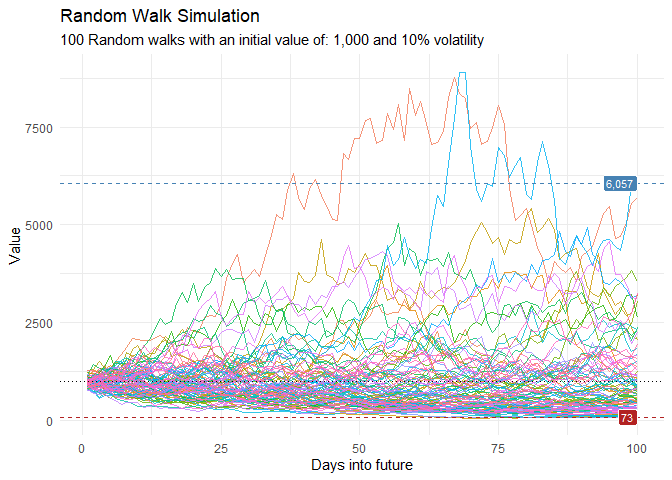
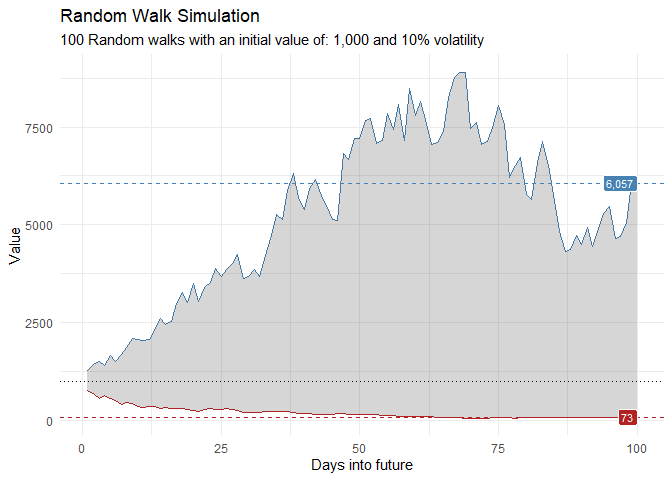
That is still pretty noisy, so lets see this in a different way. Lets clear this up a bit to make it easier to see the full range of the possible volatility of the random walks.
library(dplyr)
library(ggplot2)

df %>%
    group_by(x) %>%
    summarise(
        min_y = min(cum_y),
        max_y = max(cum_y)
    ) %>%
    ggplot(
        aes(x = x)
    ) +
    geom_line(aes(y = max_y), color = "steelblue") +
    geom_line(aes(y = min_y), color = "firebrick") +
    geom_ribbon(aes(ymin = min_y, ymax = max_y), alpha = 0.2) +
    ts_random_walk_ggplot_layers(df)
Calendar Heatmap Visualization
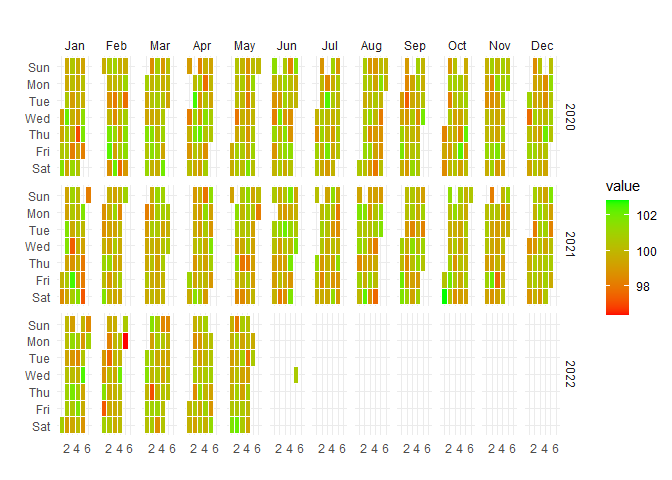
Visualize temporal patterns in your data with calendar heatmaps - perfect for identifying seasonal trends or unusual patterns in hospital metrics:
data_tbl <- data.frame(
  date_col = seq.Date(
    from = as.Date("2020-01-01"),
    to   = as.Date("2022-06-01"),
    length.out = 365*2 + 180
    ),
  value = rnorm(365*2+180, mean = 100)
)

ts_calendar_heatmap_plot(
  .data          = data_tbl
  , .date_col    = date_col
  , .value_col   = value
  , .interactive = FALSE
)
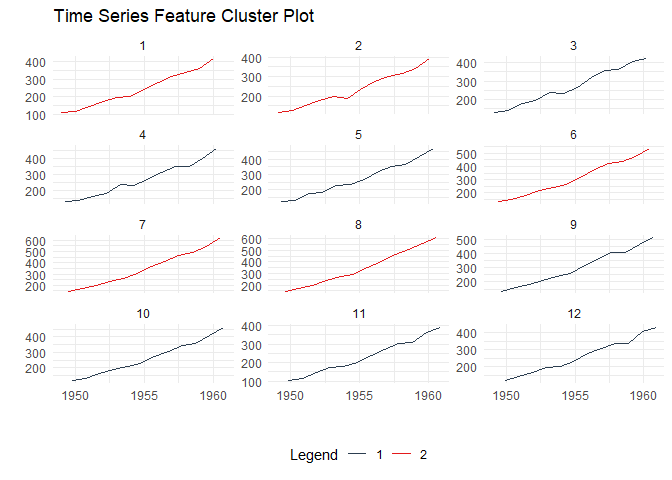
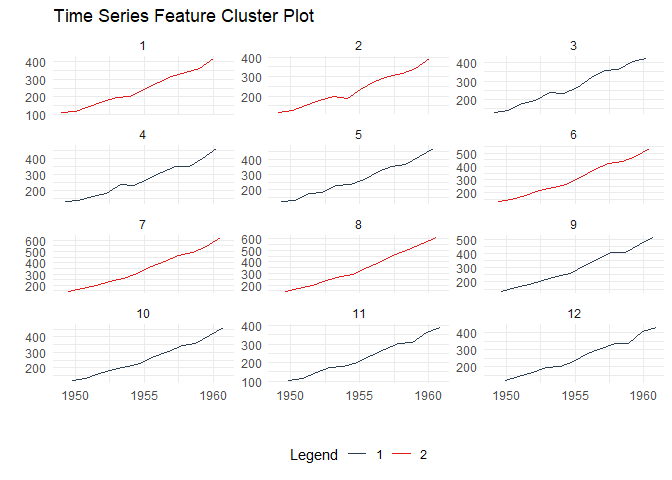
Time Series Clustering
Discover patterns by clustering time series based on their statistical features:
data_tbl <- ts_to_tbl(AirPassengers) %>%
  mutate(group_id = rep(1:12, 12))

output <- ts_feature_cluster(
  .data = data_tbl,
  .date_col = date_col,
  .value_col = value,
  group_id,
  .features = c("acf_features","entropy"),
  .scale = TRUE,
  .prefix = "ts_",
  .centers = 3
)

ts_feature_cluster_plot(
  .data = output,
  .date_col = date_col,
  .value_col = value,
  .center = 2,
  group_id
)
#> $plot
#> $plot$static_plot
#>
#> $plot$plotly_plot
#>
#>
#> $data
#> $data$original_data
#> # A tibble: 144 × 4
#>    index     date_col   value group_id
#>    <yearmon> <date>     <dbl>    <int>
#>  1 Jan 1949  1949-01-01   112        1
#>  2 Feb 1949  1949-02-01   118        2
#>  3 Mar 1949  1949-03-01   132        3
#>  4 Apr 1949  1949-04-01   129        4
#>  5 May 1949  1949-05-01   121        5
#>  6 Jun 1949  1949-06-01   135        6
#>  7 Jul 1949  1949-07-01   148        7
#>  8 Aug 1949  1949-08-01   148        8
#>  9 Sep 1949  1949-09-01   136        9
#> 10 Oct 1949  1949-10-01   119       10
#> # ℹ 134 more rows
#>
#> $data$kmm_data_tbl
#> # A tibble: 3 × 3
#>   centers k_means  glance
#>     <int> <list>   <list>
#> 1       1 <kmeans> <tibble [1 × 4]>
#> 2       2 <kmeans> <tibble [1 × 4]>
#> 3       3 <kmeans> <tibble [1 × 4]>
#>
#> $data$user_item_tbl
#> # A tibble: 12 × 8
#>    group_id ts_x_acf1 ts_x_acf10 ts_diff1_acf1 ts_diff1_acf10 ts_diff2_acf1
#>       <int>     <dbl>      <dbl>         <dbl>          <dbl>         <dbl>
#>  1        1     0.741       1.55       -0.0995          0.474       -0.182
#>  2        2     0.730       1.50       -0.0155          0.654       -0.147
#>  3        3     0.766       1.62       -0.471           0.562       -0.620
#>  4        4     0.715       1.46       -0.253           0.457       -0.555
#>  5        5     0.730       1.48       -0.372           0.417       -0.649
#>  6        6     0.751       1.61        0.122           0.646        0.0506
#>  7        7     0.745       1.58        0.260           0.236       -0.303
#>  8        8     0.761       1.60        0.319           0.419       -0.319
#>  9        9     0.747       1.59       -0.235           0.191       -0.650
#> 10       10     0.732       1.50       -0.0371          0.269       -0.510
#> 11       11     0.746       1.54       -0.310           0.357       -0.556
#> 12       12     0.735       1.51       -0.360           0.294       -0.601
#> # ℹ 2 more variables: ts_seas_acf1 <dbl>, ts_entropy <dbl>
#>
#> $data$cluster_tbl
#> # A tibble: 12 × 9
#>    cluster group_id ts_x_acf1 ts_x_acf10 ts_diff1_acf1 ts_diff1_acf10
#>      <int>    <int>     <dbl>      <dbl>         <dbl>          <dbl>
#>  1       2        1     0.741       1.55       -0.0995          0.474
#>  2       2        2     0.730       1.50       -0.0155          0.654
#>  3       1        3     0.766       1.62       -0.471           0.562
#>  4       1        4     0.715       1.46       -0.253           0.457
#>  5       1        5     0.730       1.48       -0.372           0.417
#>  6       2        6     0.751       1.61        0.122           0.646
#>  7       2        7     0.745       1.58        0.260           0.236
#>  8       2        8     0.761       1.60        0.319           0.419
#>  9       1        9     0.747       1.59       -0.235           0.191
#> 10       1       10     0.732       1.50       -0.0371          0.269
#> 11       1       11     0.746       1.54       -0.310           0.357
#> 12       1       12     0.735       1.51       -0.360           0.294
#> # ℹ 3 more variables: ts_diff2_acf1 <dbl>, ts_seas_acf1 <dbl>, ts_entropy <dbl>
#>
#>
#> $kmeans_object
#> $kmeans_object[[1]]
#> K-means clustering with 2 clusters of sizes 7, 5
#>
#> Cluster means:
#>   ts_x_acf1 ts_x_acf10 ts_diff1_acf1 ts_diff1_acf10 ts_diff2_acf1 ts_seas_acf1
#> 1 0.7387865   1.528308    -0.2909349      0.3638392    -0.5916245    0.2930543
#> 2 0.7456468   1.568532     0.1172685      0.4858013    -0.1799728    0.2876449
#>   ts_entropy
#> 1  0.6438176
#> 2  0.4918321
#>
#> Clustering vector:
#>  [1] 2 2 1 1 1 2 2 2 1 1 1 1
#>
#> Within cluster sum of squares by cluster:
#> [1] 0.3660630 0.3704304
#>  (between_SS / total_SS =  59.8 %)
#>
#> Available components:
#>
#> [1] "cluster"      "centers"      "totss"        "withinss"     "tot.withinss"
#> [6] "betweenss"    "size"         "iter"         "ifault"
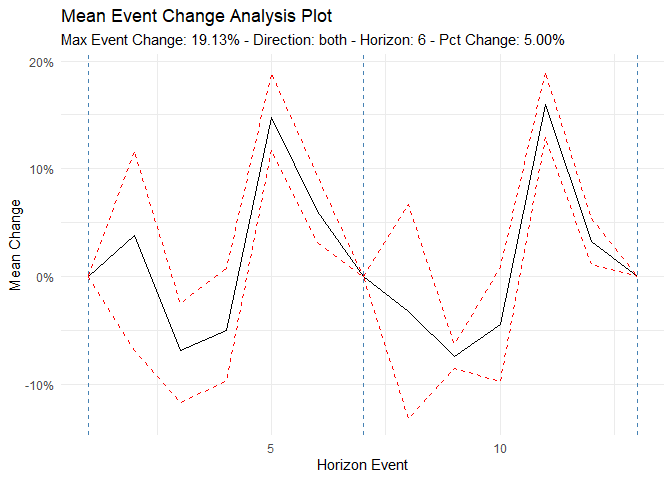
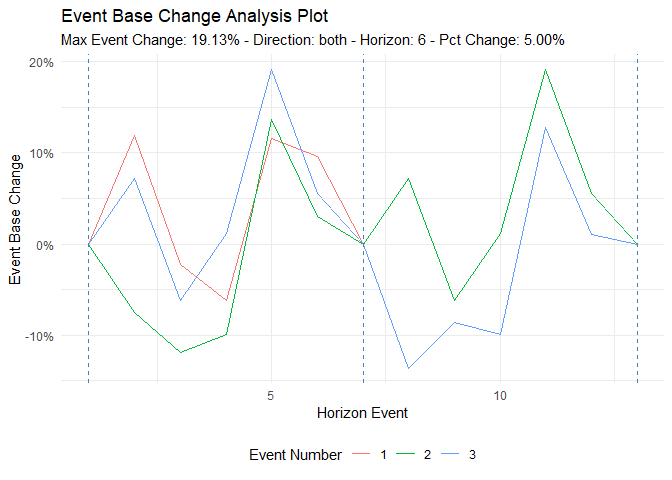
Event Analysis
Analyze time series behavior before and after significant events (e.g., policy changes, new treatments):
library(dplyr)
df <- ts_to_tbl(AirPassengers) %>% select(-index)

ts_time_event_analysis_tbl(
  .data = df,
  .horizon = 6,
  .date_col = date_col,
  .value_col = value,
  .direction = "both"
) %>%
  ts_event_analysis_plot()
ts_time_event_analysis_tbl(
  .data = df,
  .horizon = 6,
  .date_col = date_col,
  .value_col = value,
  .direction = "both"
) %>%
  ts_event_analysis_plot(.plot_type = "individual")
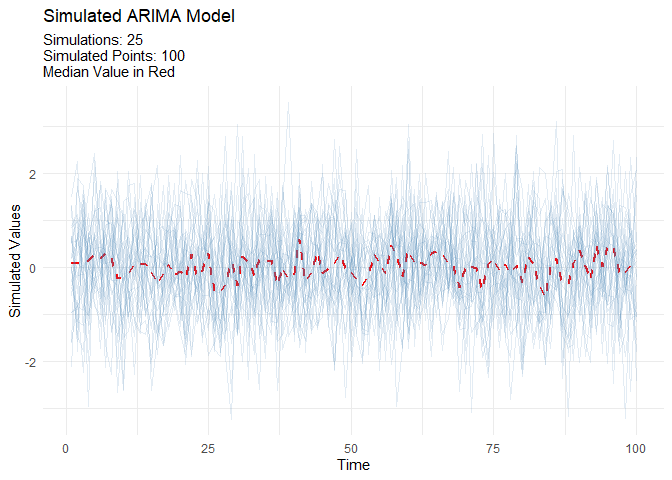
ARIMA Simulation
Generate realistic ARIMA time series for testing and validation:
output <- ts_arima_simulator()
output$plots$static_plot
Available Models
Automated Workflow Functions
Each function creates a complete modeling pipeline including recipe, model specification, workflow, fitting, and calibration:
| Function | Model Type | Description |
|---|---|---|
ts_auto_arima() |
ARIMA | Automatic ARIMA with auto-tuning |
ts_auto_arima_xgboost() |
Hybrid | ARIMA errors with XGBoost |
ts_auto_prophet_reg() |
Prophet | Facebook’s Prophet algorithm |
ts_auto_prophet_boost() |
Hybrid | Prophet with XGBoost |
ts_auto_xgboost() |
ML | Gradient boosting |
ts_auto_nnetar() |
Neural Net | Neural network autoregression |
ts_auto_exp_smoothing() |
ETS | Exponential smoothing |
ts_auto_smooth_es() |
Smooth | Smooth package ETS |
ts_auto_theta() |
Theta | Theta method |
ts_auto_croston() |
Croston | For intermittent demand |
ts_auto_lm() |
Linear | Linear regression with time features |
ts_auto_mars() |
MARS | Multivariate adaptive regression splines |
ts_auto_glmnet() |
GLM | Elastic net regression |
ts_auto_svm_poly() |
SVM | Support vector machine (polynomial) |
ts_auto_svm_rbf() |
SVM | Support vector machine (radial) |
Function Categories
healthyR.ts includes 90+ functions organized into these categories:
- 📊 Data Generators: Create synthetic time series data (random walks, Brownian motion, ARIMA)
- 📈 Plotting Functions: Comprehensive visualization suite for time series
- 🔍 Clustering: Feature-based time series clustering and analysis
- 🤖 Forecasting: Automated modeling workflows and model comparison
- 📐 Statistical Functions: Tests, transformations, and time series statistics
- 🔧 Utilities: Helper functions for data manipulation and transformation
- 📉 Augment Functions: Add features like velocity, acceleration, and growth rates
- 🧮 Vector Functions: Vectorized operations for time series
- 🔬 Recipe Steps: Custom tidymodels recipe steps for time series
Documentation
- 📘 Getting Started Vignette - Comprehensive introduction
- 📗 Function Reference - Complete function documentation
- 📙 Package Website - Full documentation site
- 📕 News/Changelog - Version history and updates
Learning Resources
Vignettes
Example Use Cases
- Hospital Admissions Forecasting - Predict daily/weekly admissions using multiple models
- Length of Stay Analysis - Analyze and forecast ALOS trends
- Readmission Rate Monitoring - Track and predict readmission patterns
- Resource Planning - Forecast bed occupancy and staffing needs
- Seasonal Pattern Detection - Identify and visualize seasonal trends in clinical data
Contributing
Contributions are welcome! Here’s how you can help:
- 🐛 Report bugs via GitHub Issues
- 💡 Suggest features through issue requests
- 🔧 Submit pull requests for bug fixes or new features
- 📖 Improve documentation by suggesting clarifications or additions
Please follow the tidyverse style guide for code contributions.
Related Packages
- healthyR - Hospital data analysis companion package
- healthyR.ai - Machine learning companion for healthcare
- healthyverse - Meta-package loading all healthyR packages
Citation
If you use healthyR.ts in your research or publications, please cite:
citation("healthyR.ts")
Support
- 📧 Email: [email protected]
- 🐦 Issues: GitHub Issue Tracker
- 🌐 Website: https://www.spsanderson.com/healthyR.ts/
Author: Steven P. Sanderson II, MPH
Maintainer: Steven P. Sanderson II, MPH ([email protected])
Copyright: © 2020-2025 Steven P. Sanderson II, MPH