Holomics
A User-Friendly R 'shiny' Application for Multi-Omics Data Integration and Analysis
A 'shiny' application, which allows you to perform single- and
multi-omics analyses using your own omics datasets. After the upload
of the omics datasets and a metadata file, single-omics is performed
for feature selection and dataset reduction. These datasets are used
for pairwise- and multi-omics analyses, where automatic tuning is
done to identify correlations between the datasets - the end goal
of the recommended 'Holomics' workflow.
Methods used in the package were implemented in the package 'mixomics'
by Florian Rohart,Benoît Gautier,Amrit Singh,Kim-Anh Lê Cao (2017)
Holomics




Holomics is an R Shiny application that enables users to perform single- and multi-omics analyses by providing a user-friendly interface to upload different omics datasets, select and run the implemented algorithms and finally visualize the generated results.
Holomics is primarily built on the R package mixOmics, which offers numerous algorithms for the integrative analysis of omics datasets. From this repertoire, the single-omics algorithms “Principal Component Analysis” (PCA) and “Partial Least Squares Discriminant Analysis” (PLS-DA), the pairwise-omics analysis “sparse Partial Least Squares” (sPLS) and the multi-omics framework DIABLO (“Data Integration Analysis for Biomarker discovery using Latent variable approaches for Omics studies”) have been implemented in Holomics.
Installation
CRAN
install.packages("Holomics")
Github
# Install devtools if it is not already installed
install.packages("devtools")
library(devtools)

# Install Holomics package
install_github("https://github.com/MolinLab/Holomics")
Additional packages
You need to install the Bioconductor package separately.
if (!require("BiocManager", quietly = TRUE))
    install.packages("BiocManager")
BiocManager::install("mixOmics")
BiocManager::install("BiocParallel")
Start application
Either with
library(Holomics)
run_app()
or
Holomics::run_app()
Workflow
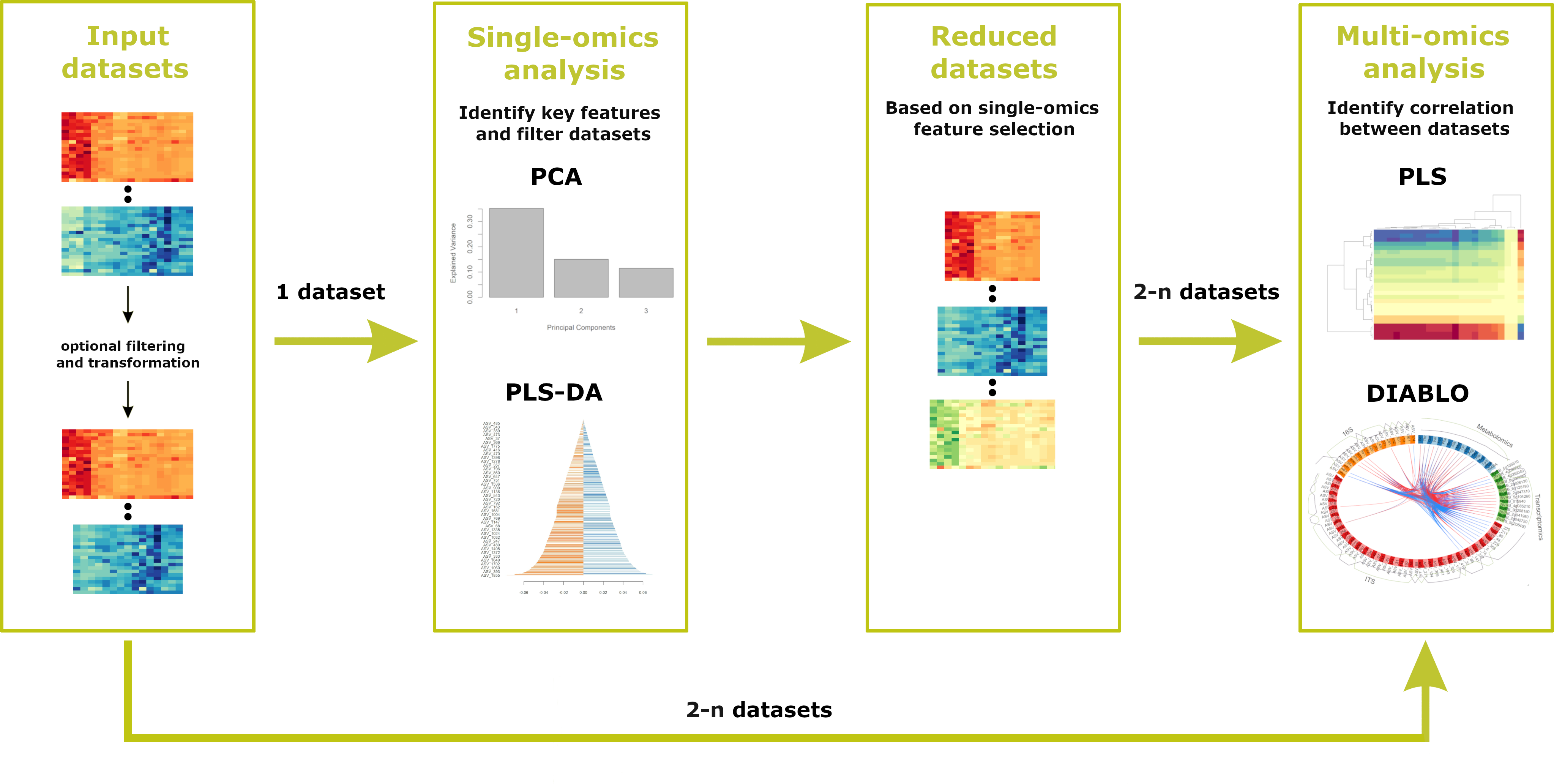
To use all the features offered, the following workflow should be followed. First, datasets are uploaded, during which any necessary pre-filtering or transformation steps take place. Next, the user should proceed to the single-omics analysis, where key features are identified and the datasets are reduced accordingly. After completing the single-omics analyses, the user can apply multi-omics analyses to identify correlations between two or more datasets. NOTE: If pre-filtered datasets (ideally generated earlier using Holomics) have already been uploaded, it is possible to start directly with the multi-omics analysis.
Further information
For further information on how to use Holomics please have a look at our vignette.