foresty
Forest Plots and Subgroup Effects from Fitted Regression Models
Draws forest plots of exposure effects from fitted regression
models. Name an exposure and 'foresty' plots its effect. Name an effect
modifier as well and it refits the model with the interaction term,
estimates the exposure effect within each level of the modifier as a
linear combination of the coefficients, and reports the joint interaction
test beside those estimates. It takes one exposure and one modifier at a
time, so the interaction is always a two-way one. Rows of the plot and of
the table beside it share one scale, in a layout that can follow a
journal's house style. The same results go to a self-contained HTML page
holding the subgroup estimates, the joint test and the coefficient table.
The 'car' package computes the linear combinations and their tests.
Models fitted by stats::glm(), stats::lm(), the 'survival' package, the
'lme4' package, the 'geepack' package and the 'survey' package are
supported, as is any fit supplying coef() and vcov(). Ordinal outcomes are supported through the
'MASS' package and nominal ones through the 'nnet' package, where the
figure carries one row per level of the outcome and the interaction is
tested jointly across the equations. Fits from the 'rms' package are
refused, naming the function that fits the same model in their place.
The estimation of an exposure effect within a level of a modifier, and the
test of the difference between such estimates, follow Altman and Bland
(2003)
foresty


Visualize interaction effects with publication-ready forest plots.
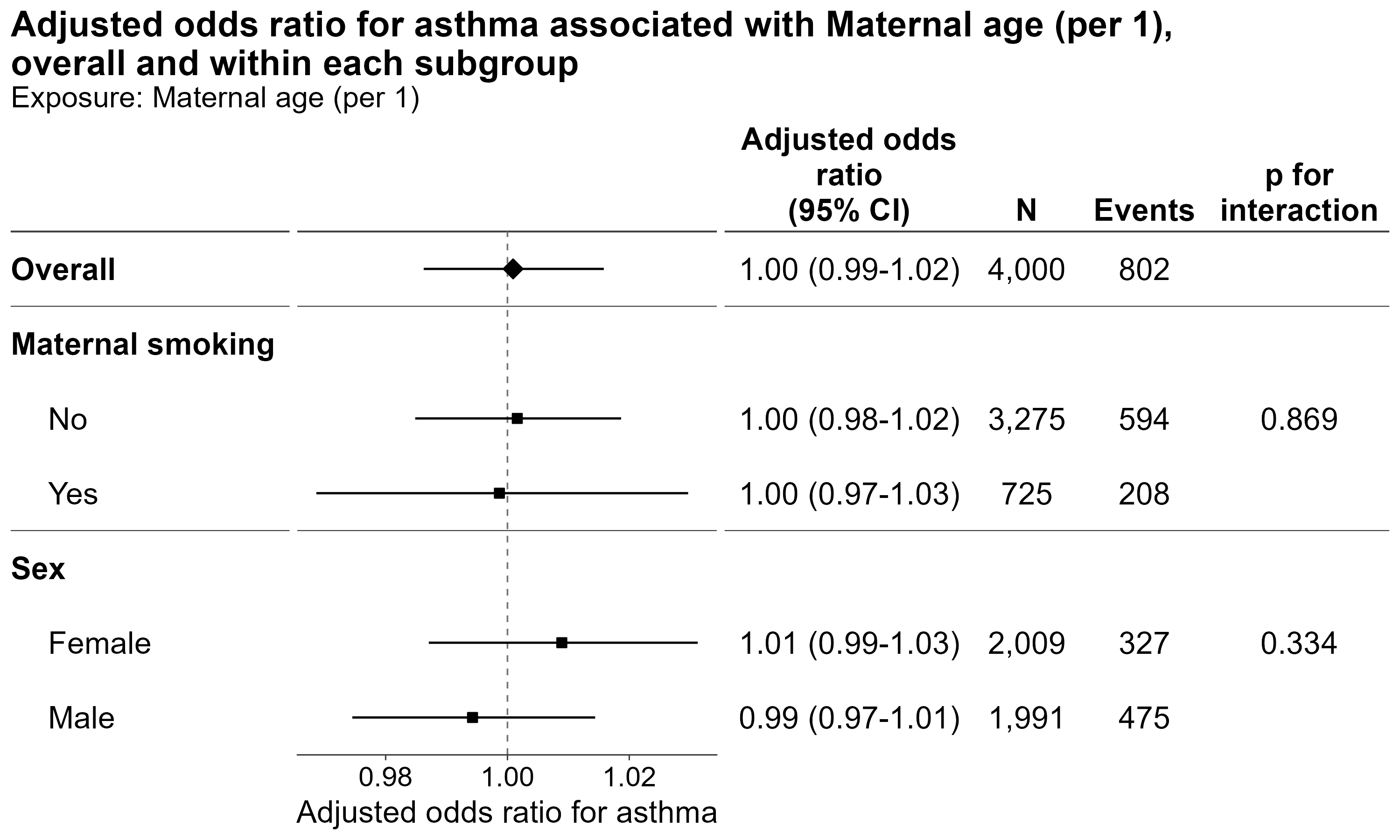
An interaction p-value tells you whether the effect differs between
subgroups, but not which subgroup shows the effect, in which
direction, or by how much. foresty puts the interaction test and the
subgroup estimates side by side, making interaction effects easier to
interpret and report.
It also makes publication-ready forest plots easy to produce, with a Shiny app for exploring the results interactively and an HTML report that documents the model behind them.
Try it first
Installation from CRAN:
install.packages("foresty")
The development version from GitHub:
# install.packages("remotes")
remotes::install_github("AkiShiroshita/foresty")
Start with a model without an interaction term and let foresty
explore possible exposure–modifier interactions:
library(foresty)

fit <- glm(
  asthma ~ no2 + sex + maternal_smoking + maternal_age,
  family = binomial,
  data = foresty_cohort
)

foresty_app(fit)
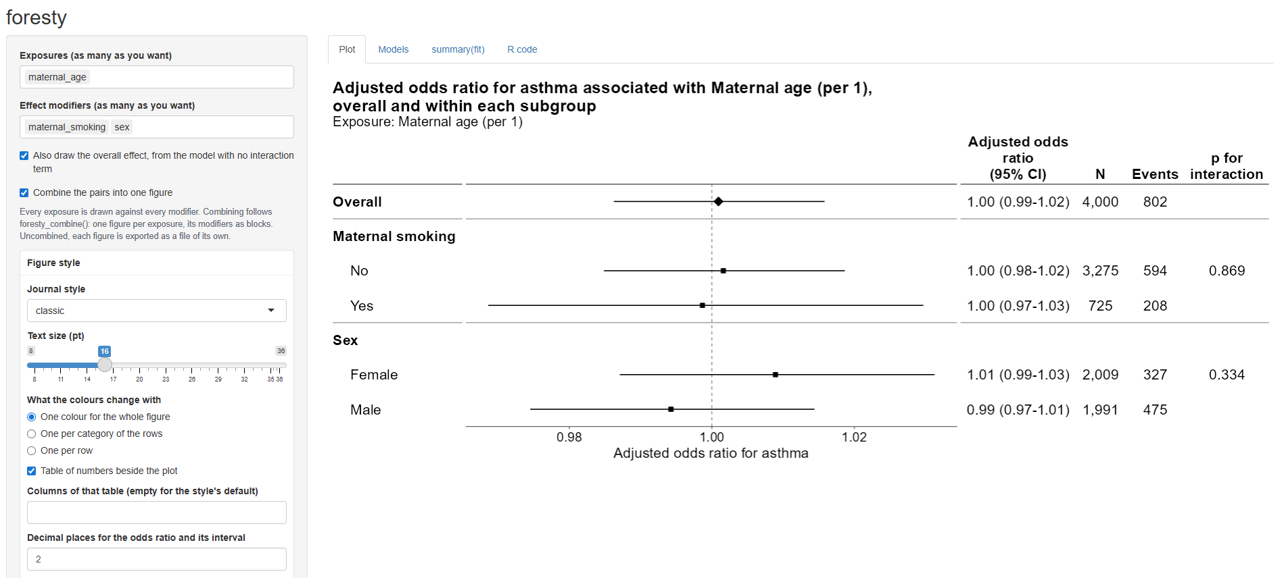
The app lets you select exposures and effect modifiers, choose how big a difference in the exposure each estimate is for — an interquartile range, two quantiles of it, an increment of your own — adjust the figure style, and produce forest plots and reports without having to remember the plotting code.
It opens in your browser, and its R code tab writes the code twice
over: the foresty call that drew the figures, and — under How to
calculate effect estimates for each subgroup — where those numbers come
from, in base R and the car package with nothing from this package in
them. So interactive exploration becomes a reproducible script either
way.
Publication-ready styles
foresty provides several predefined styles:
| Style | Description |
|---|---|
"classic" |
Simple forest plot with a null line |
"jama" |
JAMA-inspired layout |
"nejm" |
NEJM-inspired layout |
"lancet" |
Lancet-inspired layout |
"bmj" |
BMJ-inspired layout |
"revman" |
Cochrane RevMan-inspired layout |
Styles are approximations of journal layouts rather than official journal templates.
The output can be customized further with ordinary ggplot2 layers, and
it can be passed to summary(), predict(), broom::tidy(), and
broom::glance(), etc.
Supported models
foresty works with fitted models that provide coefficients, a
covariance matrix, and a model frame. Tested model classes include:
| Package | Models |
|---|---|
| base R | glm(), lm() |
survival |
coxph(), survreg() |
lme4 |
lmer(), glmer() |
survey |
svyglm() |
| other | MASS::polr() (logistic), nnet::multinom(), geepack::geeglm() |
The effect measure is inferred from the model where possible, including odds ratios, hazard ratios, risk ratios, incidence rate ratios, and mean differences.
Robust and cluster-robust standard errors are also supported where
applicable. A survey::svyglm() fit keeps the design-based variance it
was fitted with, and is referred to a t and an F on the degrees of
freedom of its design, as survey itself does; the interaction is
tested by the Rao-Scott working likelihood ratio test.
rms fits – lrm(), ols(), cph(), psm(), Glm(), orm() – are
not supported. A variable transformed by rms is a different
thing and is still read: rms::rcs(x, 4) inside a glm() formula is a
spline basis like any other, as are splines::ns(), splines::bs() and
stats::poly().
What foresty does not do
foresty is intentionally focused on two-way exposure × modifier
interactions.
- No three-way interactions. One call handles one exposure and one
modifier. Multiple modifiers can be shown as separate blocks with
foresty_combine(), but they are not crossed with each other. - No automatic categorization of continuous modifiers. If a continuous modifier should be categorized, choose the cut points yourself and refit the model.
- No separate subgroup refitting.
forestyestimates subgroup effects from one model containing the interaction rather than fitting separate models within each subgroup.
Use it in R
foresty has four main functions (see vignette("forest") for
details):
foresty_main()— draws the effect of one or more exposures from models you have already fitted.foresty_interaction()— the core of the package: it adds the exposure × modifier interaction to a fitted model, estimates the exposure effect within each level of the modifier, and tests the interaction.foresty_combine()— puts an overall estimate and several subgroup analyses into one publication-ready figure.foresty_data()— draws the same figure from estimates you already have: a data frame, tibble or data.table with one row per row of the figure, for numbers that did not come out of a modelforestycan read.
More flexible way
Do you want to adjust for multiplicity (e.g., using the false discovery
rate)? Do you want to perform multiple imputation and present pooled,
subgroup-specific estimates? Of course, you can! Prepare the data you
want to present and use foresty_data().
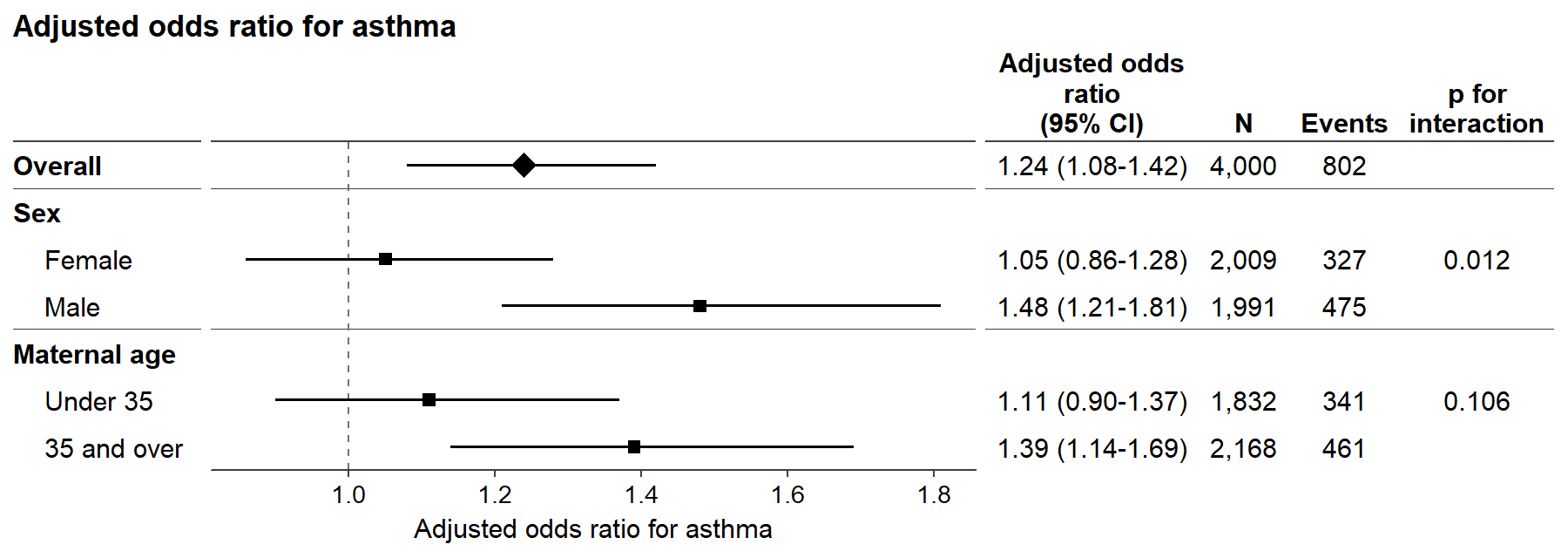
subgroups <- data.frame(
  subgroup  = c("Overall", "Female", "Male", "Under 35", "35 and over"),
  block     = c("Overall", "Sex", "Sex", "Maternal age", "Maternal age"),
  overall   = c(TRUE, FALSE, FALSE, FALSE, FALSE),
  estimate  = c(1.24, 1.05, 1.48, 1.11, 1.39),
  conf.low  = c(1.08, 0.86, 1.21, 0.90, 1.14),
  conf.high = c(1.42, 1.28, 1.81, 1.37, 1.69),
  n         = c(4000, 2009, 1991, 1832, 2168),
  events    = c(802, 327, 475, 341, 461),
  p_int     = c(NA, 0.012, NA, 0.106, NA)
)

library(foresty)

foresty_data(
  subgroups,
  label = "subgroup", group = "block", emphasis = "overall",
  interaction_p = "p_int",
  measure = "OR", outcome = "asthma", adjusted = TRUE
)
Add a column of colors — "red" and "#B24745", or the names of
categories to draw from the layout’s palette — and name it with color =
to say which row is drawn in which color:
foresty_data(subgroups, color = "color_group", ...).
Acknowledgements
-
Claude Code (Anthropic’s Claude Opus 5) assisted with adding notes, testing and English-language proofreading. The design, decisions and final responsibility remain the author’s.
-
Subgroup-specific effect sizes are computed through car.
-
The forest plot designs took their cues from meta.
License
GPL-3.