vvdoctor
Statistical Test App with R 'shiny'
Provides a user-friendly R 'shiny' app for performing various statistical tests on datasets. It allows users to upload data in numerous formats and perform statistical analyses. The app dynamically adapts its options based on the selected columns and supports both single and multiple column comparisons. The app's user interface is designed to streamline the process of selecting datasets, columns, and test options, making it easy for users to explore and interpret their data. The underlying functions for statistical tests are well-organized and can be used independently within other R scripts.
vvdoctor 



vvdoctor is an R package/Shiny app that provides a user-friendly interface for data analysis. It allows users to upload data files, visualize the data, perform statistical tests, and interpret the results.
The app is currently live on shinyapps.io, see: https://edulytics.shinyapps.io/vvdoctor/
Usage
## Install the app
devtools::install_github("vusaverse/vvdoctor")
library(vvdoctor)

## run the app
vvdoctor::run_vvdoctor()
-
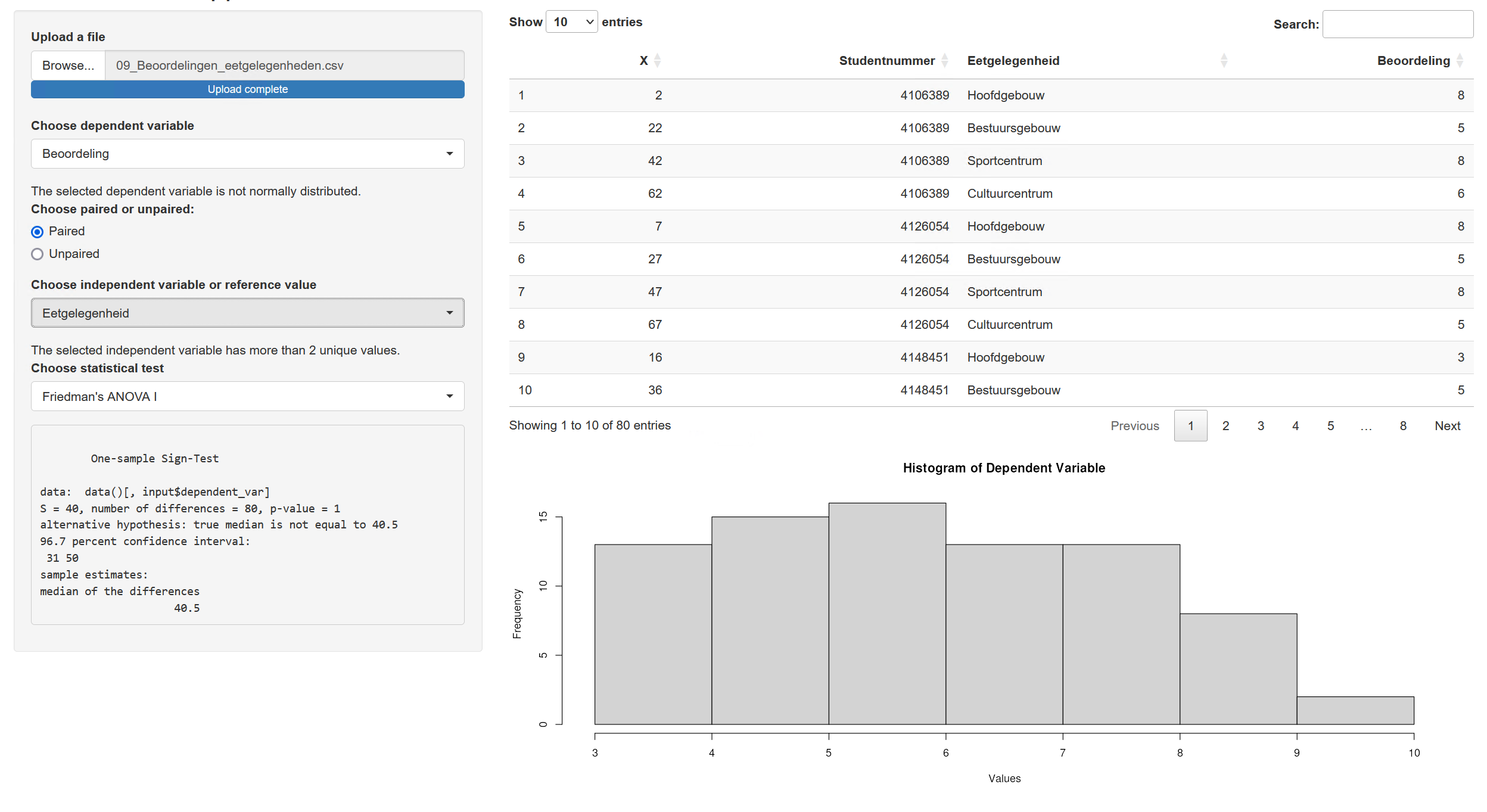
Uploading Data Files: Click on the "Browse" button to select and upload your data file in CSV or Excel format.
-
Displaying the Dataframe: Once the data file is uploaded, the app will display the data as a dataframe. You can explore the data by scrolling through the table or using the search and filter options.
-
Generating a Histogram: To generate a histogram of a specific variable, select a numeric dependent variable from the dropdown menu. The histogram will be displayed, allowing you to visualize the distribution of the data.
-
Choosing Dependent and Independent Variables: To perform statistical tests, select the dependent and independent variables from the respective dropdown menus. The available variables will be automatically populated based on the uploaded data.
-
Statistical Test Options: Once the variables are selected, the app will provide a list of statistical test options, such as t-tests, ANOVA, or correlation analysis. Choose the desired test and click on the "Run Test" button. The output of the test will be displayed, including the test statistic, p-value, and any additional relevant information.
Supported File Extensions
Currently, the following file types are supported:
| Full File Type Name | Full Extension Name | Package | Read Function | Parsable Arguments |
|---|---|---|---|---|
| R Data File | .RData | base | readRDS | None |
| ASCII Text File | .asc | utils | read.table | None |
| Comma Separated Values File | .csv | utils | read.csv | sep, header |
| Apache Feather File | .feather | feather | read_feather | None |
| Fixed-Size File | .fst | fst | read_fst | None |
| Apache Parquet File | .parquet | arrow | read_parquet | None |
| R Data File | .rda | base | readRDS | None |
| R Data File | .rds | base | readRDS | None |
| SPSS Data File | .sav | haven | read_sav | None |
| Tab Separated Values File | .tsv | utils | read.delim | sep, header |
| Text File | .txt | utils | read.delim | sep, header |
| Microsoft Excel File | .xlsx | readxl | read_excel | None |
Decision Tree for Statistical Test Selection
Based on the characteristics of the input data, the vvdoctor app uses the following decision tree to select the appropriate statistical test:
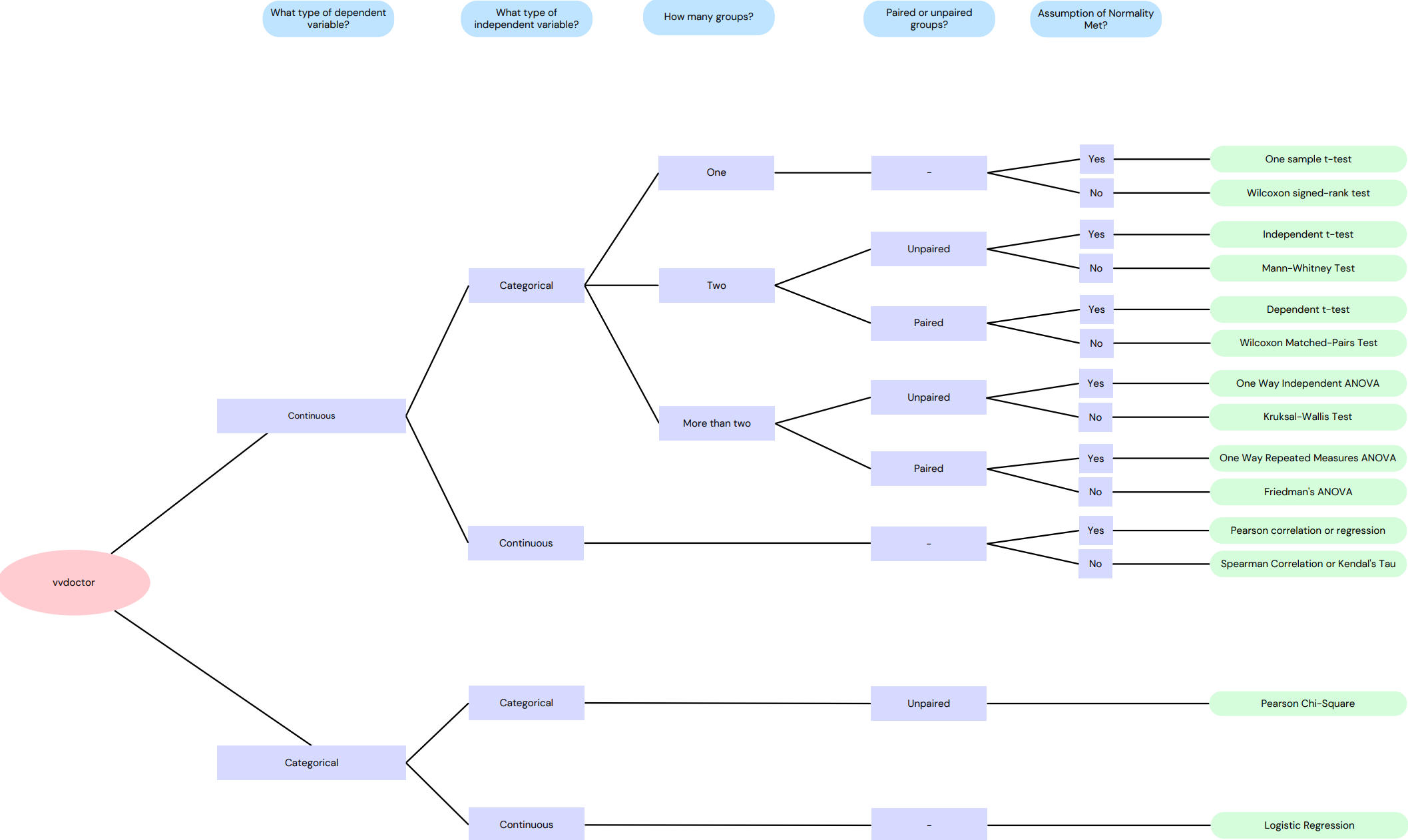
This flowchart illustrates the process of selecting a statistical test based on the class of independent/dependent variables, whether the test is paired or unpaired, and whether the data is normally distributed.
Overview of Implemented Statistical Test
The table below serves as a reference for understanding the logic behind the app's functionality, showcasing how different statistical tests are executed through various R packages and functions.
| Statistical Test Name | R Package | R Function (from the package) |
|---|---|---|
| Sign Test | DescTools | SignTest() |
| Wilcoxon Signed Rank Test | stats | wilcox.test() |
| Mann-Whitney U Test | stats | wilcox.test() |
| Kruskal-Wallis Test | stats | kruskal.test() |
| One Sample t-test | stats | t.test() |
| Paired t-test | stats | t.test() |
| Independent Samples t-test | stats | t.test() |
| Repeated Measures ANOVA | ez | ezANOVA() |
| One-way ANOVA | stats | aov() |
| Chi-Square Goodness-of-Fit and Binomial Test | stats | chisq.test() |
| McNemar's Test | exact2x2 | exact2x2() |
| Chi-Square Test for Independence and Fisher's Exact Test | stats | chisq.test() |
| Bhapkar's Test | irr | bhapkar() |
Example
Below is a screenshot of an example in vvdoctor.