ggstratify
Fast Stratified Descriptive Figures with a Point-and-Click GUI
A point-and-click 'shiny' interface for the descriptive analysis that comes before any model is chosen. Pass a data frame, pick the variable to describe, and add the layers you want to see it within: a second variable becomes the panels of a 'ggplot2' facet_wrap(), and further variables become separate figures, one file each, taken either one variable at a time or crossed. Every stratum is reported with the number of observations behind it, on the figure and on each of its panels; strata that contain none are listed rather than dropped, and rows with a missing value in a layer variable are excluded and counted. A continuous variable can be categorized into quantile groups, equal-width bins or user-supplied cut points, a variable of any type can be turned into whether it is missing or observed, so that the rows a layer would exclude become a stratum of their own, and a date or date-time variable can be read at a chosen resolution, either as a calendar period or as a position in the yearly cycle such as the month or the season; any of them can then be used as a layer. The figure types follow those offered by the 'ggplotgui' package and add the line plot for change over time, an optional LOWESS smoother, and the Kaplan-Meier curve estimated by 'survival', with an optional number-at-risk table. An error bar can show a standard error or a confidence interval, the latter from the t distribution for a mean and from the Clopper-Pearson or Wilson method for a proportion, and the points can be joined by a line computed from the same summary, which is how a trend over time is read. A survey weight can be set: the figure is then drawn from the weighted data, every count is reported both as rows and as the sum of the weights, and error bars and confidence bands are design-based estimates from the 'survey' package. Columns are described as they are typed, so convert each to the type you mean first. Figures are written as PNG or SVG, and the application prints the 'ggplot2' code behind the figure on screen, so that a description can be repeated, shared or accounted for later. Everything runs locally, with no network access and no AI involved.
ggstratify



A one-function, point-and-click Shiny interface for the descriptive analysis.
ggstratify(your_data)
That is the only function you need to remember.
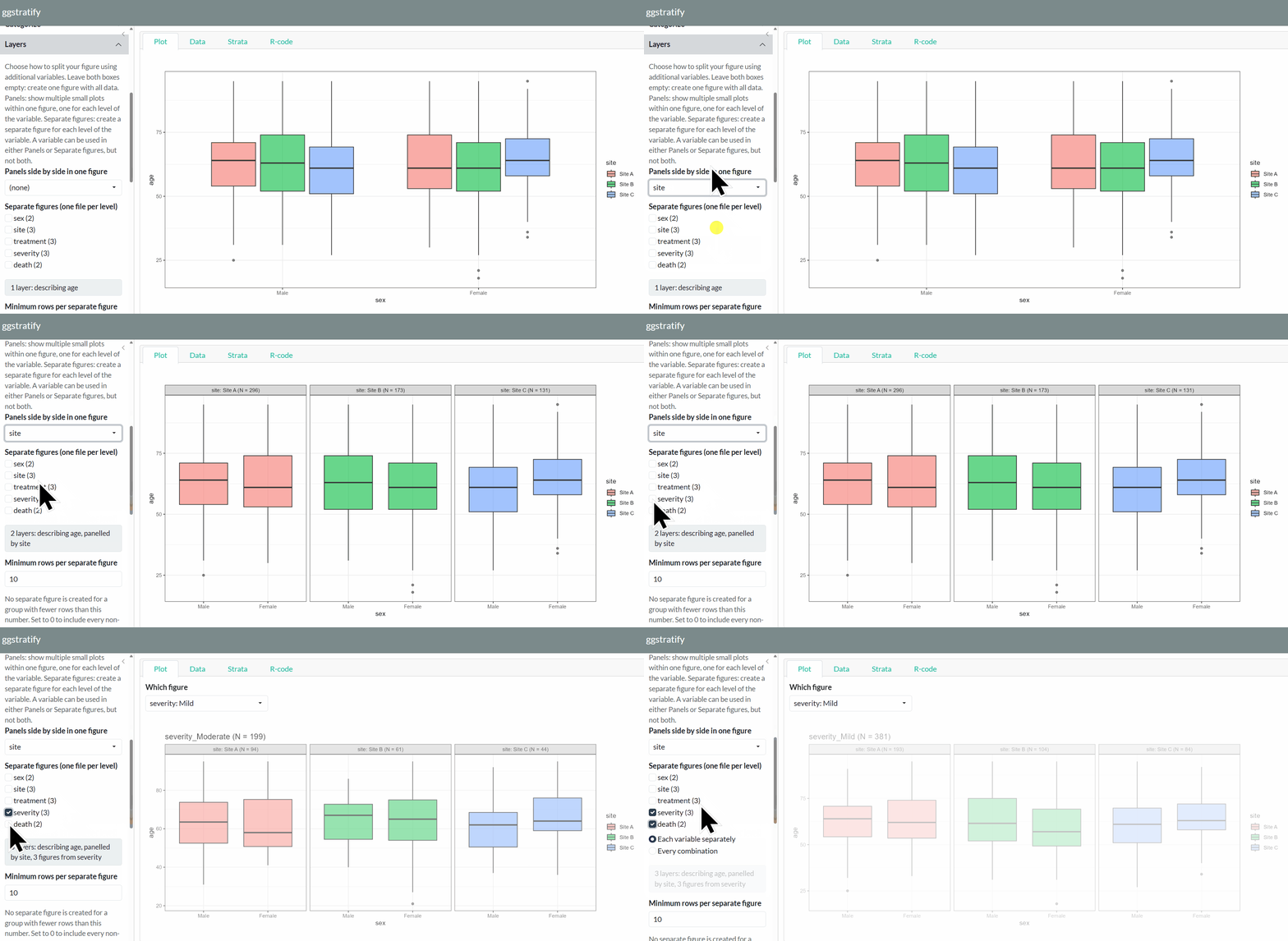
Overview
Descriptive analysis is essential in every research study. Humans (not AI) need to understand the data before making decisions, such as choosing an appropriate statistical model.
In particular, understanding how variables are distributed across strata defined by other variables is often critical.
-
Visually inspect your data without repeatedly writing code.
-
ggstratifyruns entirely locally and requires neither a network connection nor a language model. -
Easily export figures to share with collaborators.
Before you start: decide the variable types
This package describes what it is given. It does not guess what you meant. Convert each column to the type you intend before handing it over.
dat <- transform(
  dat,
  sex       = factor(sex, levels = c("Male", "Female")),   # groups as factors
  severity  = factor(severity, levels = c("Mild", "Moderate", "Severe")),
  age       = as.numeric(age)                              # measurements as numeric
)
ggstratify(dat)
A grouping variable left as 1, 2, 3 will be described as a number. The
order of a factor's levels becomes the order of the panels, the figures and
the axis.
Installation
From CRAN:
install.packages("ggstratify")
The development version from GitHub:
# install.packages("remotes")
remotes::install_github("AkiShiroshita/ggstratify")
Usage
library(ggstratify)

ggstratify(epi_cohort)           # the example data that ships with the package
ggstratify(iris)                 # data.frame / tibble / data.table / matrix
The screen
| Tab | Contents |
|---|---|
| Plot | Either every figure at once as panels (fastest) or one at a time, enlarged. The variables you chose decide which (see below) |
| Data | The first 200 rows |
| Strata | Every stratum: variable, level, N and the file name it will be written to. Strata with no file name get no figure. Plus the rows excluded for missing values |
| R-code | The ggplot2 code for the figure on screen. One button copies it |
Figure types
Boxplot / Density / Dot + Error / Dotplot / Histogram /
Kaplan-Meier curve / Line / Scatter / Violin
On a Dot + Error figure, Join the dots with a line under Plot options joins the points left to right -- one line per colour and per panel -- which is what a set of yearly estimates is usually read for. The line is computed by the same summary as the dots, so it passes through them.
Derived variables
Derive a variable makes a new variable out of one you already have, which can then be used as a layer like any other. A continuous variable becomes quantile groups, equal-width bins or your own cut points. A variable of any type becomes missing vs observed: the rows where it has a value and the rows where it does not.
A date or date-time variable gets a time resolution. Either a calendar period -- the year, quarter, month, week, day, hour or minute it falls in, which keeps it a date and so keeps a trend spaced by elapsed time -- or a position in the cycle, which drops the year and pools every March since the data began: month of the year, season, quarter of the year, day of the week, hour of the day. Months run January to December and days Monday to Sunday, never alphabetically; the season's start month is yours to choose, so March gives the northern hemisphere and September the southern.
For a Line plot drawn against a date, the Appearance panel sets how far
apart the ticks are and what each one reads, so a column of dates can be shown
and labelled as years.
crp in the bundled epi_cohort is incomplete on purpose and admit_date
spans three calendar years, so ggstratify(epi_cohort) is enough to try
both.
Survey weights
Set a numeric column as the Survey weight under Describe, and each row
counts for as many people as its weight -- aes(weight = survey_weight) for a
histogram, density, boxplot or violin, and a weighted fit for a smoother. Every
N is shown twice, as rows and as the sum of the weights. The bar on a
Dot + Error figure and the band on a Kaplan-Meier curve are design-based
estimates from the survey package,
with the sampling strata and clusters as well when you give them. The
design is the whole sample's, and every panel and figure is a subpopulation of
it. svy_weight in epi_cohort is there to try it on.
Acknowledgements
- Claude Code (Anthropic's Claude Opus 5) assisted with adding notes, testing and English-language proofreading. The design, decisions and final responsibility remain the author's.
- The package design was inspired by ggplotgui (Gert Stulp, GPL-3).
License
GPL-3