classbound
Visualization for Classification Decision Boundaries
Exploring, visualizing, and comparing classification decision boundaries. Provides a unified interface for fitting classifiers and rendering 2D decision boundary plots, with support for 2D slice visualization (fixing non-plotted dimensions at reference values) and projection-based visualization for high-dimensional data (including Principal Component Analysis (PCA) and tour projections from the 'tourr' package). Supports native 'R' classifiers, 'tidymodels' workflows, and custom user-supplied models via a flexible adapter system. Includes an interactive 'Shiny' application ('explorapp') for visual exploration, data simulation, drawing, model comparison, probability surfaces, and reproducible exports.
classbound


classbound is an R package for exploring and comparing classification
decision boundaries. It provides a unified interface for fitting
classifiers, computing 2D boundary grids, and visualizing how different
models partition the feature space.
What you can do with classbound:
- Visualize decision boundaries for any R classifier
- Compare multiple classifiers side by side
- Handle high-dimensional data via 2D slicing or projection (PCA, tourr)
- View probability surfaces for classifiers that provide them
- Explore data interactively using the built-in Shiny app
(
explorapp()) - Integrate natively with
tidymodelsworkflows
Full documentation: https://natydasilva.github.io/classbound/
Installation
devtools::install_github("natydasilva/classbound")
Quick start
One-step wrapper
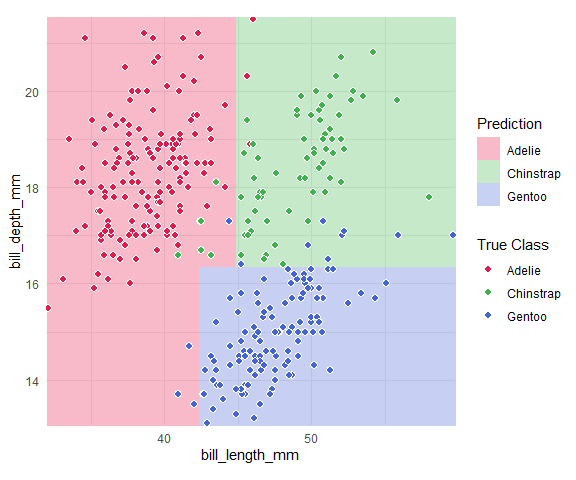
classbound() fits a model, computes its decision boundary, and plots
the result in a single call.
library(classbound)
library(palmerpenguins)

penguins <- na.omit(palmerpenguins::penguins[
  ,
  c("species", "bill_length_mm", "bill_depth_mm")
])

classbound(
  data       = penguins,
  formula    = species ~ bill_length_mm + bill_depth_mm,
  classifier = rpart::rpart
)
Modular pipeline
For full control, use the three-step pipeline:
# 1. Fit
model <- fit_model(penguins, species ~ bill_length_mm + bill_depth_mm, rpart::rpart)

# 2. Compute boundary
model <- boundary_compute(model)

# 3. Plot
plot_boundary(
  model,
  obs_data   = penguins,
  x_col      = "bill_length_mm",
  y_col      = "bill_depth_mm",
  true_label = "species"
)
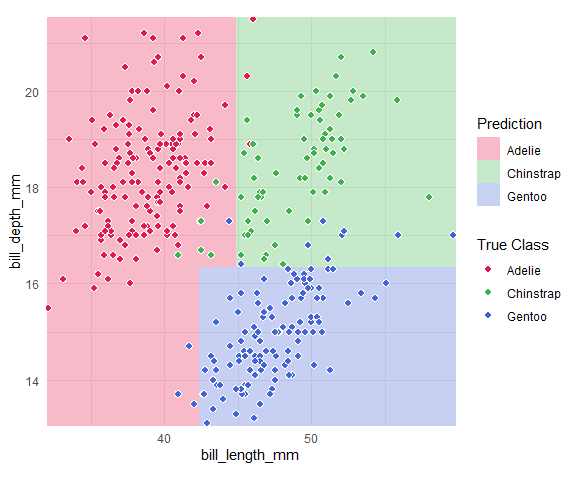
boundary_compute() returns the model with the grid attached, so you
can replot with different settings without refitting.
Interactive workflow
Launch the built-in Shiny application for point-and-click exploration:
# Start with your own dataset
explorapp(data = penguins, target_col = "species")

# Or start empty and simulate/draw data
explorapp()
In explorapp() you can: - Import real data or simulate synthetic
datasets - Draw classification data by hand - Fit and compare multiple
classifiers simultaneously - Switch between 2D Slice and Projection
views for high-dimensional data - Inject outliers and observe how
boundaries shift - Inspect probability surfaces (for supported
classifiers) - Export data, models, plots, and a reproduce script
Two main workflows
Interactive
Use explorapp() to:
- Choose or create data
- Choose models
- Explore decision boundaries
- Navigate, zoom, and draw
- Compare models and export results
Programmatic
Use the core Classbound functions directly:
fit_model()
boundary_compute()
plot_boundary()
High-dimensional data
When a model is trained on more than two features, boundary_compute()
supports:
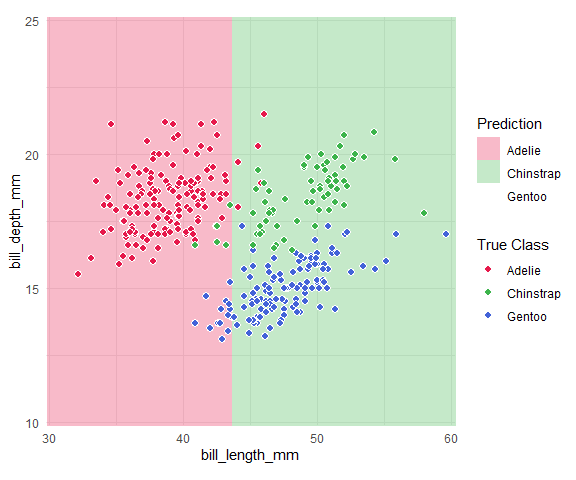
- 2D Slice: two features are plotted; other features are fixed at their median/mode.
penguins3 <- na.omit(palmerpenguins::penguins[
  ,
  c("species", "bill_length_mm", "bill_depth_mm", "flipper_length_mm")
])

m3 <- fit_model(penguins3, species ~ ., rpart::rpart)
m3_slice <- boundary_compute(m3,
  feature_range = list(bill_length_mm = c(30, 60), bill_depth_mm = c(10, 25)),
  resolution = 60
)

plot_boundary(m3_slice,
  obs_data = penguins3,
  x_col = "bill_length_mm", y_col = "bill_depth_mm",
  true_label = "species"
)
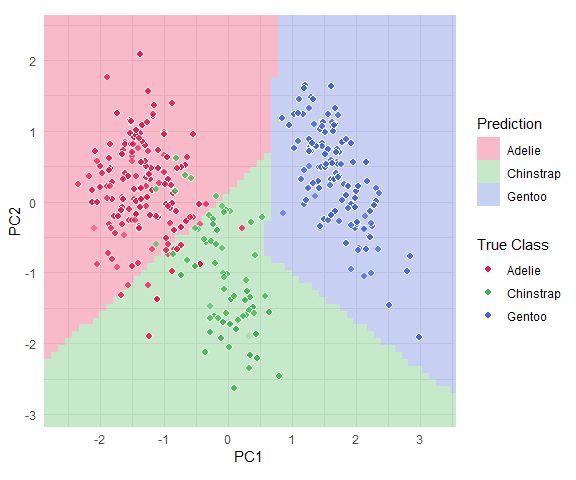
- Projection: all features are combined into two projected axes (e.g., PCA).
feat_cols <- c("bill_length_mm", "bill_depth_mm", "flipper_length_mm")
pca <- prcomp(penguins3[, feat_cols], scale. = TRUE)
basis <- pca$rotation[, 1:2]

x_std <- scale(penguins3[, feat_cols], center = pca$center, scale = pca$scale)
z_mat <- x_std %*% basis

m3_proj <- boundary_compute(m3,
  feature_range = list(
    PC1 = range(z_mat[, 1]) + c(-0.5, 0.5),
    PC2 = range(z_mat[, 2]) + c(-0.5, 0.5)
  ),
  resolution = 60,
  projection = list(basis = basis, center = pca$center, scale = pca$scale)
)

plot_boundary(m3_proj,
  obs_data = penguins3,
  x_col = "PC1", y_col = "PC2", true_label = "species"
)
See the high-dimensional guide for a full explanation.
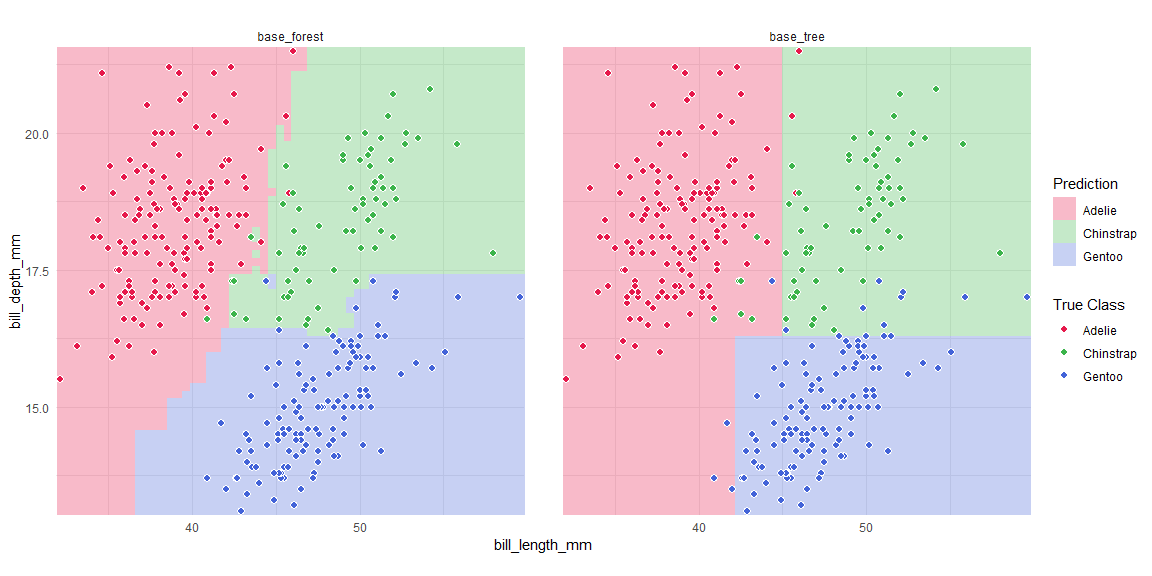
Multi-model comparison with tidymodels
library(parsnip)
library(workflowsets)

spec_tree <- decision_tree(mode = "classification") |> set_engine("rpart")
spec_rf <- rand_forest(mode = "classification") |> set_engine("randomForest")

wf_set <- workflow_set(
  preproc = list(base = species ~ bill_length_mm + bill_depth_mm),
  models  = list(tree = spec_tree, forest = spec_rf)
)

bounds <- boundary_workflow_set(wf_set,
  data = penguins,
  response = "species", resolution = 60
)

plot_boundary(bounds,
  obs_data = penguins,
  x_col = "bill_length_mm", y_col = "bill_depth_mm",
  true_label = "species"
)
Documentation
| Resource | Link |
|---|---|
| Getting Started | getting-started |
| High-Dimensional | high-dimensional |
| tidymodels | tidymodels-workflow |
| tourr | tourr-workflow |
| Explorapp Guide | explorapp-guide |
| Custom Adapters | custom_adapters |
| Reference | Function Reference |