tidyfault
Tidy Fault Tree Analysis
Fault tree analysis with tidy data. Represent a fault tree as two tables, one of nodes (the top event, gates and basic events) and one of edges, so the whole workflow stays in ordinary data frames. Derive the Boolean equation of the top event, enumerate the truth table, and find minimal cut sets with the Method of Obtaining Cut Sets (MOCUS) algorithm of Fussell and Vesely (1972), implemented in 'R' and, by default, in C++ through 'Rcpp'. Evaluate thousands of binary or probabilistic scenarios in one vectorized call, put uncertainty intervals around the top-event probability, follow it over time, and rank which component fix lowers it most. Lay out and draw the tree with 'tidygraph', 'igraph' and 'ggplot2'. Methods follow the "Fault Tree Handbook" of Vesely, Goldberg, Roberts and Haasl (1981) < https://www.nrc.gov/docs/ML1007/ML100780465.pdf>. A 'Python' port with the same functions ships in the same repository.
tidyfault


Tidy Fault Tree Analysis (FTA) for R
tidyfault uses tidyverse, tidygraph, and related tools to
visualize fault trees, identify minimal cutsets, and evaluate failure
outcomes.
Fault tree methods are used in aerospace, energy, safety, and security contexts. The package keeps trees in rectangular nodes and edges tables so you can combine FTA with familiar data manipulation and plotting tools in R.
Applications


Image Sources
All photographs are served from the [Unsplash](https://unsplash.com/) CDN and are subject to the [Unsplash License](https://unsplash.com/license).Key capabilities
| Capability | What tidyfault provides |
|---|---|
| Tidy inputs | Fault trees as nodes / edges tables (one row per gate or basic event, one row per directed link). |
| Core pipeline | curate() → equate() → formulate() → calculate() → concentrate() → tabulate(). |
| Minimal cutsets | MOCUS-style expansion (mocus(), Rcpp-backed by default) plus boolean reduction in concentrate(). |
| Visualization | illustrate() and plot() for ggplot2 / igraph fault tree layouts. |
| Quantification | quantify() for binary scenarios or top-event probabilities over many rows at once. |
| Documentation | Articles on workflows, plotting, quantify(), and simulation. |
Installation
# R, from CRAN (once accepted)
install.packages("tidyfault")

# R, development version from GitHub
remotes::install_github("timothyfraser/tidyfault")
# Python
pip install "git+https://github.com/timothyfraser/tidyfault#subdirectory=python"
On Linux, igraph (used directly and through tidygraph) needs the
GLPK library: sudo apt-get install libglpk40 on Ubuntu or Debian.
Basic Usage
How do we use tidyfault to analyze fault trees?
Load Packages and Data
Let’s start by loading our dependencies!
# Load dependencies
library(tidyfault)
library(tidyverse)
Next, let’s get some fake data to work with, including nodes and edges in our fault tree.
#Load example data into our environment
data("fakenodes")
data("fakeedges")
Workflow (Step-by-Step)
Finally, let’s demonstrate the basic workflow for tidyfault!
First, we…
curate()a list of gates in the fault tree;
mygates = curate(nodes = fakenodes, edges = fakeedges)
mygates
#> # A tibble: 6 x 6
#>   gate  type  class     n set           items
#>   <chr> <fct> <fct> <int> <chr>         <list>
#> 1 T     top   top       1 " (G1) "      <chr [1]>
#> 2 G1    and   gate      2 " (G2 * G3) " <chr [2]>
#> 3 G2    and   gate      2 " (B * G5) "  <chr [2]>
#> 4 G3    or    gate      2 " (A + G4) "  <chr [2]>
#> 5 G4    and   gate      2 " (B * C) "   <chr [2]>
#> 6 G5    or    gate      2 " (C + D) "   <chr [2]>
- use
equate()to find the boolean equation for the fault tree;
myequation = mygates %>% equate()
myequation
#> [1] " ( ( (B *  (C + D) )  *  (A +  (B * C) ) ) ) "
formulate()that equation into anRfunction we can use;
myfunction = myequation %>% formulate()
myfunction
#> function (A, B, C, D)
#> (((B * (C + D)) * (A + (B * C))))
#> <environment: 0x560048da9200>
calculate()the full truth table of all possible combinations of events and theoutcomeeach leads to.
mycombos = myfunction %>% calculate()
head(mycombos)
#> # A tibble: 6 x 5
#>       A     B     C     D outcome
#>   <dbl> <dbl> <dbl> <dbl>   <dbl>
#> 1     0     1     1     0       1
#> 2     0     1     1     1       1
#> 3     1     1     0     1       1
#> 4     1     1     1     0       1
#> 5     1     1     1     1       1
#> 6     0     0     0     0       0
concentrate()our gate structure into the minimum cutsets, the smallest sets of events necessary to cause system failure. This function uses Boolean minimization to find the minimum cutsets.
mymin = mygates %>% concentrate()
mymin
#> [1] "B*C"   "A*B*D"
tabulate()the minimum cutsets and how much coverage they have over the total paths to failure found withcalculate().tabulate()needs both the minimum cutsets and the formula (function from step 3).
mytable = tabulate(mymin, formula = myfunction)
mytable
#> # A tibble: 2 x 4
#>   mincut cutsets failures coverage
#>   <chr>    <int>    <int>    <dbl>
#> 1 A*B*D        2        5      0.4
#> 2 B*C          4        5      0.8
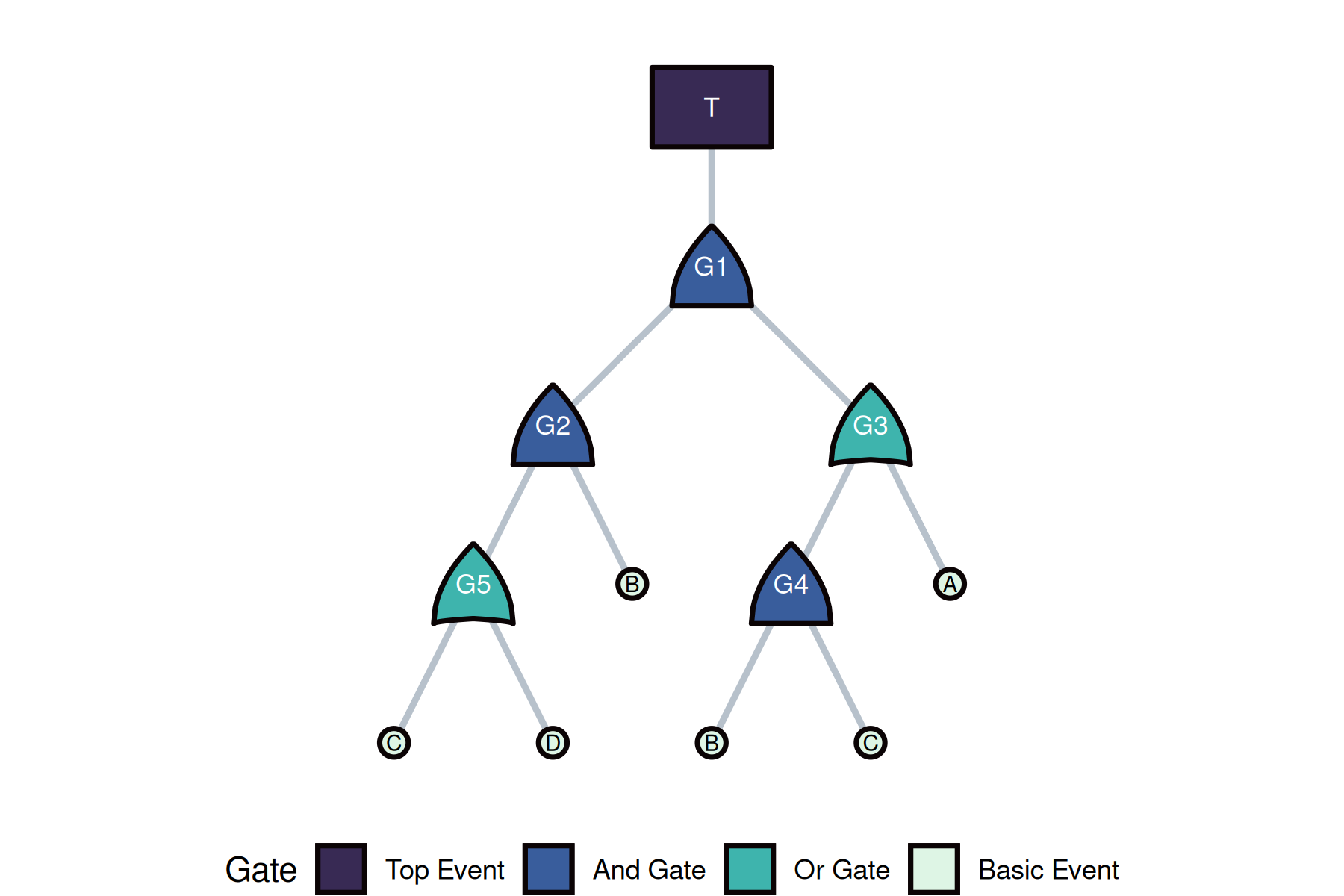
illustrate()+plot()to visualize the fault tree structure.
myviz <- illustrate(nodes = fakenodes, edges = fakeedges, type = "both")
myplot <- plot(
  myviz,
  gate_fill = c(top = "#382a54", and = "#395d9c", or = "#3eb4ad", "basic event" = "#def5e5")
)
myplot
quantify()to evaluate specific scenarios (binary) or top-event probabilities.
# Binary scenario evaluation
quantify(myfunction, c(TRUE, FALSE, TRUE, FALSE))
#> [1] FALSE

# Probabilistic evaluation
quantify(myfunction, c(0.10, 0.20, 0.05, 0.15), prob = TRUE)
#> [1] 0.01285
Workflow (All at Once!)
Or, we can do this all in one fell swoop!
Let’s extract the minimum cutsets from our fault tree data!
# Build gates and formula once (needed for tabulate)
mygates = curate(nodes = fakenodes, edges = fakeedges)
myfunction = mygates %>%
  equate() %>%
  formulate()

# Run the full pipeline; tabulate() needs the formula for coverage stats
mytable = mygates %>%
  concentrate() %>%
  tabulate(formula = myfunction)
Credits and license
- Software: GPL-3 (full text in LICENSE.md). The documentation site is built with pkgdown.
- Images above: Unsplash-hosted stock photos; see the Unsplash License. When redistributing or cropping, follow Unsplash attribution guidance.
- Favicons: Generated with RealFaviconGenerator from the package logo.
Questions?
Contact: Timothy Fraser, PhD ([email protected])