mailmerge
Mail Merge Using R Markdown Documents and 'gmailr'
Perform a mail merge (mass email) using the message defined in markdown, the recipients in a 'csv' file, and gmail as the mailing engine. With this package you can parse markdown documents as the body of email, and the 'yaml' header to specify the subject line of the email. Any '{}' braces in the email will be encoded with 'glue::glue()'. You can preview the email in the RStudio viewer pane, and send (draft) email using 'gmailr'.
mailmerge 



Mail merge from R using markdown documents and gmail.
- Parse markdown documents as the body of email
- Use the
yamlheader to specify the subject line of the email - Use
glueto replace{}tags - Preview the email in the RStudio viewer pane
- Send email (or saving as draft) using
gmailr
Note: Right now, the only supported email back end is gmailr (see
https://gmailr.r-lib.org/).
Installation
Install the package from CRAN:
install.packages("mailmerge")
Install the dev version from https://github.com/andrie/mailmerge
remotes::install_github("andrie/mailmerge")
Setup
At the moment only gmail is supported as the email back-end, using the
gmailr package (https://github.com/r-lib/gmailr).
Before you use mail_merge() it’s important to authenticate against the
gmail service, and you should use gmailr::gm_auth() to do this.
Example
Construct a data frame with the content you want to merge into your email:
dat <-  data.frame(
  email      = c("[email protected]", "[email protected]"),
  first_name = c("friend", "foe"),
  thing      = c("something good", "something bad"),
  stringsAsFactors = FALSE
)
Write the text of your email as a R markdown document. You can add the
subject line in the yaml header. Use {} braces inside the email to
refer to the data inside your data frame. Expressions inside these
braces will be encoded by the glue::glue_data() function (See
https://glue.tidyverse.org/).
msg <- '
---
subject: "**Hello, {first_name}**"
---

Hi, **{first_name}**

I am writing to tell you about **{thing}**.

{if (first_name == "friend") "Regards" else ""}


Me
'
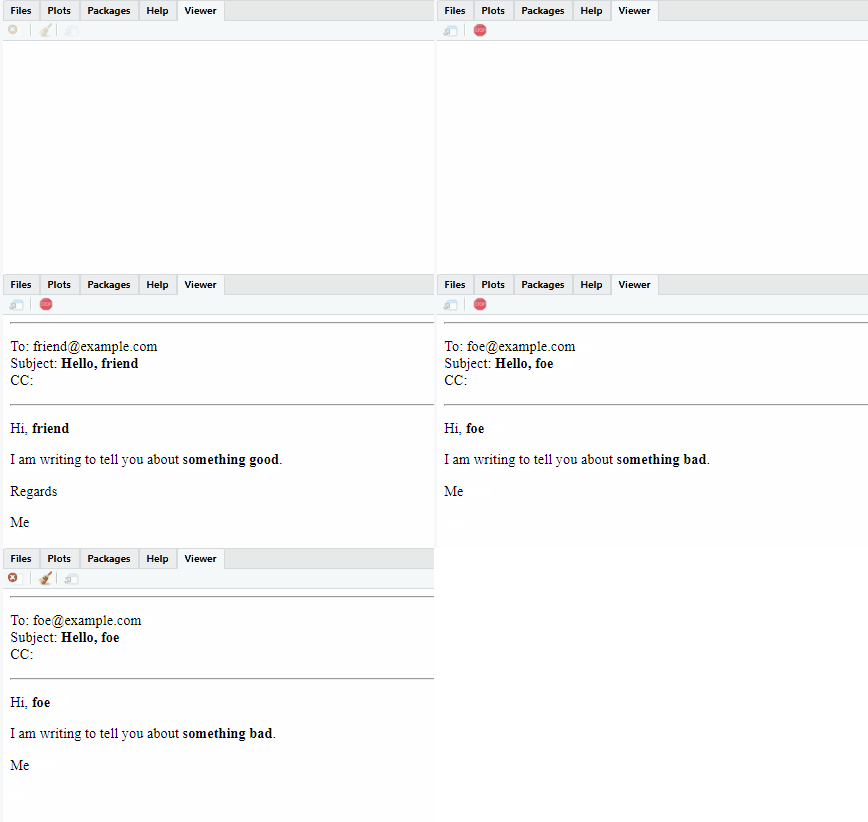
Then you can use mail_merge() to embed the content of your data frame
into the email message. By default the email will be shown in a preview
window (in the RStudio viewer pane, if you use RStudio).
To send the message, use send = "draft" (to save in your gmail drafts
folder) or send = "immediately" to send the mail immediately.
library(mailmerge)
library(gmailr, quietly = TRUE, warn.conflicts = FALSE)

if (interactive()) {
  # Note: you should always authenticate. The 'interactive()` condition only
  # prevents execution on the CRAN servers
  gm_auth()
}
dat %>%
  mail_merge(msg)
#> Sent preview to viewer

if (interactive()) {
  dat %>%
    mail_merge(msg) %>%
    print()
}