gridify
Enrich Figures and Tables with Custom Headers and Footers and More
A simple and flexible tool designed to create enriched figures and tables by providing a way to add text
around them through predefined or custom layouts.
Any input which is convertible to 'grob' is supported, like 'ggplot', 'gt' or 'flextable'.
Based on R 'grid' graphics, for more details see Paul Murrell (2018)
gridify 




Overview
In the pharmaceutical industry, and many other fields that rely heavily on data reporting, there is often a need to create figures and tables with specific graphical arrangements. These could be titles, subtitles, captions, footnotes, and other text elements that provide important context to the data being shown.
However, creating the headers and footers etc. and correctly positioning them around the output can be challenging, often requiring fine-tuning. This can be time-consuming and can lead to inconsistencies in the way the figures and tables are presented across different projects.
gridify builds on the base R grid package and makes it easy to add
flexible and customizable information around a figure or table using a
pre-defined or custom layout. The gridify package works with all of
the following input types, creating consistency when using various
different inputs:
grob, gtable, ggplot, flextable, gt, base R plots (by formula)
Whilst rtables are not directly supported, we can use rtables with gridify by first converting them to flextable (with rtables.officer).
As gridify is based on the graphical tool grid, any figure or table
inputs are converted to a grob object in gridify and the result of using
gridify is always a graphical image by design. By unifying
tables and figures into scalable vector graphics, gridify locks the
layout so it cannot break across environments — no shifting columns, no
reflowing text. The output is stable while the text stays clear, searchable,
and copy-able at any zoom level.
Installation
You can install the newest release version from CRAN:
install.packages("gridify")
Or you can install the newest development version from Pharmaverse GitHub (example):
# install.packages("remotes")
remotes::install_github("pharmaverse/gridify", build_manual = TRUE)
Example
The workflow of the package is as follows:
- Create your object (
ggplot,gtetc.) - Choose a layout (predefined or custom). Use
get_layouts()to see the predefined options - Use
gridify()to create agridifyobject - Print the
gridifyobject to see empty cells - Use
set_cell()to fill in the various text elements in the layout (headers, footers etc.)
The following example uses a table created by the gt package and the
gridify layout pharma_layout_base().
library(gridify)
# install.packages("gt")
# gt needs gtable
# install.packages("gtable")
library(gt)
# (to use |> version 4.1.0 of R is required, for lower versions we recommend %>% from magrittr)

tab <- gt::gt(head(mtcars, n = 10))  |>
  gt::tab_options(
    table.width = gt::pct(100),
    data_row.padding = gt::px(10),
    table_body.hlines.color = "white",
    # gt font size is in pixels
    # Multiply points by 96/72 to get pixels
    table.font.size = 10 * 96 / 72,
    table.font.names = "sans"
  )

# Use `gridify()` to create a `gridify` object
gridify_object <- gridify(
  object = tab,
  # Choose a layout (predefined or custom)
  layout = pharma_layout_base(
    margin = grid::unit(c(0.5, 0.5, 0.5, 0.5), "inches"),
    global_gpar = grid::gpar(fontfamily = "sans", fontsize = 10)
  )
)
# Print the `gridify` object to see empty cells
gridify_object
# Use `set_cell()` to fill in the various text elements in the layout (headers etc.)
gridify_object_fill <- gridify_object |>
  set_cell("header_left_1", "My Company") |>
  set_cell("header_left_2", "<PROJECT> / <INDICATION>") |>
  set_cell("header_left_3", "<STUDY>") |>
  set_cell("header_right_1", "CONFIDENTIAL") |>
  set_cell("header_right_2", "<Draft or Final>") |>
  set_cell("header_right_3", "Data Cut-off: YYYY-MM-DD") |>
  set_cell("output_num", "<Table> xx.xx.xx") |>
  set_cell("title_1", "<Title 1>") |>
  set_cell("title_2", "<Title 2>") |>
  set_cell("title_3", "<Optional Title 3>") |>
  set_cell("by_line", "By: <GROUP>, <optionally: Demographic parameters>") |>
  set_cell("note", "<Note or Footnotes>") |>
  set_cell("references", "<References:>") |>
  set_cell("footer_left", "Program: <PROGRAM NAME>, YYYY-MM-DD at HH:MM") |>
  set_cell("footer_right", "Page xx of nn") |>
  set_cell("watermark", "DRAFT")

gridify_object_fill

print(gridify_object_fill)
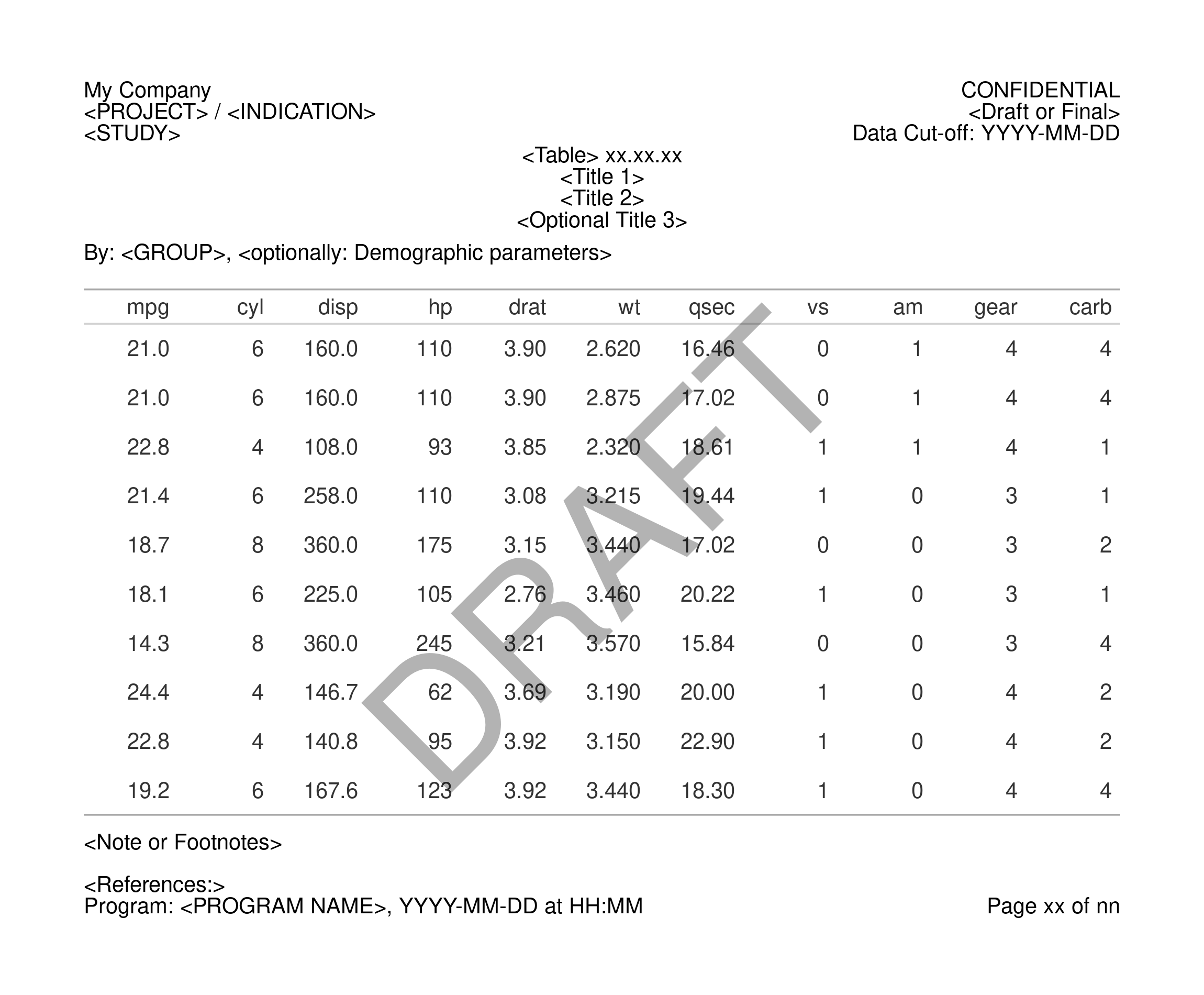
Note: Get the image using
export_to(gridify_object_fill, to = "mypng.png", res = 300, width = 2300, height = 1900)
Documentation Guide
For more information please visit the following vignettes:
- Getting Started
vignette("gridify", package = "gridify")- A case study in how the above example is constructed. - Simple Examples
vignette("simple_examples", package = "gridify")- A showcase of implementations ofgridifyfor the various possible inputs. - Multi-Page Examples
vignette("multi_page_examples", package = "gridify")- Showing how to usegridifyin more complex situations e.g a for-loop for multiple results. - Create Custom Layout
vignette("create_custom_layout", package = "gridify")- An explanation on how to create a custom layout to use ingridify. - Transparency of gridify
vignette("transparency", package = "gridify")- How to extract the raw grid code to reproduce agridifyobject.
Non Editable Outputs
gridify outputs are graphical — they cannot be hand-edited like
Word or Excel. Once a PDF or PNG is produced, the content is locked:
nothing to retype, nothing to rephrase. Unlike Word/RTF, the layout
will not reflow or break when opened on a different machine. This is
useful in validated environments where any manual change after
generation is a compliance issue, and especially for final eCTD
submissions where formatting must be pixel-stable.
PDF Text is Still Searchable
Because gridify uses R's vector graphics engine, text in PDFs
(exported with export_to()) is real text, not a flat image.
Reviewers can:
- use Ctrl+F / Cmd+F to search,
- copy & paste values for checks,
- zoom in without losing clarity.
So the output is uneditable and searchable at the same time.
Related packages
Other packages exist which add headers, footers, and other elements to figures and tables; most of the input classes to gridify already support these features.
However, gridify was created not to supersede these,
but to be used in conjunction with, in a way that is flexible for all use
cases and consistent across various inputs.
Contributing
Interested in contributing? Check out the contributing guidelines, CONTRIBUTING.md.
Please note that this project is released with a Code of Conduct, CODE_OF_CONDUCT.md.
By contributing to this project, you agree to abide by its terms.
Acknowledgments
Along with the authors and contributors, thanks to the following people for their support:
Alberto Montironi, Jonathan Bleier, Cynthia McShea, Nils Penard, Oswald Dallimore, Laetitia Lemoine, Daniel Vicencio Perez, Richard Abdy, Sophie Lee