gridmicrotex
Native 'LaTeX' Math Rendering for Grid Graphics
Renders 'LaTeX' math equations as native R grid graphics objects (grobs) using the 'MicroTeX' 'C++' library as the layout engine. Produces resolution-independent vector output that works on any R graphics device, with no external 'LaTeX' installation required. Markdown labels and block documents that mix prose formatting with math are also rendered, for use with both 'grid' and 'ggplot2'.
gridmicrotex


LaTeX math and markdown for R graphics: grid, base plots and ggplot2. No LaTeX installation needed. Built on the MicroTeX layout engine.
Everything on KaTeX’s list of supported
functions is drawn, and more: amsmath
and mathtools environments, equation numbers, tables from kable() and
gt, tikz-cd diagrams, \ce{} chemistry, and a subset of siunitx.
Installation
install.packages("gridmicrotex")

# Development version
# install.packages("devtools")
devtools::install_github("adayim/gridmicrotex")
grid
library(gridmicrotex)
library(grid)

grid.newpage()
grid.latex(r"($x = \frac{\textcolor{red}{-b} \pm \sqrt{b^2 - 4ac}}{2a}$)",
           gp = gpar(fontsize = 30))
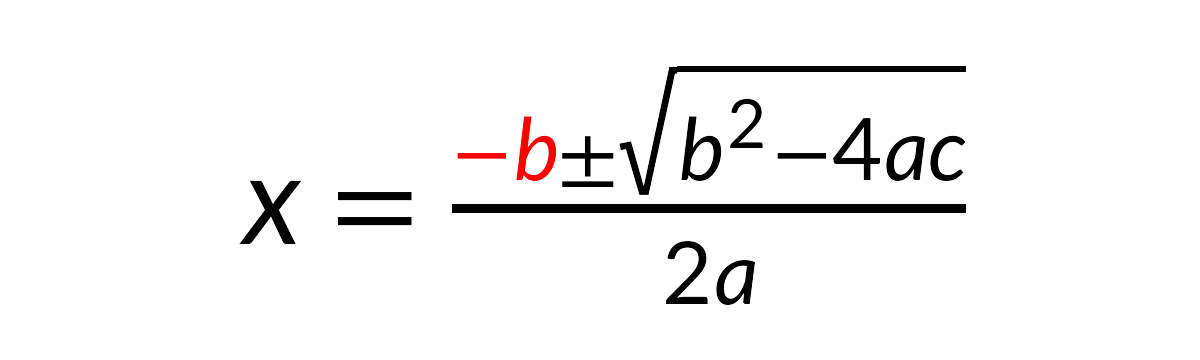
Text and math mix as in LaTeX, with math between $...$. Use
input_mode = "math" for a bare formula, or input_mode = "document"
for paragraphs, headings and displayed equations. latex_grob() returns
the grob instead of drawing it.
Base graphics
latex_options(device_math = TRUE)

plot(1:10, (1:10)^2,
     main = r"(Slope $\hat{\beta}_1 = \sum_{i=1}^{n} x_i^2$)",
     xlab = "Cost $5-$10 per unit",   # no math, drawn as written
     ylab = r"($\frac{y}{2}$)")
text(3, 80, r"($\int_0^\infty e^{-x^2}\,dx$)", col = "steelblue")
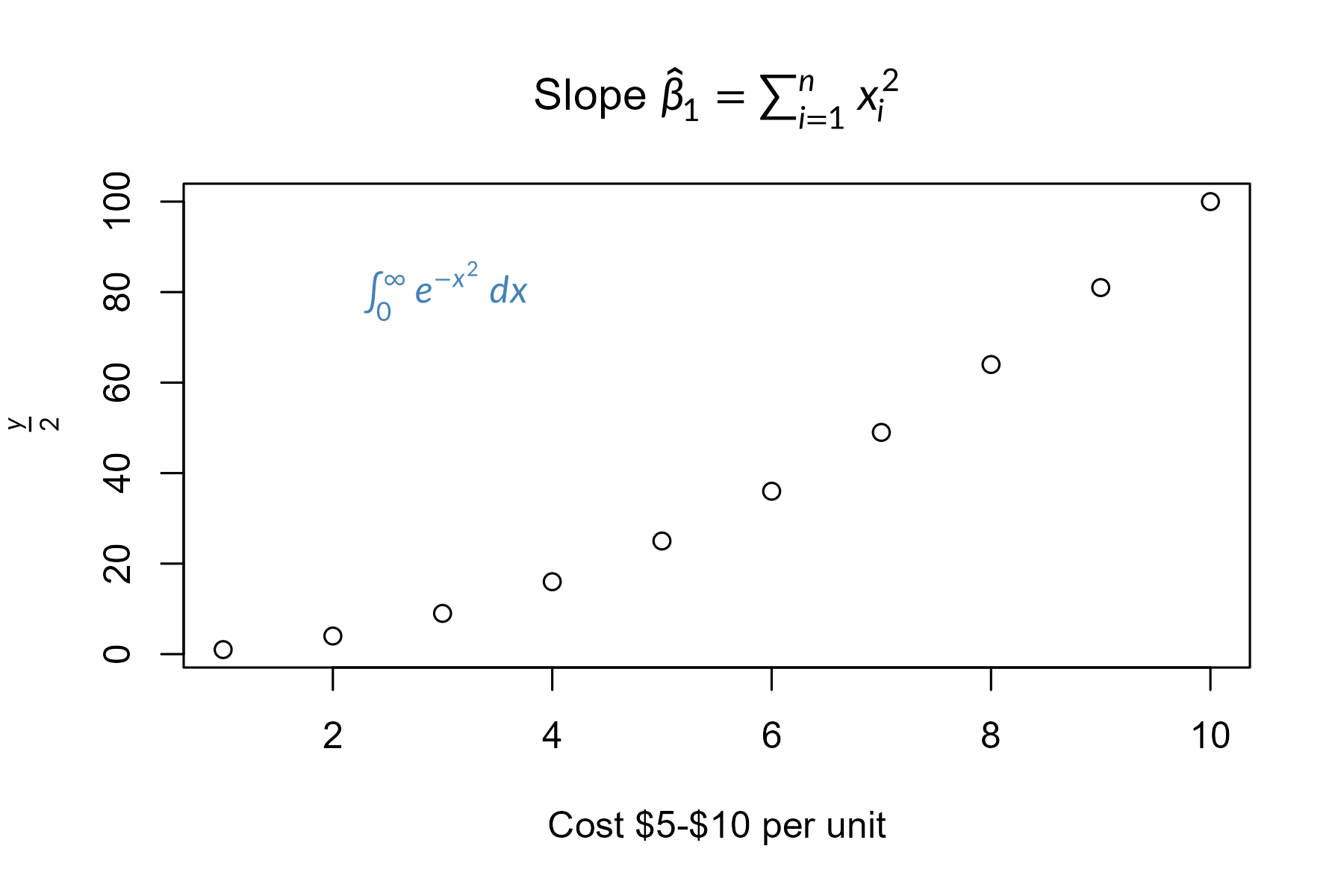
With device_math = TRUE, any label containing math is typeset: titles,
axis labels, text(), legend(), and labels in lattice and ggplot2
plots too.
ggplot2
library(ggplot2)

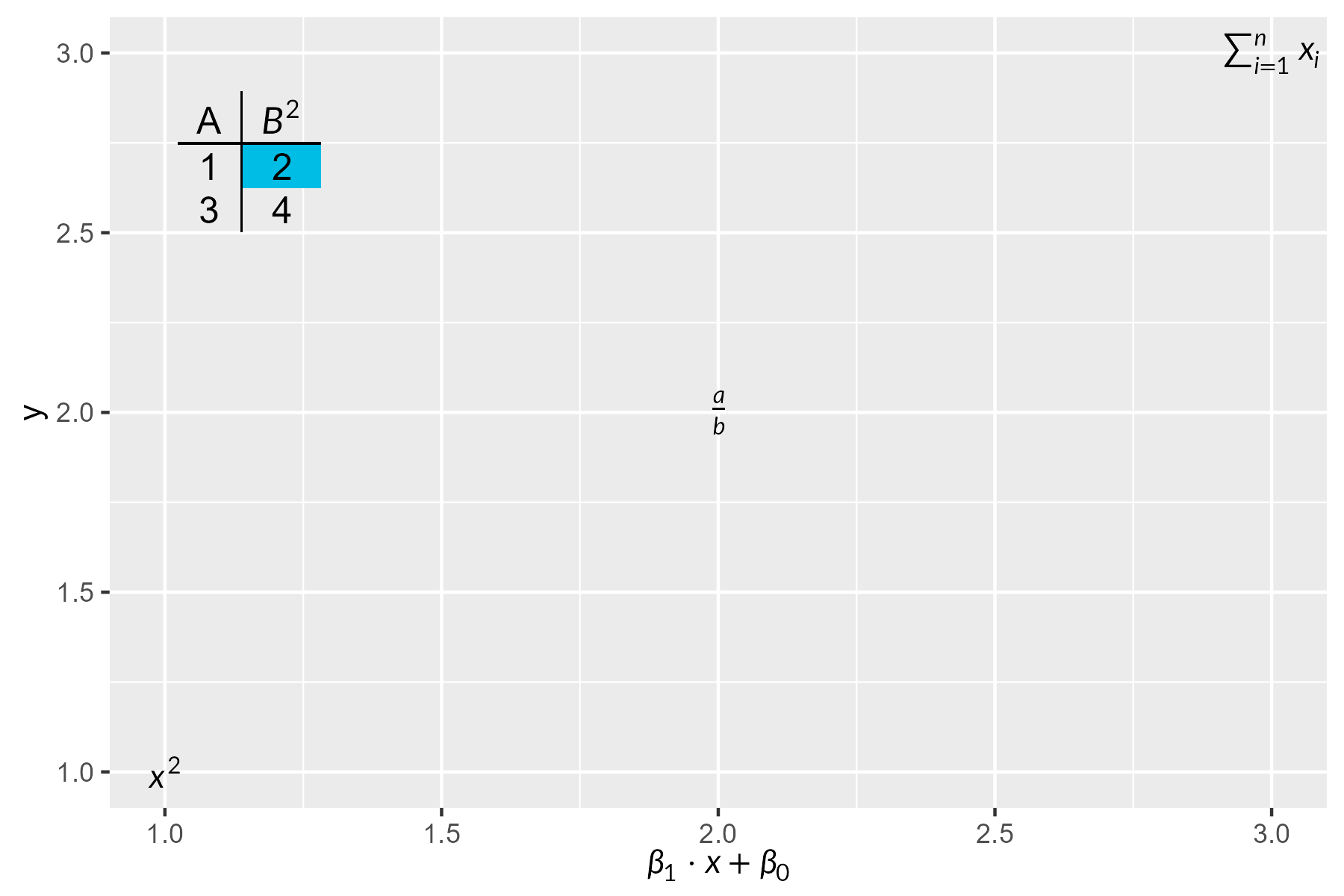
tab <- r"(\begin{tabular}{c|c} A & $B^2$ \\ \hline 1 & \cellcolor{#00bde5}2 \\ 3 & 4 \end{tabular})"
df <- data.frame(x = 1:3, y = 1:3,
                 eq = c("$x^2$", r"($\frac{a}{b}$)", r"($\sum_{i=1}^n x_i$)"))

ggplot(df, aes(x, y, label = eq)) +
  geom_latex() +
  annotate("latex", x = 1.15, y = 2.7, label = tab, size = 12) +
  labs(x = r"($\beta_1 \cdot x + \beta_0$)") +
  theme(axis.title.x = element_latex())
Markdown
grid.newpage()
grid.markdown(r"(The **fitted** slope is $\hat{\beta}_1 = 0.42$ (*p* < 0.001).)",
              x = 0.02, hjust = 0, gp = gpar(fontsize = 20))

markdown_box_grob() lays out whole documents: headings, lists, code,
tables and images. geom_markdown() and element_markdown() bring
markdown labels to ggplot2.
Fonts and devices
Lete Sans Math (the default) and STIX Two Math (math_font = "stix")
are included. load_font() names a font file or an installed family, to
use in gp, in latex_options() and in the LaTeX itself
(\setmainfont, \fontspec, …); text in it is drawn from the file on
every device.
If the default device on Windows or macOS warns font family not found,
use ragg,
svglite or cairo_pdf()
(in knitr: knitr::opts_chunk$set(dev = "ragg_png")), or set
render_mode = "path" to draw glyphs as outlines.
Comparison
| Approach | LaTeX required? | Device independent? | Math coverage | Markdown |
|---|---|---|---|---|
tikzDevice |
Yes | No | Full | No |
xdvir |
Yes | No | Full | No |
latexpdf |
Yes | No | Full (tables) | No |
latex2exp |
No | Yes | Limited | No |
plotmath |
No | Yes | Limited | No |
gridtext |
No | Yes | None | Yes |
marquee |
No | Yes | None | Yes |
| gridmicrotex | No | Yes | Broad | Yes |
Learn more
Disclaimer
A note on development: This package was developed as a proof of concept for AI-assisted package creation. I designed the architecture and specification, and the core C++ integration (via MicroTeX) was largely facilitated by AI, with my review and oversight of the design and final outputs. I am sharing it because it works, and I hope that others will find it useful. Contributions, bug reports and improvements from the community are very welcome.