brandr
Brand Identity Management Using brand.yml Standard
A system to facilitate brand identity management using the brand.yml standard, providing functions to consistently access and apply brand colors, typography, and other visual elements across your R projects.
brandr 





Overview
brandr is an R package designed to facilitate brand identity
management using the brand.yml
standard. It provides functions to consistently access and apply brand
colors, typography, and other visual elements across your R projects.
Unlike Posit’s
thematic package, brandr
offers more refined control over brand assets.
Please note that brandr is not affiliated with
Posit.
Installation
You can install the released version of brandr from
CRAN with:
install.packages("brandr")
And the development version from GitHub with:
# install.packages("remotes")
remotes::install_github("danielvartan/brandr")
Usage
brandr is equipped with several functions to help you use your
_brand.yml file, like:
color_brand_sequential(),color_brand_diverging(),color_brand_qualitative(): Sequential, diverging, and qualitative brand color palettesscale_brand(),scale_color_brand_d(),scale_color_brand_c(),scale_color_brand_b(),scale_fill_brand_d(),scale_fill_brand_c(),scale_fill_brand_b(): Discrete, continuous, and binned brand color scales forggplot2get_brand_color(): Get a brand color by name (e.g., primary)get_brand_color_tint(): Get a brand color tintget_brand_color_mix(): Get a mix of brand colorsget_brand_font(): Get a brand font by name (e.g., headings)
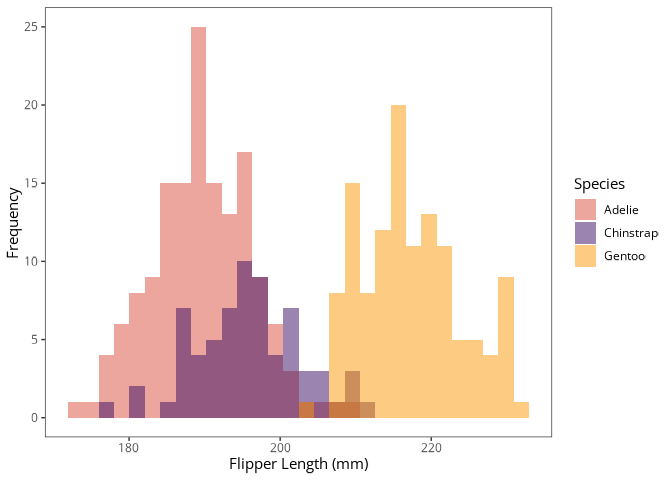
Example:
library(brandr)
library(ggplot2)
library(palmerpenguins)

penguins |>
  ggplot(aes(x = flipper_length_mm, fill = species)) +
    geom_histogram(alpha = 0.5, position = "identity") +
    scale_fill_brand_d() +
    labs(
      x = "Flipper Length (mm)",
      y = "Frequency",
      fill = "Species"
    )
Configuration
Path to _brand.yml
brandr will always look for a _brand.yml file in the root directory
of your project. If the file is not found, an error message will be
displayed. You can also set the path to the file manually using the
options() function:
options(BRANDR_BRAND_YML = "PATH_TO_BRAND.YML")
Brand Color Scales
To control the colors of each brand color scale, assign
hexadecimal color codes in a
character vector to the following options:
BRANDR_COLOR_SEQUENTIAL: For sequential color scalesBRANDR_COLOR_DIVERGING: For diverging color scalesBRANDR_COLOR_QUALITATIVE: For qualitative color scales
You can use get_brand_color() to get the hexadecimal color codes from
the _brand.yml file.
Example:
options(
 BRANDR_COLOR_SEQUENTIAL =
   get_brand_color(c("primary", "secondary")),
 BRANDR_COLOR_DIVERGING =
   get_brand_color(c("primary", "white", "secondary")),
 BRANDR_COLOR_QUALITATIVE =
   get_brand_color(c("primary", "secondary", "tertiary"))
)
Setting Brand Fonts/Typefaces
Currently, brandr does not support the use of custom fonts directly.
This feature is planned for future releases.
In the meantime, you can use Yixuan Qiu’s
showtext R package
to apply custom fonts/typefaces to your plots.
Below is an example of how to use the Google Font Open
Sans in all of your plots.
This example assumes that the font files are located in a ttf folder
within your project directory.
library(brandr)
library(ggplot2)
library(here)
library(sysfonts)
library(showtext)

font_paths(here("ttf"))

font_add(
  family = "open-sans",
  regular = here("ttf", "opensans-regular.ttf"),
  bold = here("ttf", "opensans-bold.ttf"),
  italic = here("ttf", "opensans-italic.ttf"),
  bolditalic = here("ttf", "opensans-bolditalic.ttf"),
  symbol = NULL
)

showtext_auto()

theme_set(
  theme(
    text = element_text(
      color = get_brand_color("black"),
      family = "open-sans",
      face = "plain"
    )
  )
)
License
brandr code is released under the MIT
license.
Contributing
Contributions are welcome, including bug reports. Take a moment to review the Guidelines for Contributing.
Become a brandr supporter!
Click here to make a
donation. Please indicate the brandr package in your donation message.