mscstts
R Client for the Microsoft Cognitive Services 'Text-to-Speech' REST API
R Client for the Microsoft Cognitive Services 'Text-to-Speech' REST API, including voice synthesis. A valid account must be registered at the Microsoft Cognitive Services website < https://azure.microsoft.com/en-us/products/ai-services/> in order to obtain a (free) API key. Without an API key, this package will not work properly.


mscstts Package:
The goal of mscstts is to provide an R Client for the Microsoft
Cognitive Services Text to Speech REST API, including voice synthesis. A
valid account MUST be registered at the Microsoft Cognitive Services
website https://azure.microsoft.com/en-us/free/cognitive-services/ in
order to obtain a (free) API key. Without an API key, this package will
not work properly.
See the documentation here: https://learn.microsoft.com/en-us/azure/cognitive-services/speech-service/overview
Getting an API key
You can get a TTS API key here: https://azure.microsoft.com/en-us/free/cognitive-services/. The API you need to get one from is Cognitive Services, Speech.
- Create an Azure account
- Go to https://portal.azure.com/#create/Microsoft.CognitiveServicesSpeechServices. If that works, skip to step 5.
- Go to https://portal.azure.com/#home
- Click
+ Create a Resource - Search “Speech”
- Hit
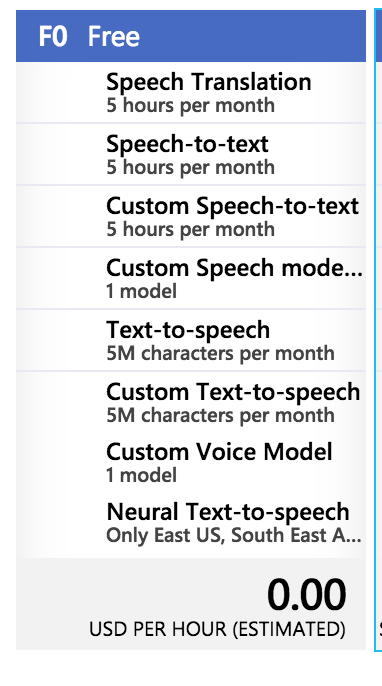
+ Create - Should be able to create an F0 account (which is free - see below) if you hit the pricing tiers
Setting up your API key
You can set up your API key in a number of ways (where XXX is your API
key):
- Edit
~/.Renvironand setMS_TTS_API_KEY = "XXXX" - In
R, useoptions(ms_tts_key = "XXXX"). - Set
export MS_TTS_API_KEY=XXXXin.bash_profile/.bashrcif you’re usingRin the terminal. - Pass
api_key = "XXXX"in arguments of functions such asms_list_voices(api_key = "XXXX").
Installation
You can install mscstts from GitHub with:
# install.packages("remotes")
remotes::install_github("jhudsl/mscstts")
Example
library(mscstts)
if (ms_have_tts_key()) {
  res = ms_synthesize(
    script = "hey, how are you doing? I'm doing pretty good",
    output_format = "audio-16khz-128kbitrate-mono-mp3")
  tmp <- tempfile("example", fileext = ".mp3")
  writeBin(res$content, con = tmp)
  mp3 = tuneR::readMP3(tmp)
}
testthat::expect_true(file.size(tmp) > 50000)
if (interactive()) {
  player = tuneR::getWavPlayer()
  if (.Platform$OS.type == "windows" && is.null(player)) player = NULL
  if (.Platform$OS.type != "windows" && is.null(player)) player = "play"
  tuneR::play(mp3, player = player)
}