lssdoc
'LimeSurvey' '.lss' Questionnaires to and from Word Documents
Turn a 'LimeSurvey' '.lss' survey export into a publication-quality questionnaire document in Word ('.docx') or PDF, with up to four of the survey's own languages side by side. Every label the package adds around that content -- column headers, type names, the audit section -- is written in English, French, German, Spanish or Italian, whatever the survey languages are. A rule-based audit flags missing translations, forward filter references, duplicate codes, array-scale inconsistencies and orphan structural references. Questionnaires travel the other way too: describe one in R, or fill in a Word form, and write a '.lss' file ready to import. Meant for the people who work on questionnaires -- researchers, methodologists, ethics committees, translators and reviewers -- and fully local: the source file is the only input, and no questionnaire content is uploaded to a third-party service.
lssdoc: LimeSurvey questionnaires to and from Word 





lssdoc turns a LimeSurvey .lss export into a polished Word
(.docx) or PDF questionnaire document for anyone working with a
LimeSurvey survey: researchers, survey methodologists, ethics
committees, translators and reviewers. It renders the questionnaire
content side by side in up to four languages, runs an automated
integrity audit, and produces a layout that reads as a published
instrument – not a developer dump.
It also works the other way around. Write a questionnaire in a Word
form, or describe it in R, and lssdoc writes the .lss file you import
into LimeSurvey – so the people who design a questionnaire never have to
build it by hand in a web interface.
Two output templates:
-
"cards"– one detached block per item (meta table + question table), stacked vertically. Closest to the printed questionnaire a respondent would see.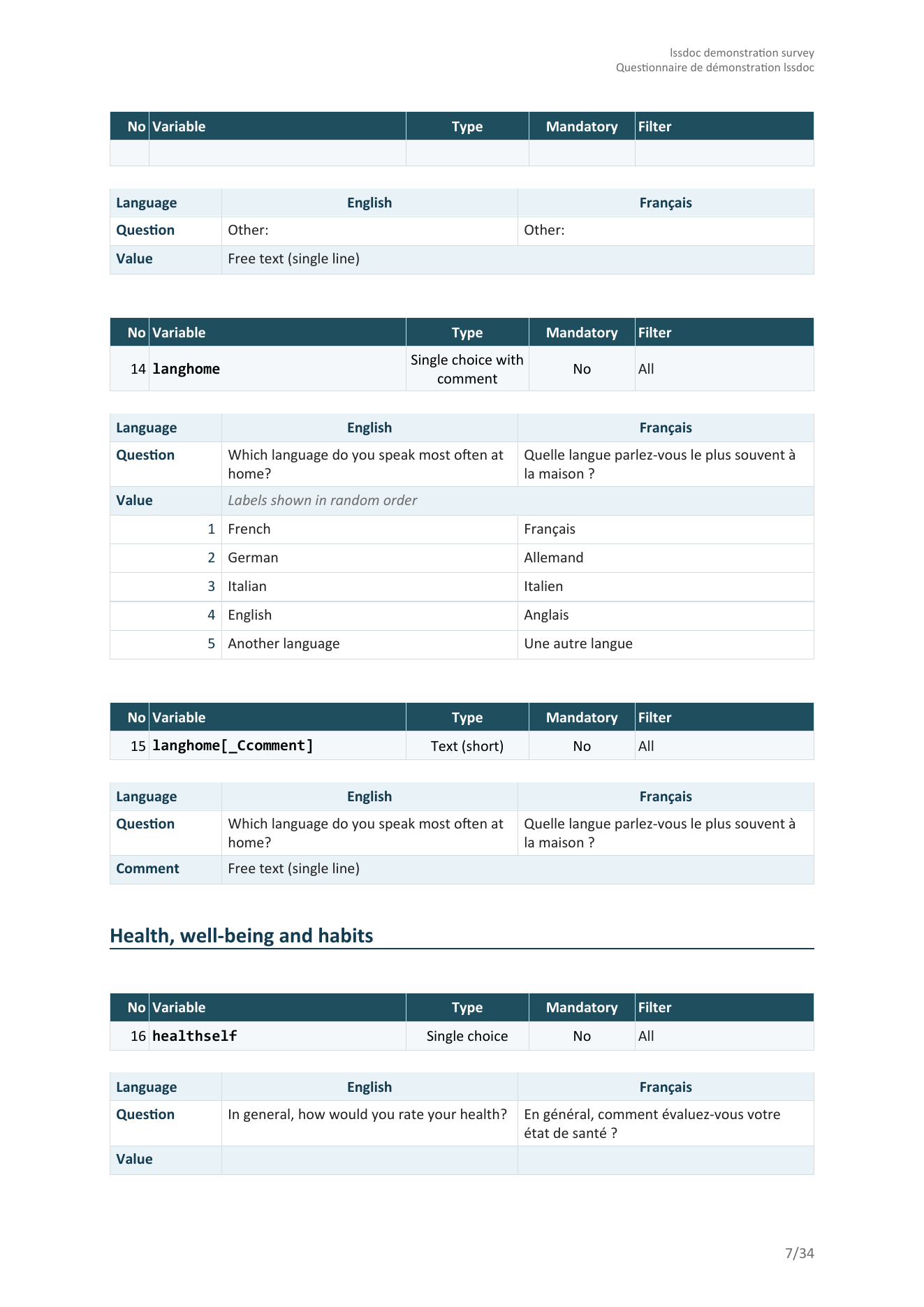
-
"table"– one dense table covering the whole document: every variable is one tinted Question row carrying its metadata, followed by one or more white Value rows holding the answer codes and their labels per language. Group banners (with their description, when present), welcome text, survey description and end text become labelled rows of the same table so the document reads as a single artifact.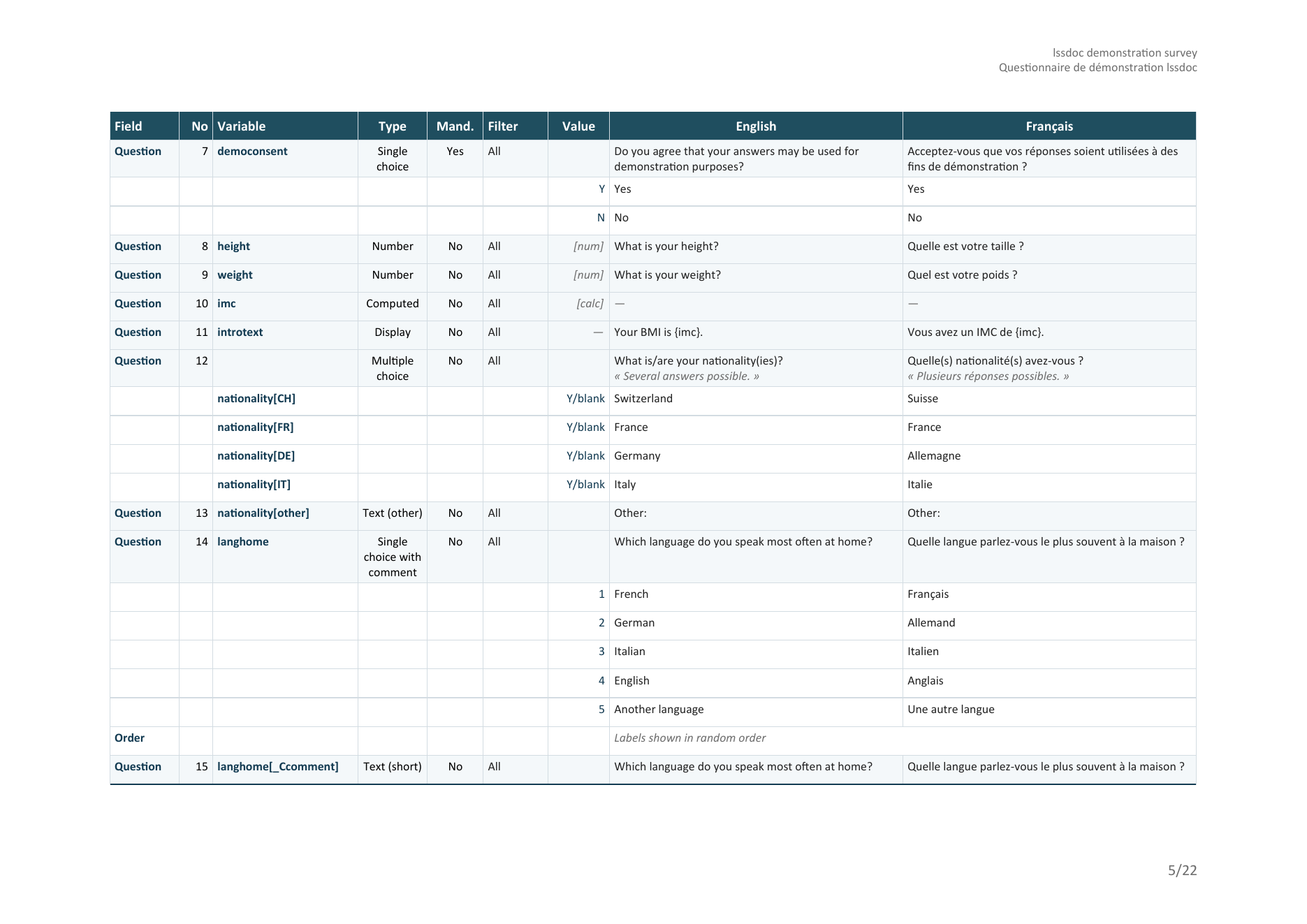
Other things lssdoc takes care of for you:
- Multilingual chrome. Column headers, row labels, type labels (Single choice / Multiple choice / Text / Number …), Value descriptors, the audit section – everything outside the survey content – is translated to English, French, German, Spanish or Italian. Independent from the survey’s content languages, so you can keep your FR/DE questionnaire and switch the document scaffolding to English (or vice versa) with a single argument.
- Variable-centric compound rendering, matching the data file. Every
response variable is documented under the exact column name of the
LimeSurvey CSV / Excel export, so the variable index lines up with
the raw data file column for column: arrays and multiple choice as
parent[subq]/parent[other], dual-scale arrays split into one block per scale (parent[subq][1]), two-dimensional arrays as the row x column cross-product (parent[row_col]), ranking expanded into one column per position (parent[answerid]), and list-with-comment intoparent[_Ccomment]. Passvariable_names = "underscore"for the Expression Manager / SPSS / Stata code form (parent_subq) instead. - Methodological type labels. UI distinctions like “List (radio)” vs “List (dropdown)” collapse into “Single choice”, because the response semantics are identical and the actual codes appear in the Value section. The Type cell reads in the methodologist’s vocabulary, not LimeSurvey’s.
- Automated audit. Missing translations, duplicate codes, forward references in routing filters, array-scale inconsistencies, orphan structural references, types missing their required options or subquestions – all flagged inline on the rendered item and, when you ask for it, in a dedicated section. No AI; rule-based and reviewable.
- Local-only processing. No network calls, no third-party services. The questionnaire content never leaves the machine where R runs.
Installation
Install the released version from CRAN:
install.packages("lssdoc")
Or the latest build from R-universe (pre-built, no compiler needed):
install.packages(
  "lssdoc",
  repos = c("https://amaltawfik.r-universe.dev", "https://cloud.r-project.org")
)
Or the development version from GitHub, with pak:
# install.packages("pak")
pak::pak("amaltawfik/lssdoc")
Or with remotes:
# install.packages("remotes")
remotes::install_github("amaltawfik/lssdoc")
The package depends on officer and flextable (declared as
Suggests – the parse and audit paths work without them).
Quick tour
Reading, auditing and rendering:
| Function | Role |
|---|---|
read_lss(file) |
Parse a .lss into a structured lss object. |
audit_lss(input) |
Inspect a survey for anomalies; returns an lss_audit object with a print() method. |
render_questionnaire(input, output, ...) |
Render the full questionnaire to a Word or PDF document. |
render_audit(input, output, ...) |
Render the audit findings alone to a Word or PDF document. |
Writing a questionnaire (experimental):
| Function | Role |
|---|---|
lss_template_docx(path, lang) |
Write a blank Word form to fill in. |
check_form_docx(path) |
Report every problem in a filled form, in one pass. |
read_form_docx(path) |
Read a filled form back into a specification. |
lss_spec(title, groups, ...) |
Describe a questionnaire directly in R instead. |
as_lss_spec(lss) |
Turn a survey read with read_lss() into a specification. |
write_form_docx(x, path, lang) |
Render a specification, or an existing survey, as the form. |
write_lss(spec, file) |
Write a specification as an importable .lss file. |
audit_lss(), render_questionnaire() and render_audit() accept
input as either a path to a .lss file or a pre-parsed lss object.
The output format for the two renderers is inferred from the extension
of output (.docx or .pdf).
A one-line pipeline
library(lssdoc)

# Parse the .lss and render the Word document in a single call.
render_questionnaire("survey.lss", "review.docx")
The output uses the "cards" template by default, with chrome_lang
following the survey’s primary content language. Open review.docx in
Word, click Yes when prompted to update fields (page numbers and the
table of contents).
Table layout
render_questionnaire(
  "survey.lss",
  "review.docx",
  languages   = c("en", "fr"),
  template    = "table",
  chrome_lang = "en"
)
languages controls which content columns appear and in which order;
the first one is the primary language used for the table of contents and
group headings. chrome_lang is independent of languages: keep
chrome_lang = "en" to get English column headers and row labels even
if your survey content runs in French and German – pass
chrome_lang = "fr" (or "de" / "es" / "it") when you want the
scaffolding to follow the content.
Ethics committee submission
render_questionnaire(
  "survey.lss",
  "ethics_review.docx",
  languages              = c("en", "fr"),
  template               = "table",
  chrome_lang            = "en",
  show_privacy_settings  = TRUE,   # anonymized / save partial / IP / referrer / timestamp
  show_admin_settings    = TRUE,   # alias / end URL / active
  authors = list(
    list(name        = "Jane Doe",
         affiliation = "HESAV",
         orcid       = "0009-0001-2345-6789"),
    list(name        = "John Doe",
         affiliation = "HESAV",
         orcid       = "0009-0002-3456-7890")
  ),
  description = paste0(
    "Validated as part of the SNSF project XYZ. ",
    "Reference: https://example.org/projects/xyz"
  )
)
The cover page picks up the authors block (with clickable ORCID hyperlinks), the description (with URLs auto-detected and made clickable), and the privacy / admin settings rows in the metadata table.
Minimal questionnaire – just the variables
render_questionnaire(
  "survey.lss",
  "minimal.docx",
  template         = "table",
  show_welcome     = FALSE,
  show_endtext     = FALSE,
  show_description = FALSE,
  show_groups      = FALSE,
  show_toc         = FALSE,
  show_audit       = FALSE,
  show_index       = FALSE
)
Pure data: one row per variable header, one row per value code, nothing else.
Parse once, render many
# Parse a single time, then audit and render different variants
# without re-reading the .lss.
lss   <- read_lss("survey.lss")
audit <- audit_lss(lss)
print(audit)  # console summary of flagged anomalies

render_questionnaire(lss, "review_en.docx", languages = "en")
render_questionnaire(lss, "review_fr.docx", languages = "fr")
render_audit(lss, "qa_followup.docx")
See the audit in action
A deliberately flawed survey ships with the package, so you can see what
audit_lss() catches without supplying your own file:
demo <- system.file("extdata", "audit_demo.lss", package = "lssdoc")
audit_lss(read_lss(demo))
#> -- lssdoc audit ----------------------------------------------------
#> 12 findings: 5 errors, 7 warnings, 0 notes.
#> x Survey: duplicate question code 'age'
#> x Question 'age': filter references 'income', asked later (forward reference)
#> x Answer 'X': points to a question id that does not exist
#> x Subquestion 'orphan_sq': points to a question id that does not exist
#> x Question 'blank_q': text empty in every language
#> ! Question 'satisf': expects answer options, but none are defined
#> ! Question 'income': text missing in 'fr'
#> ! Question 'comment ': code carries whitespace
#> ... plus an empty group name, missing subquestions and an array-scale mismatch.
PDF output
# Same call, just pass a .pdf path. The package writes the .docx
# into a temp file and converts it locally via LibreOffice
# (must be installed and on PATH).
render_questionnaire("survey.lss", "review.pdf", template = "table")
render_audit("survey.lss", "qa.pdf")
Write a questionnaire in Word
Many questionnaires are written by people who live in Word, not in R. Hand them a blank form, get it back filled in, and turn it into a LimeSurvey file.
# 1. a blank form, in the language of your choice
lss_template_docx("questionnaire.docx", lang = "fr")

# 2. the author fills it in, in Word

# 3. check it, then read it
check_form_docx("questionnaire.docx")   # every problem at once
spec <- read_form_docx("questionnaire.docx")

# 4. write the file to import into LimeSurvey
write_lss(spec, "questionnaire.lss")
The form is one small table per survey, group, question and quota, carrying the fields each question type needs with its defaults already filled in. Blank forms can also be downloaded from the website, so an author who does not use R never has to install anything.
An existing survey can enter the same loop: write_form_docx() renders
it as the form, so a questionnaire can be exported from LimeSurvey,
edited in Word and re-imported. See vignette("write-in-word") for the
conventions, the question types and the filter syntax.
Templates and palette
The rendered .docx uses an editorial petrol-blue palette tuned for
publication-grade output (#133B52 primary, #3A7C8C accent, #E9F2F6
and #F4F8FA for tinted bands, #D3DCE2 for the soft grid). Calibri
body / Consolas monospace by default; the font and font_code
arguments accept any string to override.
Citation
Run citation("lssdoc") for the up-to-date citation, or cite as:
Tawfik A (2026). _lssdoc: 'LimeSurvey' '.lss' Questionnaires to and
from Word Documents_. doi:10.32614/CRAN.package.lssdoc
<https://doi.org/10.32614/CRAN.package.lssdoc>. R package version
0.3.0, <https://CRAN.R-project.org/package=lssdoc>.
License
MIT. See LICENSE for the full notice.