kfino
Kalman Filter for Impulse Noised Outliers
A method for detecting outliers with a Kalman filter on impulsed
noised outliers and prediction on cleaned data. 'kfino' is a robust
sequential algorithm allowing to filter data with a large number of outliers.
This algorithm is based on simple latent linear Gaussian processes as in the
Kalman Filter method and is devoted to detect impulse-noised outliers. These
are data points that differ significantly from other observations. 'ML'
(Maximization Likelihood) and 'EM' (Expectation-Maximization algorithm)
algorithms were implemented in 'kfino'. The method is described in full
details in the following arXiv e-Print:

kfino 
The kfino algorithm was developped for time courses in order to detect impulse noised outliers and predict the parameter of interest mainly for data recorded on the walk-over-weighing system described in this publication:
E.González-García et. al. (2018) A mobile and automated walk-over-weighing system for a close and remote monitoring of liveweight in sheep. vol 153: 226-238. https://doi.org/10.1016/j.compag.2018.08.022
Kalman filter with impulse noised outliers (kfino) is a robust sequential algorithm allowing to filter data with a large number of outliers. This algorithm is based on simple latent linear Gaussian processes as in the Kalman Filter method and is devoted to detect impulse-noised outliers. These are data points that differ significantly from other observations.
The method is described in full details in the following arxiv preprint: https://arxiv.org/abs/2208.00961.
Installation
To install the kfino package, the easiest is to install it directly from GitLab. Open an R session and run the following commands:
if (!require("remotes")) {
  install.packages("remotes")
}
remotes::install_gitlab("isabelle.sanchez/kfino",host = "forgemia.inra.fr",
                        build_vignettes=TRUE)
Usage
Once the package is installed on your computer, it can be loaded into a R session:
library(kfino)
help(package="kfino")
Please, have a look to the vignettes that explain how to use the algorithm. The main specifications are:
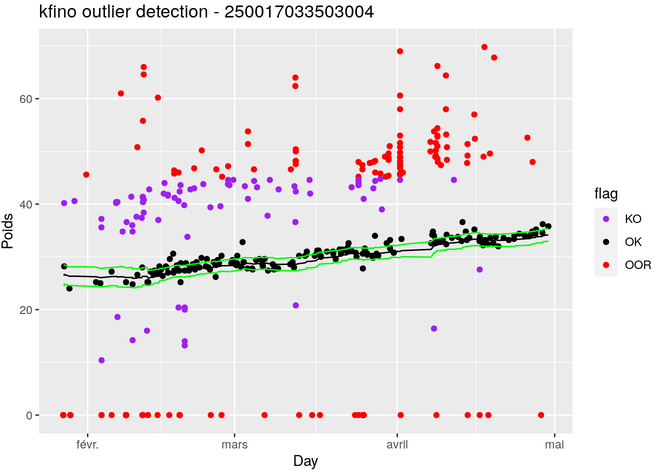
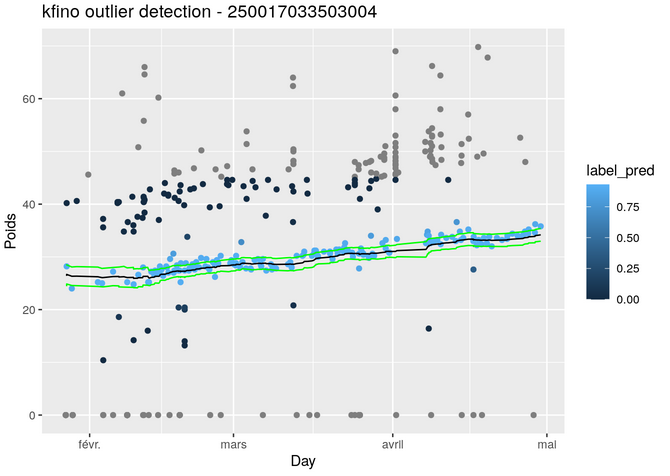
- filtering data with a large number of outliers
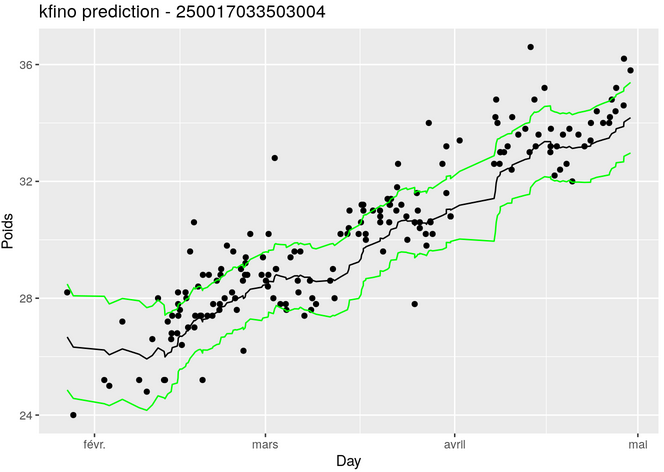
- predicting the analyzed variable
- providing useful graphics to interpret the data
Citation
As a lot of time and effort were spent in creating the kfino algorithm, please cite it when using it for data analysis:
https://arxiv.org/abs/2208.00961.
See also citation() for citing R itself.
References
The kfino logo was created using the hexSticker package:
- Guangchuang Yu (2020). hexSticker: Create Hexagon Sticker in R. R package version 0.4.9. https://CRAN.R-project.org/package=hexSticker
Walk-over-weighing system:
- E.González-García et. al. (2018) A mobile and automated walk-over-weighing system for a close and remote monitoring of liveweight in sheep. vol 153: 226-238. https://doi.org/10.1016/j.compag.2018.08.022
- González García, Eliel, 2021, Individual liveweight of Mérinos d'Arles ewelambs, measured with a Walk-over-Weighing (WoW) system under Mediterranean grazing conditions, https://doi.org/10.15454/IXSHF7, Recherche Data Gouv, V5, UNF:6:q4HEDt0n8nzxYRxc+9KK8g==[fileUNF]