ggmemo
Add Arrows, Labels, and Change Annotations to 'ggplot2' Charts
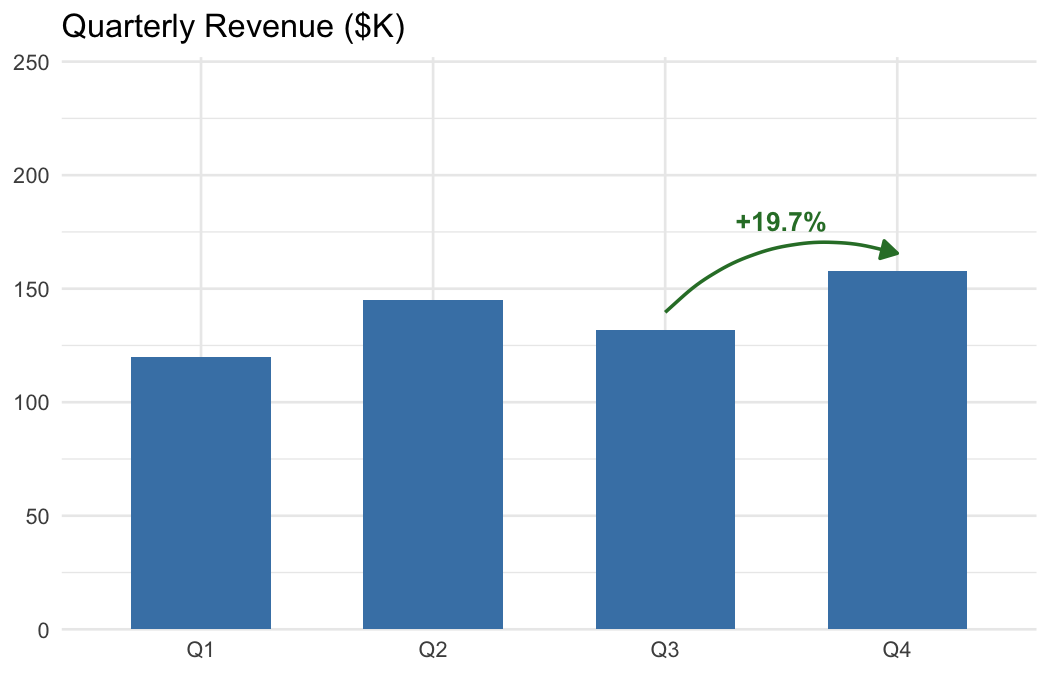
Add callout arrows, highlight data points, and show percent change between rows on 'ggplot2' charts in one line of code. annotate_callout() points at a data row with an arrow and label. annotate_change() draws a color-coded arrow between two rows and labels the delta as percent change, absolute difference, or percentage points. Designed for business charts, quarterly reports, and dashboards. Built on top of the 'ggpp' package.
ggmemo 

Add arrows, labels, and change annotations to ggplot2 business charts in one line of code.
Overview
| You want to… | Use |
|---|---|
| Point at a data point with an arrow and label | annotate_callout(data, where = year == 2024, label = "Peak") |
| Show percent change between two rows | annotate_change(data, from = ..., to = ..., value = sales) |
| Show absolute difference | annotate_change(..., format = "absolute") |
| Show change in percentage points | annotate_change(..., format = "points") |
| Use custom colors | annotate_change(..., colors = c(up = "#1B9E77", down = "#D95F02", flat = "#999")) |
Without ggmemo, annotating a ggplot2 chart means hardcoding coordinates, computing deltas, formatting labels, and choosing colors — roughly 10 lines of manual work per annotation. ggmemo replaces that with a single function call.
Installation
# install.packages("pak")
pak::pak("lindsay-lintelman/ggmemo")
Examples
Charts below are rendered at 7 × 4.5 in, 150 dpi.
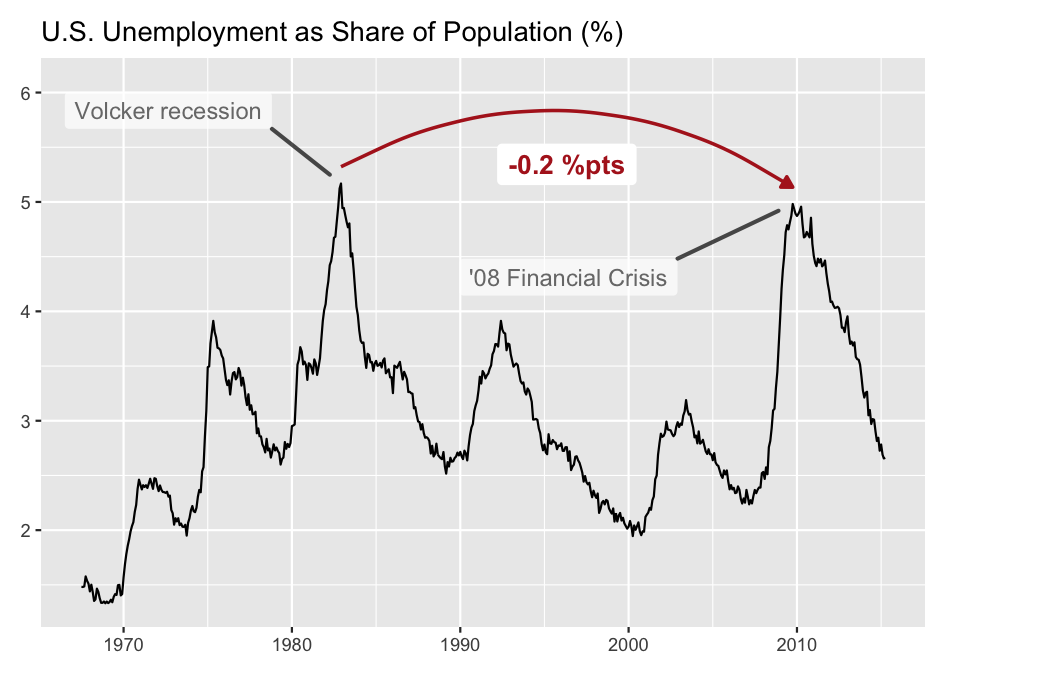
Callout annotation
Point at a specific data row with an arrow and label:
library(ggplot2)
library(ggmemo)

# fig.width = 7, fig.height = 4.5, dpi = 150
econ <- economics
econ$unemp_rate <- econ$unemploy / econ$pop * 100

ggplot(econ, aes(x = date, y = unemp_rate)) +
  geom_line() +
  annotate_callout(
    econ,
    where = date == as.Date("1982-12-01"),
    label = "Volcker recession",
    position = "top-right",
    nudge = c(-1500, 0.5),
    arrow = NULL,
    point.padding = 2,
    alpha = .7
  ) +
  annotate_callout(
    econ,
    where = date == as.Date("2009-10-01"),
    label = "'08 Financial Crisis",
    position = "bottom-right",
    nudge = c(-2500, 0.5),
    arrow = NULL,
    point.padding = 2,
    alpha = .7
  ) +
  annotate_change(
    econ,
    from = date == as.Date("1982-12-01"),
    to = date == as.Date("2009-10-01"),
    value = unemp_rate,
    arrow_size = .08,
    arrow_type = "closed",
    curvature = -.3,
    format = "points"
  ) +
  scale_y_continuous(expand = expansion(mult = c(0.05, 0.15))) +
  labs(title = "U.S. Unemployment as Share of Population (%)",
       x = NULL, y = NULL) +
  theme(plot.margin = margin(10, 60, 10, 10))
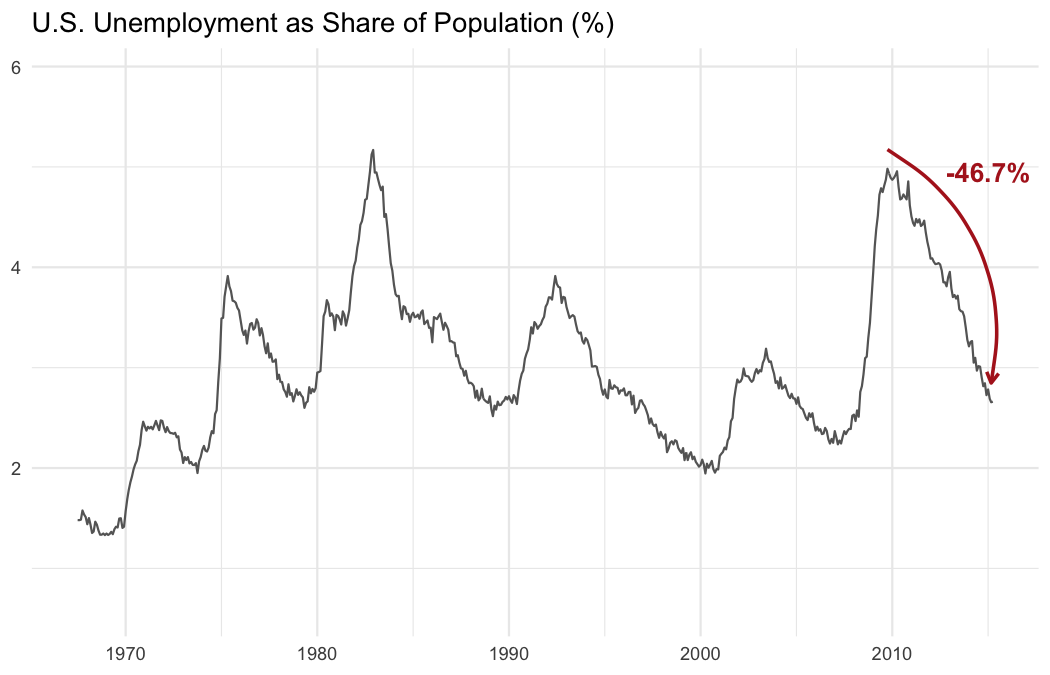
Time series change
Show the delta between two data points with a color-coded arrow:
# fig.width = 7, fig.height = 4.5, dpi = 150
econ <- economics
econ$unemp_rate <- econ$unemploy / econ$pop * 100

ggplot(econ, aes(x = date, y = unemp_rate)) +
  geom_line(colour = "grey40") +
  annotate_change(
    econ,
    from = date == as.Date("2009-10-01"),
    to = date == as.Date("2015-03-01"),
    value = unemp_rate,
    arrow_pad = 0.05,
    curvature = -.35,
    arrow_size = 0.08,
    x = as.Date("2015-01-01"),
    y = 4.95,
    fill = NA
  ) +
  labs(title = "U.S. Unemployment as Share of Population (%)",
       x = NULL, y = NULL) +
  theme_minimal()
Learning more
vignette("narrating-business-charts")— full walkthrough with customization, multiple annotations, and common mistakes.?annotate_calloutand?annotate_change— function reference with all arguments and examples.
Related packages
ggmemo is focused on callout and change annotations for business charts. For other annotation needs:
- ggpp — precise annotation positioning with NPC coordinates. ggmemo is built on ggpp.
- ggrepel — automatically reposition text labels to avoid overlaps.
- ggannotate — interactively annotate plots in RStudio.
Code of Conduct
Please note that the ggmemo project is released with a Contributor Code of Conduct. By contributing to this project, you agree to abide by its terms.