fitbitr
Interface with the 'Fitbit' API
Many 'Fitbit' users, and R-friendly 'Fitbit' users especially, have found themselves curious about their 'Fitbit' data. 'Fitbit' aggregates a large amount of personal data, much of which is interesting for personal research and to satisfy curiosity, and is even potentially useful in medical settings. The goal of 'fitbitr' is to make interfacing with the 'Fitbit' API as streamlined as possible, to make it simple for R users of all backgrounds and comfort levels to analyze their 'Fitbit' data and do whatever they want with it! Currently, 'fitbitr' includes methods for pulling data on activity, sleep, and heart rate, but this list is likely to grow in the future as the package gains more traction and more requests for new methods to be implemented come in. You can find details on the 'Fitbit' API at < https://dev.fitbit.com/build/reference/web-api/>.
fitbitr - Explore your Fitbit data in R


fitbitr makes it easy to interface with Fitbit data in R.
Installation
You can install the CRAN version of fitbitr with:
install.packages("fitbitr")
Or you can install the latest development version from Github:
# install.packages("devtools")
devtools::install_github("mrkaye97/fitbitr")
Setup
There are a few steps you’ll need to do before you can start pulling your Fitbit data:
-
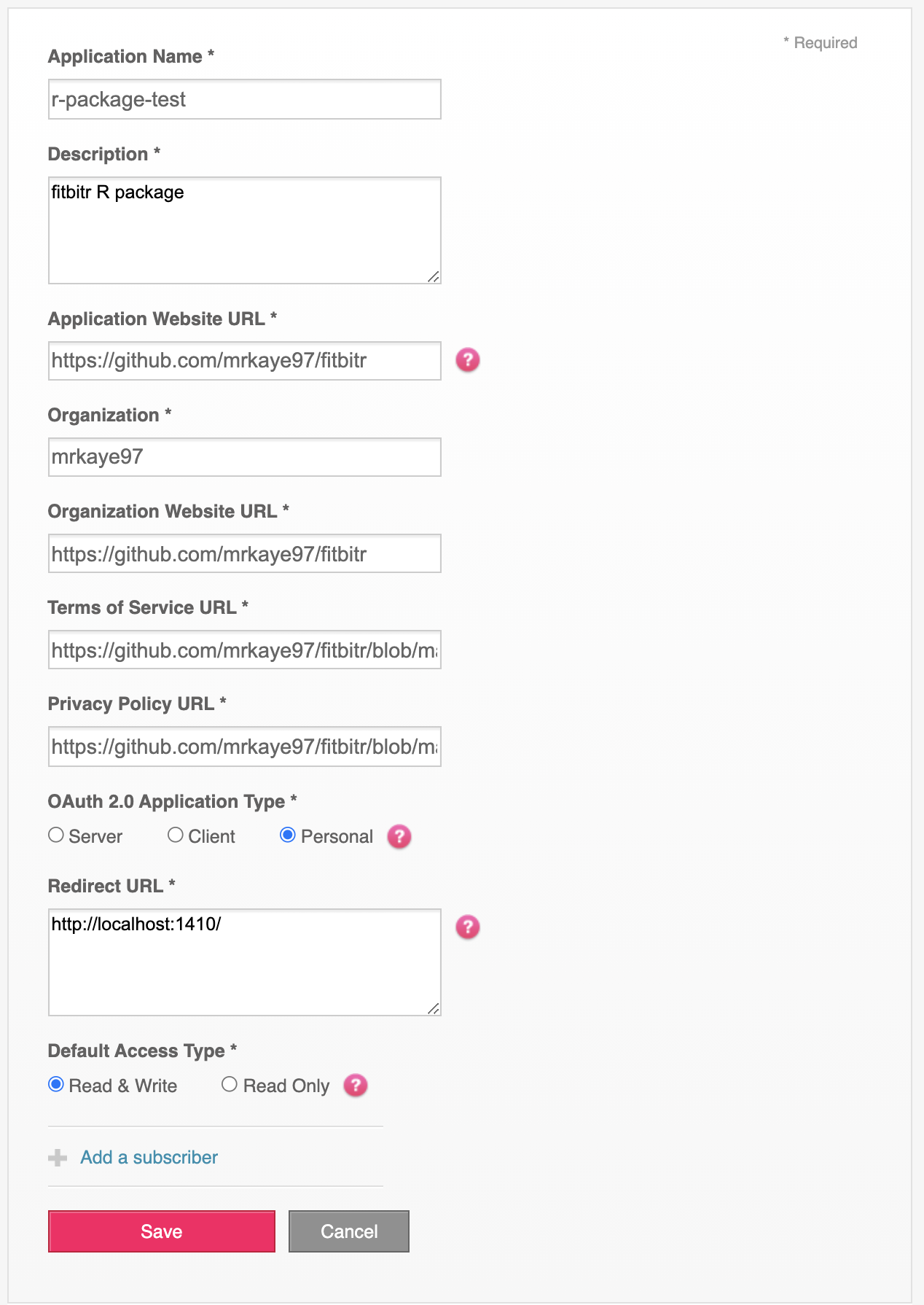
Make an app here.
-
Fill in the fields as you like (see image below for guidance).
-
You’ll be redirected to a page with your credentials. Make sure you keep the Client ID, Client Secret, and Redirect URL. You’ll need them to finish the setup process. You can always refer back to the apps page to find them again.
-
Generate a token:
library(fitbitr) .fitbitr_token <- generate_oauth_token( oauth_app_name = <YOUR-APP-NAME>, client_id = <YOUR-CLIENT-ID>, client_secret = <YOUR-CLIENT-SECRET> callback = <YOUR-REDIRECT-URL> )- If you want to edit the scopes that are enabled, you can do so
with the
scopes = c('scopes', 'you', 'want', 'enabled')argument. You can find information on the available scope options here. - If you want to cache your token, you can do so by specifying
either
cache = TRUEorcache = <some-file-path>. See the docs onhttr::oauth2.0_token()for details.
- If you want to edit the scopes that are enabled, you can do so
with the
-
And that’s it! You now have your Fitbit API credentials set up.
fitbitrtracks them behind the scenes for you, so all that you need to do at the start of each R session isgenerate_token(). On a session restart,generate_token()will try to laod a token from your.httr-oauthif it exists.
Using fitbitr
Once you have a token, using fitbitr is very straightforward:
```r
> get_steps("2020-05-21", "2020-05-28")
# A tibble: 8 × 2
  date       steps
  <date>     <dbl>
1 2020-05-21  3734
2 2020-05-22  5107
3 2020-05-23  5640
4 2020-05-24  6595
5 2020-05-25  8466
6 2020-05-26  5833
7 2020-05-27  8616
8 2020-05-28  3161
```
fitbitr tries to return a useful, tidy object back to you from the
API.
Known Issues / Futute Work
Given the structure of the Fitbit API, it doesn’t appear to be currently
possible to use fitbitr outside of an interactive session. And
furthermore, it doesn’t help that Fitbit refresh tokens only last 8
hours, at which point you’d need another interactive session to generate
a new one.
For these reasons, it is not advised to try to use fitbitr
non-interactively, such as in a Shiny app server, a CI/CD process, a
background job, etc.