bigrquerystorage
An Interface to Google's 'BigQuery Storage' API
Easily talk to Google's 'BigQuery Storage' API from R (< https://docs.cloud.google.com/bigquery/docs/reference/storage/rpc>).
bigrquerystorage

Use Google’s BigQuery Storage API from R, supporting both the BigQueryRead and BigQueryWrite gRPC interfaces.
bigrquerystorage powers high-throughput Arrow transfers in
bigrquery::bq_table_download(..., api = "arrow") and
bigrquery::bq_table_upload(..., api = "arrow"), and can also be called
directly via bqs_table_download() and bqs_table_upload().
Advantages over BigQuery REST API
Unlike the BigQuery REST API, the BigQuery Storage API streams native
binary Apache Arrow RecordBatch payloads over parallel gRPC (HTTP/2)
connections with ZSTD / LZ4 compression instead of paginated JSON,
and does not count against per-project REST tabledata/extract job
quotas.
Performance (bigrquerystorage Arrow API vs bigrquery JSON, duckdb, and adbc)
In R benchmarks on BigQuery public datasets, bigrquerystorage
(bigrquery with api = "arrow") is 21X to 47X times faster on
download (Time to Tibble) and 10X to 20X times faster on upload
(Time to Table) than bigrquery without the Arrow API
(api = "json"), while performing 1.6X to 2.3X times faster on
download (and 4.1X to 5.6X times faster on upload) than duckdb
(bigquery extension), and 2.6X to 7.1X times faster on download
(and 3.1X to 3.3X times faster on upload) than the adbc BigQuery
driver.
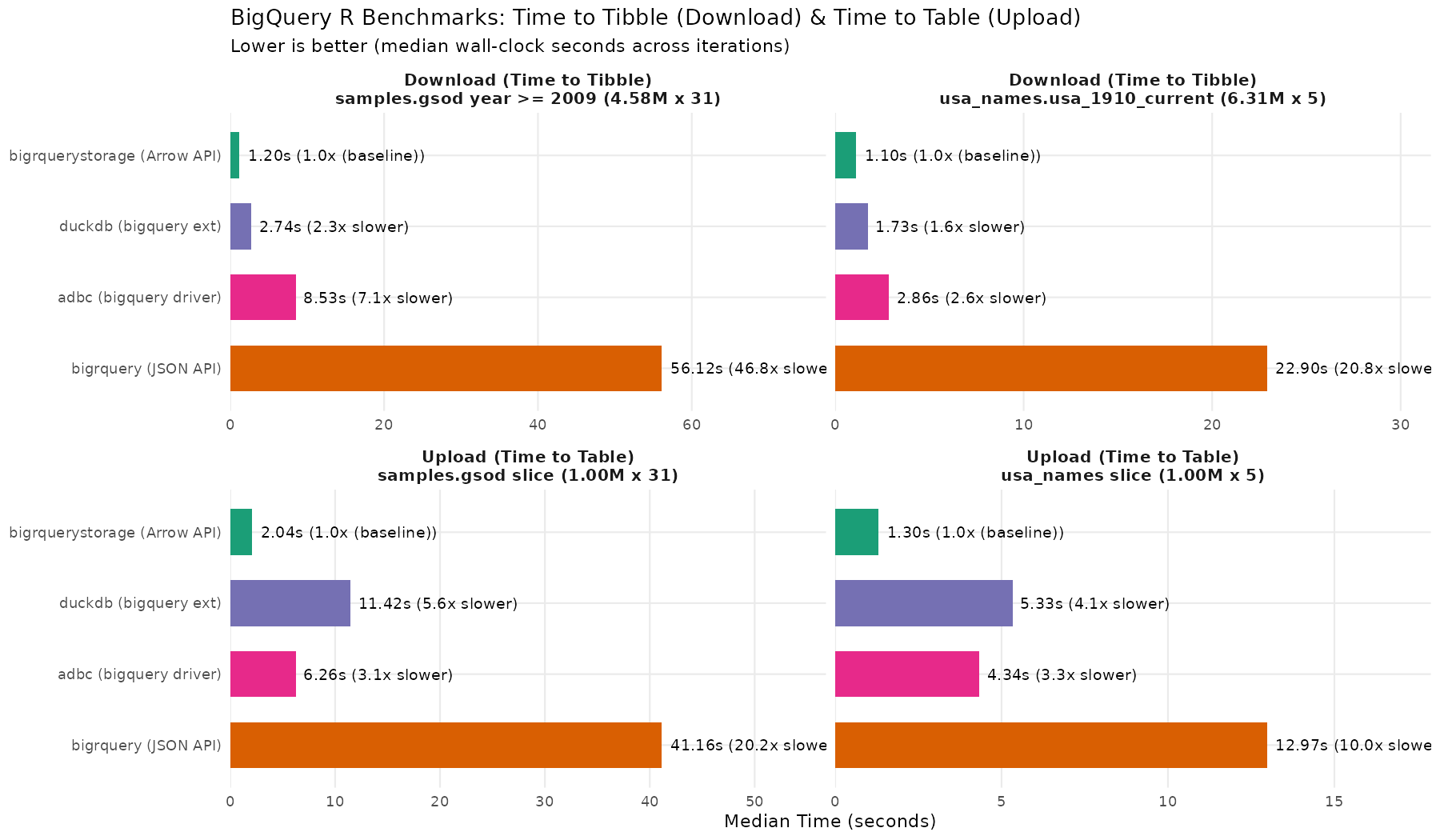
Download Benchmark — Time to Tibble (TTT)
| Dataset | Dimensions (In-Memory) | Method | Median TTT (s) | Transfer Speed (MB/s) | Throughput (M rows/s) | vs bigrquery (JSON) |
vs bigrquerystorage (Arrow) |
|---|---|---|---|---|---|---|---|
samples.gsod year >= 2009 (4.58M x 31) |
4.58M x 31 (752 MB) | bigrquerystorage (Arrow API) | 1.20 s | 624.8 MB/s | 3.81 M/s | 46.8X faster | 1.0x (baseline) |
samples.gsod year >= 2009 (4.58M x 31) |
4.58M x 31 (752 MB) | duckdb (bigquery ext) | 2.74 s | 274.3 MB/s | 1.67 M/s | 20.5X faster | 2.3x slower |
samples.gsod year >= 2009 (4.58M x 31) |
4.58M x 31 (752 MB) | adbc (bigquery driver) | 8.53 s | 88.1 MB/s | 0.54 M/s | 6.6X faster | 7.1x slower |
samples.gsod year >= 2009 (4.58M x 31) |
4.58M x 31 (752 MB) | bigrquery (JSON API) | 56.12 s | 13.4 MB/s | 0.08 M/s | 1.0x (baseline) | 46.8x slower |
usa_names.usa_1910_current (6.31M x 5) |
6.31M x 5 (194 MB) | bigrquerystorage (Arrow API) | 1.10 s | 176.4 MB/s | 5.73 M/s | 20.8X faster | 1.0x (baseline) |
usa_names.usa_1910_current (6.31M x 5) |
6.31M x 5 (194 MB) | duckdb (bigquery ext) | 1.73 s | 112.6 MB/s | 3.66 M/s | 13.2X faster | 1.6x slower |
usa_names.usa_1910_current (6.31M x 5) |
6.31M x 5 (194 MB) | adbc (bigquery driver) | 2.86 s | 67.9 MB/s | 2.20 M/s | 8.0X faster | 2.6x slower |
usa_names.usa_1910_current (6.31M x 5) |
6.31M x 5 (194 MB) | bigrquery (JSON API) | 22.90 s | 8.5 MB/s | 0.28 M/s | 1.0x (baseline) | 20.8x slower |
Upload Benchmark — Time to Table (TTT)
| Dataset | Dimensions (In-Memory) | Method | Median TTT (s) | Transfer Speed (MB/s) | Throughput (M rows/s) | vs bigrquery (JSON) |
vs bigrquerystorage (Arrow) |
|---|---|---|---|---|---|---|---|
samples.gsod slice (1.00M x 31) |
1.00M x 31 (164 MB) | bigrquerystorage (Arrow API) | 2.04 s | 80.6 MB/s | 0.49 M/s | 20.2X faster | 1.0x (baseline) |
samples.gsod slice (1.00M x 31) |
1.00M x 31 (164 MB) | duckdb (bigquery ext) | 11.42 s | 14.4 MB/s | 0.09 M/s | 3.6X faster | 5.6x slower |
samples.gsod slice (1.00M x 31) |
1.00M x 31 (164 MB) | adbc (bigquery driver) | 6.26 s | 26.2 MB/s | 0.16 M/s | 6.6X faster | 3.1x slower |
samples.gsod slice (1.00M x 31) |
1.00M x 31 (164 MB) | bigrquery (JSON API) | 41.16 s | 4.0 MB/s | 0.02 M/s | 1.0x (baseline) | 20.2x slower |
usa_names slice (1.00M x 5) |
1.00M x 5 (32 MB) | bigrquerystorage (Arrow API) | 1.30 s | 24.3 MB/s | 0.77 M/s | 10.0X faster | 1.0x (baseline) |
usa_names slice (1.00M x 5) |
1.00M x 5 (32 MB) | duckdb (bigquery ext) | 5.33 s | 5.9 MB/s | 0.19 M/s | 2.4X faster | 4.1x slower |
usa_names slice (1.00M x 5) |
1.00M x 5 (32 MB) | adbc (bigquery driver) | 4.34 s | 7.3 MB/s | 0.23 M/s | 3.0X faster | 3.3x slower |
usa_names slice (1.00M x 5) |
1.00M x 5 (32 MB) | bigrquery (JSON API) | 12.97 s | 2.4 MB/s | 0.08 M/s | 1.0x (baseline) | 10.0x slower |
Benchmark Environment
- Software & Driver Versions (3 iterations per workload; see
scripts/benchmark_bigrquerystorage.R):- R:
4.6.0 (2026-04-24) bigrquerystorage:1.3.0.9000(nanoarrow 0.9.0,gRPC 1.46.7,Protobuf 3.14.0,libzstd 1.5.1)bigrquery:1.6.2.9000(r-dbi/bigrquery#695,api = "arrow"vsapi = "json")duckdb:2.0.0+bigquerycommunity extensionv0.13.0(preserve_insertion_order = false)adbc:adbcdrivermanager 0.25.0+ ADBC Driver Foundrybigquerydriverv1.15.0
- R:
- Hardware & OS Profile: 2x Intel(R) Xeon(R) Platinum 8375C CPU @
2.90GHz (64 physical cores / 128 vCPUs), 3.9 TiB RAM, Red Hat
Enterprise Linux 9.5 (Plow) (
Linux 5.14.0-503.29.1.el9_5.x86_64,x86_64), BigQueryUSmulti-region.
Details
bigrquerystorage combines a multi-threaded C++17 gRPC client with
the nanoarrow R package to
stream Arrow IPC RecordBatch payloads directly to and from R tibble,
data.frame, data.table, or nanoarrow_array_stream objects:
- Parallel multi-stream reads & writes: Concurrently reads from
multiple
ReadSessionstreams and appends across parallelWriteStreamworkers (options(bigrquerystorage.threads = n)). - Server-side pushdown & snapshots: Supports column projection
(
selected_fields), SQL predicate filtering (row_restriction), table sampling (sample_percentage), and table time-travel (snapshot_time). - Arrow buffer compression: Automatically uses
ZSTD/LZ4Arrow IPC compression when available (compression = "auto"). - Full BigQuery type fidelity: Supports
INT64(bit64::integer64),NUMERIC(Decimal128),BIGNUMERIC(Decimal256),DATE,TIME(hms),DATETIME,TIMESTAMP,BYTES(blob),GEOGRAPHY(wk::wkt), and nestedSTRUCT/RECORDandREPEATED(ARRAY) columns.
Installation
CRAN
install.packages("bigrquerystorage")
GitHub (development version)
# Using pak or remotes:
pak::pak("meztez/bigrquerystorage")
# remotes::install_github("meztez/bigrquerystorage")
System requirements (when building from source)
Pre-compiled binary packages from CRAN on macOS and Windows do not require additional system dependencies. Building from source requires:
- gRPC (
libgrpc++andgrpc_cpp_plugin) - Protocol Buffers
(
libprotobufandprotoc) pkg-config(orpkgconf) and a C++17 compiler- Optional (recommended for
ZSTD/LZ4Arrow compression):libzstdandliblz4
Debian 11 & 12 / Ubuntu 22.04 & 24.04
apt-get install -y libgrpc++-dev libprotobuf-dev protobuf-compiler-grpc \
                   libzstd-dev pkg-config
Fedora 40 & 41 / Rocky Linux 9
dnf install -y grpc-devel libzstd-devel pkgconf
Other Linux distributions
See
tools/build/linux
for tested Dockerfiles across supported Linux distributions, and please
open an
issue if
any instructions need updating.
Alpine Linux (3.19, 3.20, 3.21, Edge)
apk add grpc-dev protobuf-dev re2-dev c-ares-dev zstd-dev
Older distributions (Ubuntu 20.04, CentOS/RHEL 7 & 8, OpenSUSE 15.x)
System grpc packages on these older distributions are either
unavailable or too old; compile a recent gRPC + protobuf toolchain
from source and pass INCLUDE_DIR / LIB_DIR if pkg-config is not on
PATH:
R CMD INSTALL --configure-vars='INCLUDE_DIR=/usr/local/include LIB_DIR=/usr/local/lib' .
macOS
If you use Homebrew, install grpc, zstd, and pkg-config. If
Homebrew is not installed, the configure script automatically
downloads static pre-built grpc libraries during source installation
(macOS Big Sur or later on Intel and Apple Silicon).
brew install grpc zstd pkg-config
Windows
To build from source on Windows with R >= 4.3, install
Rtools (Rtools43 or
newer), which includes grpc, protobuf, and zstd in the toolchain.
(On R 4.1–4.2, configure.win downloads static pre-built grpc
bundles.)
Usage
BigQuery Storage API sessions are billed to a parent Google Cloud
project (parent). You can either use bigrquery directly
(api = "arrow") or call bqs_table_download() and
bqs_table_upload():
library(bigrquery)
library(bigrquerystorage)

# Set your billing project (can differ from the project hosting the dataset)
project_id <- "your-project-id"

# Option 1: Seamless integration with bigrquery (requires bigrquery with api = "arrow" support)
# df <- bq_table_download("bigquery-public-data.usa_names.usa_1910_current", page_size = NULL, api = "arrow")
# bq_table_upload(bq_table(project_id, "my_dataset", "my_table"), values = mtcars, api = "arrow")

# Option 2: Direct bigrquerystorage calls with server-side column & row filtering
rows <- bqs_table_download(
  x = "bigquery-public-data:usa_names.usa_1910_current",
  parent = project_id,
  selected_fields = c("name", "number", "state"),
  row_restriction = 'state = "WA"'
  # snapshot_time = Sys.time(), # optional POSIXct table snapshot time
  # type = "arrow"              # return a zero-copy nanoarrow_array_stream
)

sprintf(
  "Got %d unique names in states: %s",
  length(unique(rows$name)),
  paste(unique(rows$state), collapse = " ")
)

# Upload a data.frame, tibble, data.table, or nanoarrow stream via BigQuery Storage Write API
bqs_table_upload(
  x = paste0(project_id, ".my_dataset.my_table"),
  values = mtcars,
  create_disposition = "CREATE_IF_NEEDED",
  write_disposition = "WRITE_TRUNCATE"
)
Concurrency defaults to up to 16 parallel streams on download and 4–8
parallel streams on upload depending on payload size, and can be tuned
globally via options(bigrquerystorage.threads = 8L).
Authentication
Authentication runs automatically on the first request (bqs_auth()):
bigrquerycredentials: Ifbigrqueryalready holds an active token (e.g. viabigrquery::bq_auth()),bigrquerystoragereuses its OAuth refresh token or access token automatically. Callbqs_deauth()if you switchbigrquerycredentials during an active session.- Application Default Credentials (ADC): Otherwise,
gRPCfalls back to Google Application Default Credentials:- The service account or user credentials file pointed to by
GOOGLE_APPLICATION_CREDENTIALS(orgcloud auth application-default login --billing-project={project}), or - The attached service account when running on Google Cloud (Compute Engine, GKE, Cloud Run, Cloud Functions, App Engine).
- The service account or user credentials file pointed to by
bqs_auth()
bqs_deauth()
Notes & Troubleshooting
- Only Apache Arrow serialization is supported (
AVROoutput format is not supported). - Verbose gRPC logging can be enabled for diagnostics with
bigrquerystorage:::bqs_set_log_verbosity(0)(0= info/verbose,1= warning,2= error [default]). - Report issues at https://github.com/meztez/bigrquerystorage/issues/new/choose.