siteymlgen
Automatically Generate _site.yml File for 'R Markdown'
The goal of 'siteymlgen' is to make it easy to organise the building of your 'R Markdown' website. The init() function placed within the first code chunk of the index.Rmd file of an 'R' project directory will initiate the generation of an automatically written _site.yml file. 'siteymlgen' recommends a specific naming convention for your 'R Markdown' files. This naming will ensure that your navbar layout is ordered according to a hierarchy.
siteymlgen - Automatically generate a _site.yml for Rmarkdown websites


siteymlgen makes it easy to organise R Markdown website output. The init() function placed within the first code chunk of the index.Rmd file of an R project directory will initiate the generation of an automatically written _site.yml file. siteymlgen recomends a specific naming convention for your markdown files. This naming will ensure that your navbar layout is ordered according to a heirarchy.
Installation
You can install siteymlgen …:
Or you can install the development version of siteymlgen from GitHub with:
devtools::install_github("Acribbs/siteymlgen")
Naming convention
In order to control how your website navbar is ordered then you need to stick to the following naming convention:
[A-Z][1-9]_TitleofTab.Rmd
e.g. A1_FileOne.Rmd
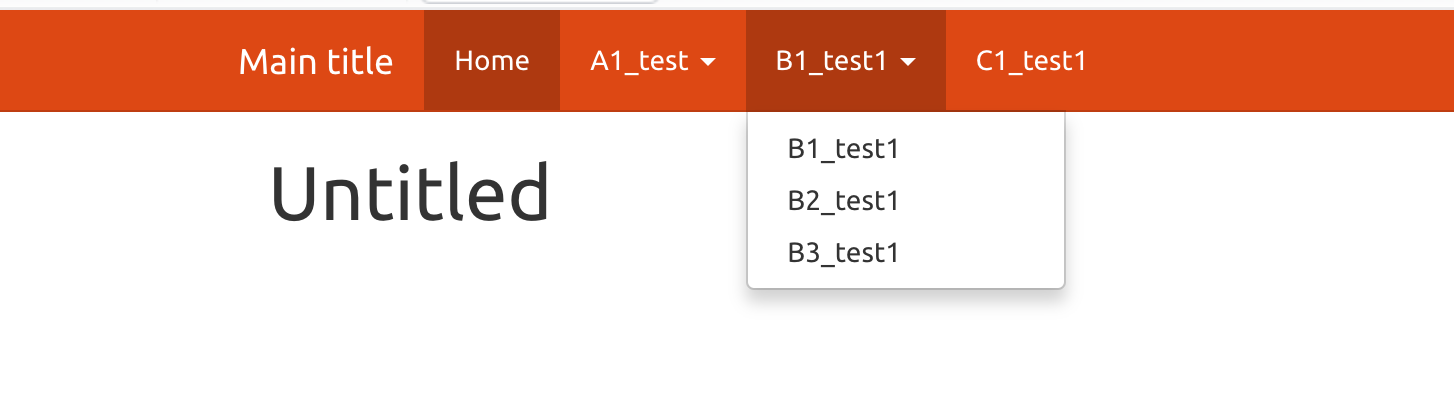
The capital first letter of the file name controls the layout position of the tab in the navbar. The number controls the position within the dropdown menu. If you would like a drop down tab menu then label your files:
B1_test1.Rmd, B2_test1.Rmd and B3_test1.Rmd.
This will ultimately render as:
Example
Included within this package is data that demonstrates the functionality of this project. First copy the data to a new folder:
dir.create(paste0(getwd(), "/test"))
file.copy(system.file("extdata", package="siteymlgen"), paste0(getwd(), "/test"), recursive = TRUE)
Then naviage to the directory and create a new R project.
All .Rmd files should be located within a single directory.
index.Rmd will become the home page.
Add an empty YAML file named _site.yml, which will be populated by
siteymlgen according to your file names and input options supplied to
init(). ?pkgdown::build_site() Set up build tools so that you can
build an R markdown website and then “Build Website”:
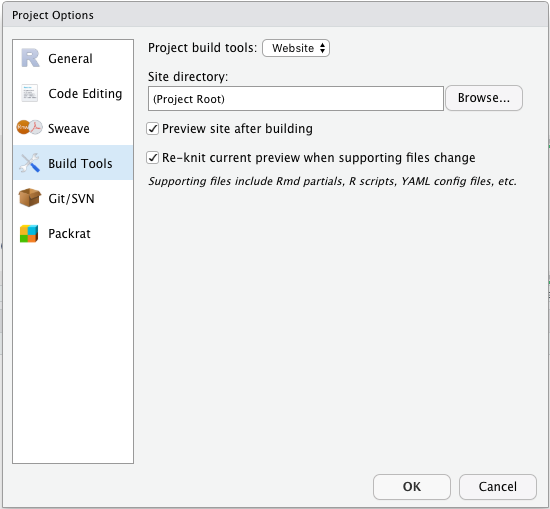
Then build your website:
