shinyelectron
Export 'Shiny' Applications as Desktop Apps using 'Electron'
Provides tools to export 'Shiny' applications written in 'R' or 'Python' as standalone desktop applications using 'Electron'. The applications run as native, cross-platform programs. Depending on the runtime strategy chosen, end users do not need 'R' or 'Python' installed on their machine.
shinyelectron 



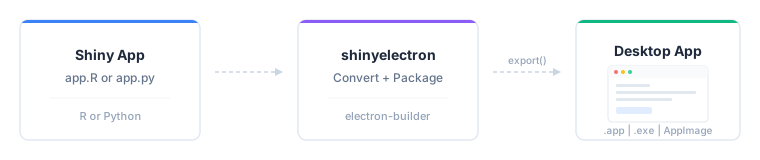
Turn any Shiny app (R or Python) into a standalone desktop application
that runs on macOS, Windows, and Linux. No web server, no browser tab,
no deployment infrastructure. Just an .app, .exe, or AppImage your
users double-click to open.
[!IMPORTANT]
This package is currently in the prototype/experimental stage. It is not yet on CRAN and may have rough edges. Not recommended for production applications at this time.
Install
Install the released version from CRAN:
install.packages("shinyelectron")
Or the development version from GitHub:
# install.packages("pak")
pak::pak("coatless-rpkg/shinyelectron")
Quick start
library(shinyelectron)

# Check your system
sitrep_shinyelectron()

# Try a bundled demo
export(
  appdir  = example_app("r"),
  destdir = "~/Desktop/my-first-app",
  run_after = TRUE
)
That’s the whole workflow: one call converts your app, wraps it in Electron, builds a distributable, and launches it. Takes about a minute for a small app.
Try a prebuilt demo
Each demo is packaged as a desktop app you can download, install, and
launch. The Download Prebuilt Demos
guide
has a build of every demo, for every runtime strategy, on each platform,
with a one-click installer for yours; or browse the releases
page
directly. The simplest are the shinylive builds: they need no R,
Python, or internet, since everything runs inside the app. On Linux each
download is a portable AppImage you can run straight away.
[!NOTE]
The macOS demos are signed and notarized under our Apple Developer Program membership ($99/year), so they open cleanly. The Windows demos are unsigned, so the first launch shows a Microsoft Defender SmartScreen prompt: choose More info, then Run anyway. If you distribute your own apps, you will need to pay for code signing on each platform to avoid these prompts, a recurring budget line item for organizations. Our development is on macOS and Linux, so if you would like to help fund a Windows certificate for these demos, sponsorship is welcome at github.com/sponsors/coatless.
What you can export
shinyelectron supports two app types, autodetected from the contents of
your appdir:
r-shiny: detected fromapp.Rorui.R+server.Rpy-shiny: detected fromapp.py
Both types work with five runtime strategies for delivering the app to the end user:
| Strategy | What Ships | First Launch | User Needs | Best For |
|---|---|---|---|---|
shinylive |
Electron + WASM bundle | Instant, offline | Nothing | Simple apps; deps that run in WebR or Pyodide (default) |
bundled |
Electron + R/Python runtime | Instant, offline | Nothing | Offline distribution; predictable runtime |
auto-download |
Electron + downloader | Needs internet | Nothing | Public distribution; smaller download |
system |
Electron only | Finds R/Python on PATH | R or Python pre-installed | Internal tools for users who already have R or Python |
container |
Electron + container config | Needs Docker | Docker or Podman | Complex system deps; reproducibility |
shinylive is the default when runtime_strategy is not set. See the
Runtime Strategies
guide
for the full decision matrix.
[!NOTE]
Linux note for
r-shiny: thebundledandauto-downloadstrategies rely on the portable-r project, which currently publishes builds for macOS and Windows only. On Linux, useshinylive,system(the user has R installed), orcontainer(Docker or Podman). Python apps work with all strategies on Linux via python-build-standalone.
Prerequisites
These are required on the build machine (where you run export()).
What end users need depends on the runtime strategy: nothing for
shinylive, bundled, or auto-download; R or Python pre-installed
for system; Docker or Podman for container.
- R (>= 4.4.0)
- Node.js (>= 22.0.0): run
install_nodejs()to install locally without admin rights - npm (>= 11.5.0): included with Node.js
Platform build tools:
| Platform | Requirement |
|---|---|
| macOS | Xcode Command Line Tools |
| Windows | Visual Studio Build Tools |
| Linux | build-essential (gcc, make) |
[!TIP]
Run
sitrep_shinyelectron()to verify your system is ready before your first export. It checks everything above and tells you what’s missing.
Learn more
- Getting Started: step-by-step tutorial
- Configuration
Guide:
_shinyelectron.ymlreference - Runtime Strategies: bundled vs system vs auto-download vs container
- Multi-App Suites: bundle multiple apps in one shell
- Code Signing: macOS GateKeeper and Windows SmartScreen
- Troubleshooting: common issues and fixes
Acknowledgements
Turning Shiny apps into desktop apps is a problem many people have attacked over the years. shinyelectron stands on the shoulders of prior packaging attempts, community tutorials, and the broader WebR / Pyodide / Electron ecosystems. The list below credits the specific projects whose approaches directly informed this one; we’re grateful to the much larger community of contributors experimenting in this space.
Prior packaging attempts
- electricShine: R package
that streamlines distributable Shiny Electron apps via its
electrify()function; automates Windows builds. - Photon: RStudio add-in that
leverages Electron to build standalone Shiny apps for macOS and
Windows by cloning an R-specific
electron-quick-startrepository and including portable R versions. - RInno: standalone R application builder with Electron on Windows.
- DesktopDeployR: alternative framework for deploying self-contained R-based applications with a portable R environment and private package library.
Talks, tutorials, and templates
- UseR! 2018: Shiny meets Electron by @ksasso demonstrating how to convert Shiny apps into standalone desktop apps.
- Developer tutorials: step-by-step guides from @lawalter and @dirkschumacher on practical integration.
- Zarathu Corporation templates: cross-platform deployment templates for macOS ARM and Windows, summarized in this R-bloggers post.
Upstream projects
- Electron: the desktop framework.
- electron-builder: the packaging pipeline that produces platform installers.
- shinylive (Posit) and WebR: R in WebAssembly, enabling browser-only Shiny apps.
- py-shinylive and Pyodide: the Python equivalents.
- portable-r: standalone R binaries
used by the
bundledandauto-downloadstrategies. - python-build-standalone: standalone Python builds used by the Python strategies.
License
AGPL (>= 3)
References
electricShine(R package)RInno(R package)Photon(RStudio Add-in)COVAILelectron-quick-startDesktopDeployR(framework)- Electron ShinyApp Deployment by @ksasso
- How to Make an R Shiny Electron App by @lawalter
- R Shiny and Electron by @dirkschumacher
- Creating Standalone Shiny Apps with Electron on macOS M1
- Creating Standalone Shiny Apps with Electron on Windows by @jhk0530
- Creating Standalone Apps from Shiny with Electron (R-bloggers) by @jhk0530
- Shiny meets Electron (UseR! 2018 talk) (slides and code)
- Electron documentation
- electron-builder documentation
- shinylive (R)
- py-shinylive (Python)
- WebR
- Pyodide
- portable-r (macOS / Windows builds)
- python-build-standalone