reapeR
Interface to the 'REAPER' Library
Wrapper for David Talkin's 'Robust Epoch and Pitch EstimatoR' (REAPER) software for estimating pitch and glottal closure instants from recordings of speech. For more information about the procedure, see < https://github.com/google/REAPER/tree/master>.
reapeR
reapeR is a developmental R package providing utilities for
interacting with David Talkin’s Ropust Epoch and Pitch EstimatoR
(REAPER) software. REAPER provides
precise pitch tracking and epoch estimation from speech data. reapeR
provides functionality for r (in bulk or on a single sound file), for
running the pitch and epoch estimation algorithm, bulk structures, and
for converting REAPER output into files that can be used with
Praat.
reapeR wraps the REAPER C++ code directly using an Rcpp interface,
so should spare users the possible pain of installation (this will be
handled by R).
If you run into any problems with the package, I’m happy to hear about them.
Installation
You can install the development version of reapeR from
GitHub with:
# install.packages('devtools')
devtools::install_github('rpuggaardrode/reapeR')
Running REAPER from R
If REAPER was successfully installed, you can now run the software from
R using the reaper() function. In the simplest use case, you just pass
a single argument with the name of a sound file.
library(reapeR)
reaper_out <- reaper('inst/extdata/1.wav')
The resulting object, reaper_out, is a list containing two elements
called pitch and epochs.
class(reaper_out)
#> [1] "list"
names(reaper_out)
#> [1] "pitch"  "epochs"
pitch is a tibble with columns including information about the time of
each analysis frame, a column with information about whether the frame
is voiced, a column with the predicted F0, and a column
with the file name.
head(reaper_out$pitch)
#>    time voiced f0               file
#> 1 0.005      0 NA inst/extdata/1.wav
#> 2 0.010      0 NA inst/extdata/1.wav
#> 3 0.015      0 NA inst/extdata/1.wav
#> 4 0.020      0 NA inst/extdata/1.wav
#> 5 0.025      0 NA inst/extdata/1.wav
#> 6 0.030      0 NA inst/extdata/1.wav
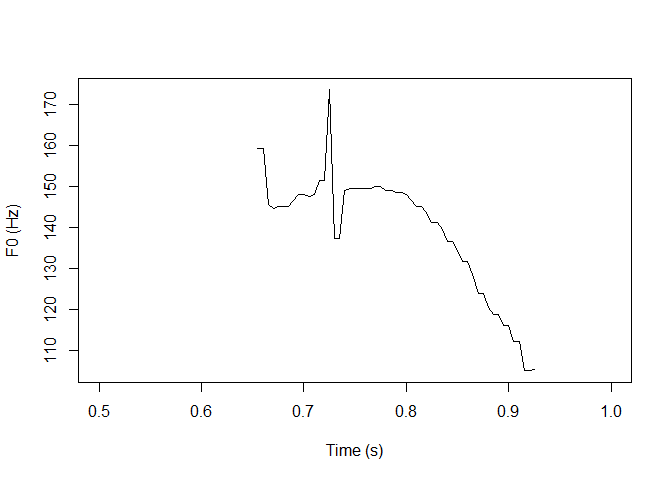
The predicted pitch track looks like this (zooming into the middle of the file where there is voicing):
plot(reaper_out$pitch$time, reaper_out$pitch$f0, type = 'l',
     xlab = 'Time (s)', ylab = 'F0 (Hz)',
     xlim = c(0.5, 1))
epochs is just a named vector of values telling you the locations of
glottal closure instants:
reaper_out$epochs
#> $`inst/extdata/1.wav`
#>  [1] 0.6515419 0.6579138 0.6646485 0.6714966 0.6783447 0.6852154 0.6920408
#>  [8] 0.6988435 0.7056463 0.7123809 0.7195011 0.7258730 0.7332426 0.7400454
#> [15] 0.7468254 0.7535601 0.7602494 0.7669161 0.7736055 0.7803175 0.7870975
#> [22] 0.7937868 0.8005896 0.8074149 0.8143311 0.8212925 0.8283900 0.8355102
#> [29] 0.8428345 0.8502721 0.8578911 0.8656462 0.8738095 0.8820862 0.8905669
#> [36] 0.8992290 0.9082086 0.9176871
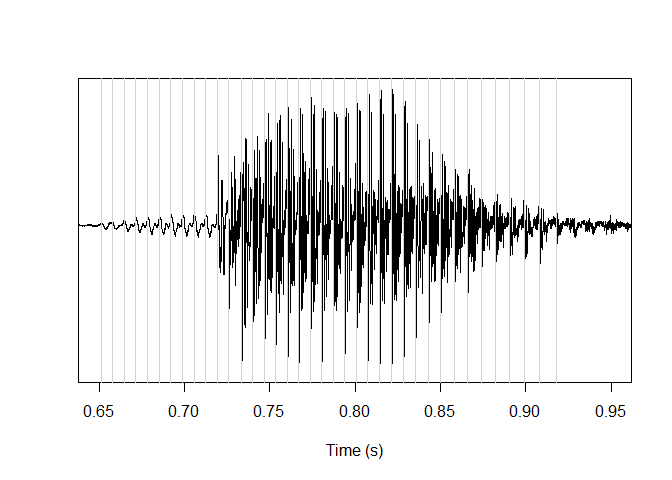
Here they are plotted along with the sound file in question:
snd <- tuneR::readWave('inst/extdata/1.wav')
times <- seq(0, length(snd@left) / [email protected],
             length.out = length(snd@left))
plot(times, snd@left, type = 'l', xlab = 'Time (s)', ylab = '', yaxt = 'n',
     xlim = c(0.65, 0.95))
abline(v = reaper_out$epochs[[1]], col='lightgrey')
You can use the same arguments with reaper() as when running the
program from the command line (pitch floor and ceiling, analysis
interval, etc). These arguments can be inspected by calling ?reaper
from the console. If you’re only interested in the pitch data frame,
set output = 'pitch'. If you just want epochs, set
output = 'epochs'. If you can’t get the REAPER installation to work
with the R package but you already have REAPER in your system and want
to control it with R, you can set the path to your REAPER executable
with the exePath argument.
If you want to run REAPER on all files in a directory, you can do so
with the reaper_bulk() function, where you pass the path to a
directory instead of the path to a sound file:
reaper_output <- reaper_bulk('inst/extdata')
reaper_bulk() has a few more interesting options.
There’s the argument hirst2pass, which can be set to TRUE to use the
Hirst/De Looze two-pass procedure to estimate suitable pitch floor and
ceiling values. In this case, REAPER is run with very liberal floor and
ceiling values on the directory, and the resulting pitch is used to
estimate more suitable values for a second pass.
Additionally, the praat_output argument can be set to TRUE, in which
case the REAPER estimated pitch is also saved as .Pitch files that can
be read in Praat (to a directory specified with praat_output_dir).
Working with REAPER output
If you don’t want to call REAPER from R or can’t get the command line interface to work, the library also comes with several functions to work with REAPER output files.
read_pitch_out() will read an ASCII-formatted REAPER pitch output file
(saved with -f filename -a) as a well-formatted tibble.
pitchOut <- read_pitch_out('inst/extdata/pitch')
head(pitchOut)
#> # A tibble: 6 × 3
#>    time voiced    f0
#>   <dbl>  <dbl> <dbl>
#> 1 0.005      0    NA
#> 2 0.01       0    NA
#> 3 0.015      0    NA
#> 4 0.02       0    NA
#> 5 0.025      0    NA
#> 6 0.03       0    NA
read_epochs_out() will read an ASCII-formatted REAPER epochs
(‘pitchmarks’) output file (saved with -p filename -a) as a vector.
epochsOut <- read_epochs_out('inst/extdata/epochs')
epochsOut
#>  [1] 0.651542 0.657914 0.664649 0.671497 0.678345 0.685215 0.692041 0.698844
#>  [9] 0.705646 0.712381 0.719501 0.725873 0.733243 0.740045 0.746825 0.753560
#> [17] 0.760249 0.766916 0.773605 0.780317 0.787098 0.793787 0.800590 0.807415
#> [25] 0.814331 0.821293 0.828390 0.835510 0.842834 0.850272 0.857891 0.865646
#> [33] 0.873810 0.882086 0.890567 0.899229 0.908209 0.917687
If you’re interested in working with this output in Praat, the
write_praat_pitch() function will save a tibble with pitch output as a
.Pitch file, and the write_praat_epochs() function will save a
vector with epoch output as a .PointProcess file.
If you want to import REAPER-estimated pitch into an EMU
database, you can import a
tibble with pitch output to a database using the reaper2emuDB()
function.