howler
'Shiny' Extension of 'howler.js'
Audio interactivity within 'shiny' applications using 'howler.js'. Enables the status of the audio player to be sent from the UI to the server, and events such as playing and pausing the audio can be triggered from the server.



{howler} - Interactive Audio Player 
{howler} is a package that utilises the howler.js library to play audio on the modern web.
Installation
This package is available on CRAN and r-universe. To install the latest version:
install.packages("devtools")
devtools::install_github("ashbaldry/howler")
Usage
The HTML way to include an audio file in any shiny application/web page is to use the <audio> tag. This can generally only handle one audio file, and cannot (easily) be manipulated from the server side.
tags$audio(src = "audio/sound.mp3", type = "audio/mp3", autoplay = NA, controls = NA)
howler.js uses the Web Audio API, and with this we are able to create an audio player that can solve both of the above issues and more:
library(shiny)
library(howler)

ui <- fluidPage(
  title = "howler Example",
  howler(
    elementId = "sound",
    tracks = list("Track 1" = "audio/track_1.mp3", "Track 2" = "audio/track_2.mp3"),
    auto_continue = TRUE,
    auto_loop = TRUE,
    seek_ping_rate = 1000
  ),
  howlerPreviousButton("sound"),
  howlerPlayPauseButton("sound"),
  howlerNextButton("sound")
)

server <- function(input, output, session) {
  observe({
    req(input$sound_seek)
    if (round(input$sound_seek) == 10) {
      pauseHowl("sound")
    } else if (round(input$sound_seek) == 20) {
      changeTrack("sound", "Track 2")
    }
  })
}

shinyApp(ui, server)
Module
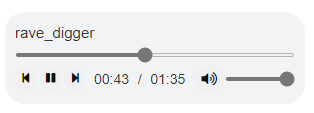
The {howler} package also includes a lightweight module howlerModuleUI and howlerModuleServer that adds a bit of styling to replicate the style of a standard <audio> HTML player.
Examples
All examples are available in the Examples directory and can be run locally by installing the {howler} package: