colt
Command-Line Color Themes
A collection of command-line color styles based on the 'crayon' package. 'Colt' styles are defined in themes that can easily be switched, to ensure command line output looks nice on dark as well as light consoles.
Colt - CLI color themes for R
Colt is aimed at package developers that want to create themeable command line output. It is a simple wrapper around the crayon package.
Installation
install.packages("colt")
Usage
Creating a Theme
A colt theme is created with the colt_theme() constructor. A colt theme is just a list of functions that get applied to the text. A print method exists for previewing themes. Colt styles are named semantically rather than directly with a color (e.g. "yes" instead of "green").
Theme Elements
print(clt_theme_light)
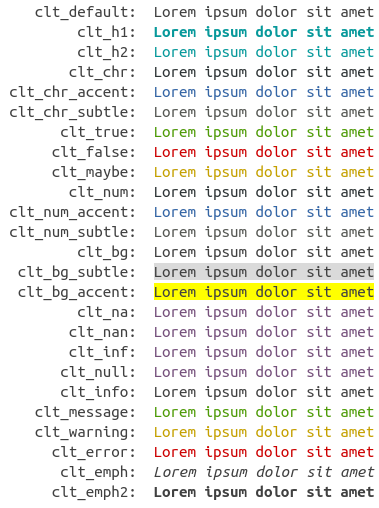
Setting themes
The acitive theme is stored in options("colt.theme"). It can easily be changed with colt::set_theme(). Colt comes with two default themes, colt_theme_light and colt_theme_dark.
fancy <- function(x) {cat(
  colt::clt_h1("Fancy text themes\n"),
  colt::clt_h2("provided by the colt package\n\n"),
  colt::clt_chr("By specifying a few"), clt_chr_accent("design elements"),
  clt_chr("it is easy to assign new themes to cli text\n"),
  colt::clt_chr("Do you agree?\n\n"),
  colt::clt_true("I agree\n"),
  colt::clt_false("I don't agree\n"),
  colt::clt_maybe("I don't know\n"),
  colt::clt_chr_subtle("I don't care\n")
)}
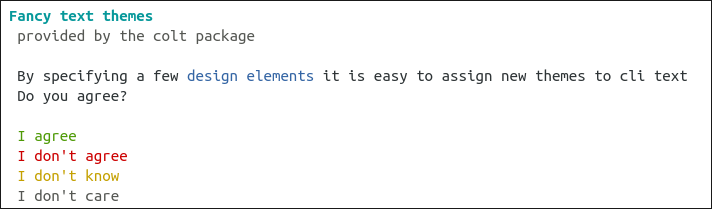
colt_theme_light
colt::set_theme(colt::clt_theme_light)
fancy()
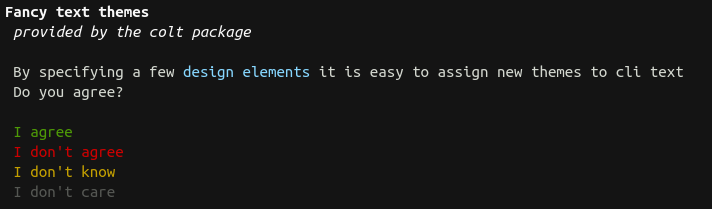
colt_theme_dark
colt::set_theme(colt::clt_theme_dark)
fancy()
You can use colt::set_theme(colt::colt_theme()) to set an empty theme (= switch off colors).