IssueTrackeR
List Things to Do
Manage a 'GitHub' problem using R: wrangle issues, labels and milestones. It includes functions for storing, prioritizing (sorting), displaying, adding, deleting, and selecting (filtering) issues based on qualitative and quantitative information. Issues (labels and milestones) are written in lists and categorized into the S3 class to be easily manipulated as datasets in R.
{IssueTrackeR} 


{IssueTrackeR} is an R package designed to retrieve and manage GitHub issues directly within R. This package allows users to efficiently track and handle issues from their GitHub repositories.
This package relies a lot on the package {gh} to use the GitHub API and retrieve data from GitHub.
Installation
You can install {IssueTrackeR} from CRAN:
install.packages("IssueTrackeR")
Development
You can install the development version of {IssueTrackeR} from GitHub:
# install.packages("pak")
pak::pak("TanguyBarthelemy/IssueTrackeR")
Features
- Multi-source support: Fetch issues from GitHub, GitLab, or local YAML files.
- Visualization: Plot issue trends, resolution times, and backlog evolution.
- Save issues locally: Write the issues, labels and milestones locally to access it without connection.
Usage
library("IssueTrackeR")
#> Currently, the default options are:
#> - location for datasets is /tmp/Rtmp45fCJp/data
#> - owner: rjdverse
#> - repo: rjdemetra
#>
#> Attaching package: 'IssueTrackeR'
#> The following objects are masked from 'package:base':
#>
#>     append, sample, write
Create a selector
# Configure {gitlabr} to retrieve issues from GitLab
gitlabr::set_gitlab_connection(
    gitlab_url = "https://gitlab.com",
    private_token = Sys.getenv("GITLAB_TRACTORTOM_API")
)

# Select repos from GitHub
selector1 <- init_selector(
    source = "GitHub",
    owner = "TanguyBarthelemy",
    repo = "IssueTrackeR"
)

# Select project from GitLab
selector2 <- init_selector(
    source = "GitLab",
    project_id = c(51699988, 29346974, 15028532)
)

# Select list of issues from local files
selector3 <- init_selector(
    source = "local",
    file = file.path(
        system.file("data_issues", package = "IssueTrackeR"),
        "list_issues.yaml"
    )
)

selector_issues <- merge_selector(selector1, selector2, selector3)
selector_other <- merge_selector(selector1, selector2)
Get the issues
To get information from a repository, you can call the functions
get_issues, get_labels and get_milestones:
my_issues <- get_issues(selector = selector_issues)
#> Repo: IssueTrackeR  owner: TanguyBarthelemy
#> Project id: 51699988
#> Project id: 29346974
#> Project id: 15028532
#> The issues will be read from /usr/local/lib/R/site-library/IssueTrackeR/data_issues/list_issues.yaml.
my_labels <- get_labels(selector = selector_other)
#> Repo: IssueTrackeR  owner: TanguyBarthelemy
#> Reading labels... Done!
#> 41 labels found.
#> Project id: 51699988
#> Project id: 29346974
#> Project id: 15028532
my_milestones <- get_milestones(selector = selector_other)
#> Repo: IssueTrackeR  owner: TanguyBarthelemy
#> Reading milestones...
#>  -  v2.1.0 ... Done!
#>  -  v2.0.0 ... Done!
#> Done! 2 milestones found.
#> Project id: 51699988
#> Done! 2 milestones found.
#> Project id: 29346974
#> Done! 0 milestones found.
#> Project id: 15028532
#> Done! 0 milestones found.
Save issues in local
You can also write the datasets in local with write():
write(
    x = my_issues,
    dataset_dir = tempdir()
)
#> The datasets will be exported to /tmp/Rtmp45fCJp/list_issues.yaml.

write(
    x = my_labels,
    dataset_dir = tempdir()
)
#> The datasets will be exported to /tmp/Rtmp45fCJp/list_labels.yaml.

write(
    x = my_milestones,
    dataset_dir = tempdir()
)
#> The datasets will be exported to /tmp/Rtmp45fCJp/list_milestones.yaml.
Filtering
You can filter the output based on its content using the with_text()
function:
filtered_issues <- my_issues |>
    with_labels("bug") |>
    with_text("format") |>
    with_comments()
Visualisation
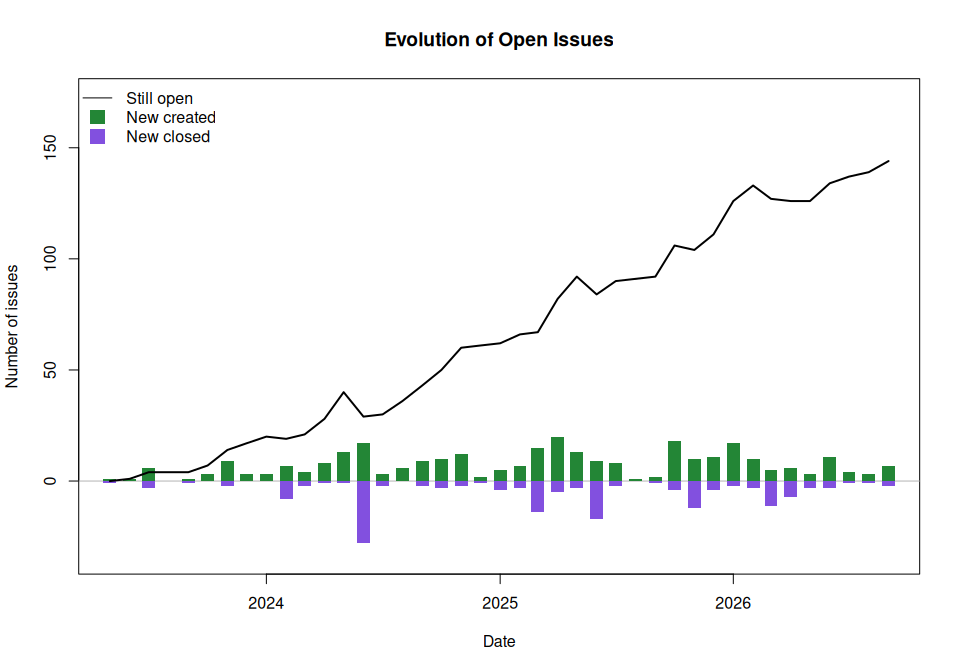
# Plot creation/closure rates
plot(my_issues, type = "created-closed")
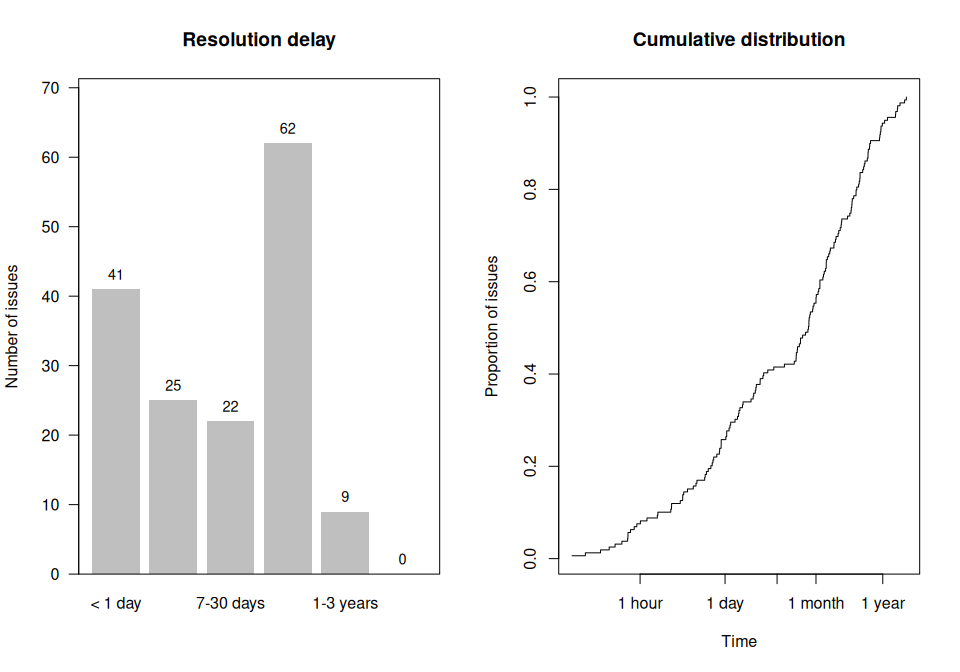
# Plot resolution time distribution
plot(my_issues, type = "resolution-time")
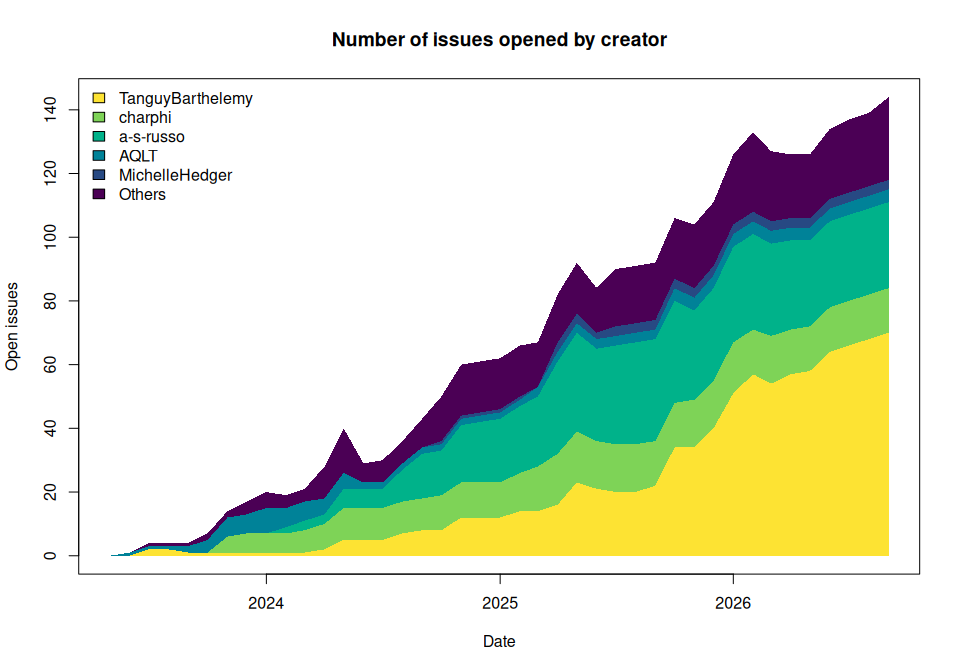
# Plot by category (e.g., by creator, milestone, or repo)
plot(my_issues, type = "area-chart", by = "creator", n = 5)
Contributing
Contributions are welcome! Please feel free to submit a pull request or report any issues.
License
This project is licensed under the MIT License. See the LICENSE file for details.