forgts
Convert Formatted Spreadsheets to Presentation-Ready Display Tables
Reads cell contents plus formatting from a spreadsheet file and creates an editable 'gt' object with the same data and formatting. Supports the most commonly-used cell and text styles including colors, fills, font weights and decorations, and borders.
forgts 
forgts reads a spreadsheet and its formatting information to produce gt tables with the same cell and text formatting as the input file.
Text and cell formats supported include:
- font face (bold, italic)
- font style (color, underline, strikethrough)
- cell fill
- cell borders (color and width)
Note that formatting in the headers is ignored intentionally in this package, and that the cell and text formatting is added iteratively on top of gt defaults.
Installation
Install the development version of forgts from GitHub:
# install.packages("remotes")
remotes::install_github("luisDVA/forgts")
Using forgts
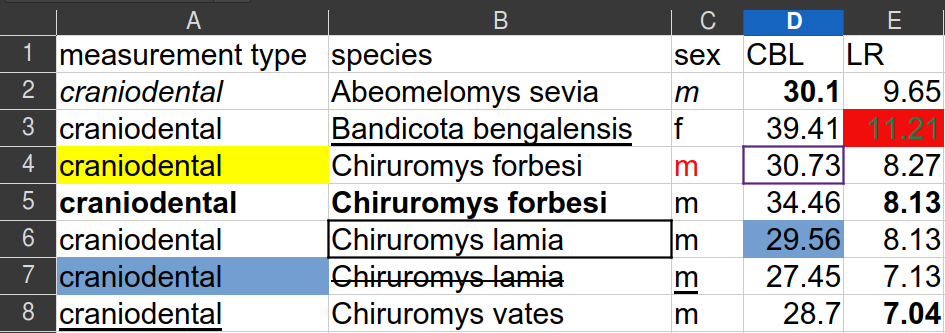
The rodentsheet.xlsx file that comes with this package looks like
this:
The function forgts will read the file and produce a gt object (shown
here as an image).
library(forgts)
###
example_spreadsheet <- system.file("extdata/rodentsheet.xlsx", package = "forgts")

forgts(example_spreadsheet)
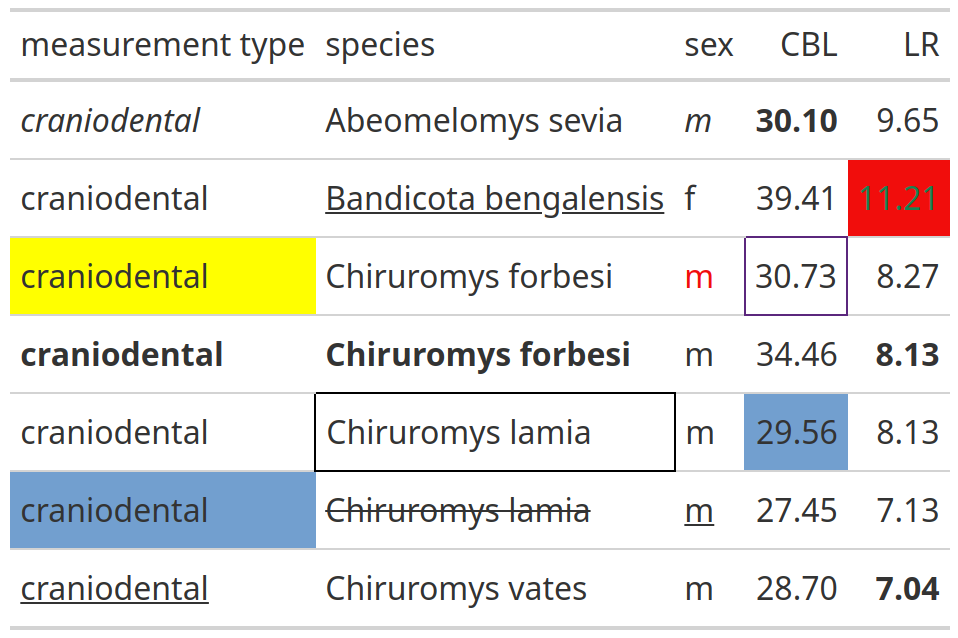
forgts() may be used in RMarkdown and Quarto documents, and the
resulting gt tables may be exported with gt::gtsave().